

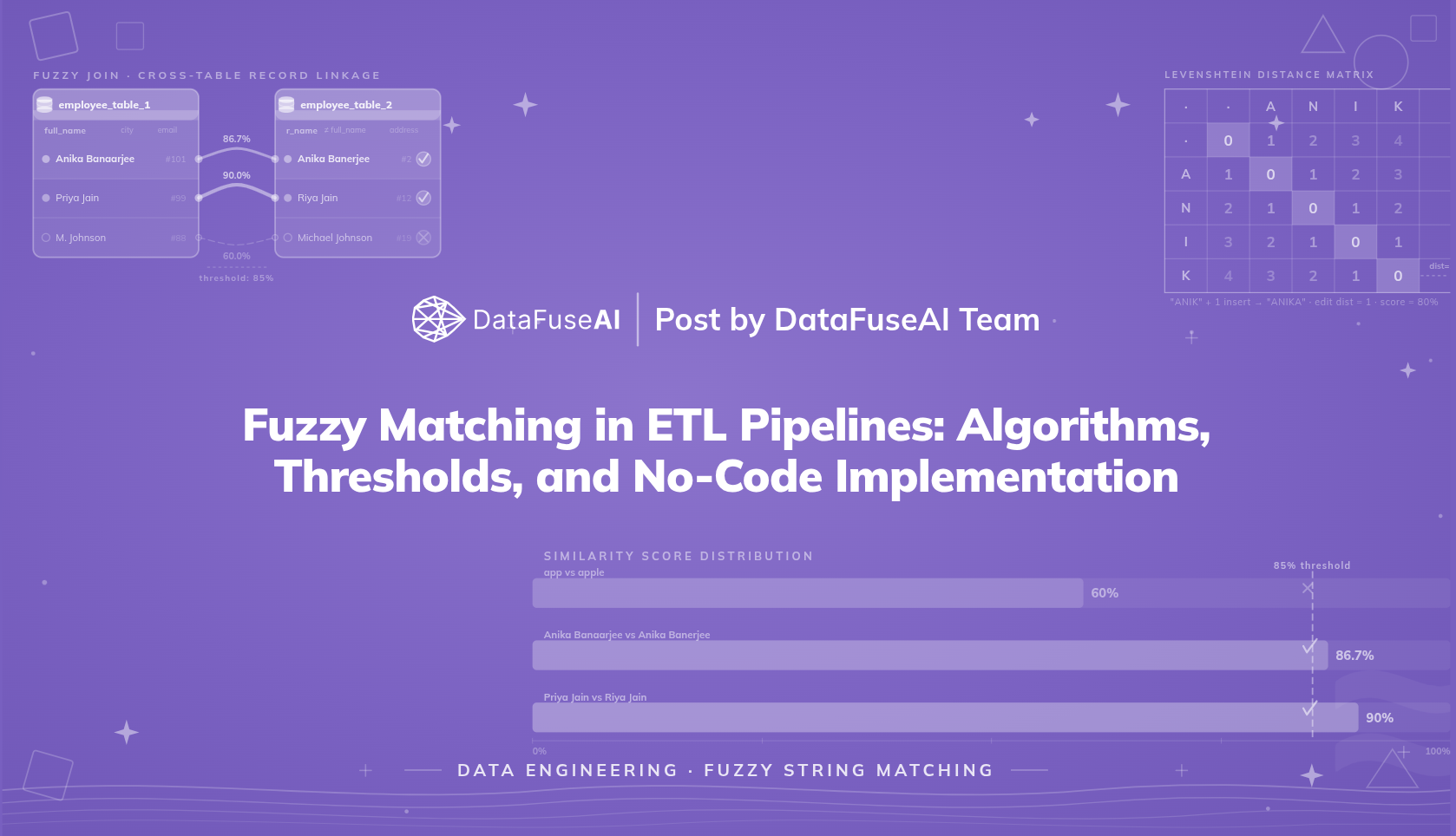
"Anika Banaarjee" and "Anika Banerjee" are the same person. Same employer, same address, same email. Two systems recorded the name differently. Run a JOIN on the name column and you get nothing.
That is the class of problem a fuzzy matching algorithm solves. Rather than requiring two values to be character-for-character identical, fuzzy matching computes a similarity score between them — a number from 0 to 100 reflecting how close the two strings are — and treats any pair above a chosen threshold as a match.
This blogfuzz covers three things: how the algorithm works mechanically, with a step-by-step Levenshtein distance calculation including a worked example; which algorithm families exist and what distinguishes them; and a full walkthrough of building both a Fuzzy Filter and a Fuzzy Join inside a no-code ETL pipeline, with real output data from a two-table employee record dataset.
What Is Fuzzy Matching?
Fuzzy matching is a technique for identifying strings that are similar but not identical, by computing a similarity score based on how many character-level edits separate the two values. Unlike exact matching, which returns results only when two values are character-for-character identical, fuzzy matching assigns each comparison a score — typically 0 to 100 — and treats any pair above a configured threshold as a match.
The "fuzzy" in the name refers to tolerance for variation, not imprecision in the method. The underlying algorithms are deterministic: given two strings and an algorithm, the score is always the same. What varies is the threshold. That is a domain judgment, not a technical default.
Where exact matching asks "are these the same?", fuzzy matching asks "how similar are these?" That difference matters when data comes from human input or multiple systems, where spelling inconsistency is normal rather than exceptional.
Fuzzy Matching vs. Exact Matching
Both methods compare values to find records that belong together. The difference is what qualifies as a match.
Exact matching treats any deviation as a non-match. One transposed letter, one missing character, one variation in how a name was recorded — the record doesn't surface. It produces zero false positives, which makes it the correct choice for clean, controlled fields: system-generated IDs, SKUs, product codes, account numbers.
Fuzzy matching operates at a configurable tolerance. It computes a similarity score and returns any pair that exceeds a threshold. That makes it appropriate wherever human input or multi-system data introduces variation that doesn't signal a genuinely different entity.
| Dimension | Exact Matching | Fuzzy Matching |
|---|---|---|
| Match requirement | Character-for-character identical | Similarity score above threshold |
| Handles typos | No | Yes |
| Handles name variations | No | Yes |
| Returns a similarity score | No | Yes (0–100) |
| False positive risk | None | Present at looser thresholds |
| Performance cost | Lower | Higher |
| Appropriate for numeric IDs | Yes | No — score is semantically unreliable |
Use exact matching for identifiers, controlled-vocabulary fields, and anything system-generated. Use fuzzy matching wherever string values come from human input or multiple source systems, and where a single character difference doesn't mean a categorically different entity. Some no-code ETL platforms expose fuzzy matching as a configurable pipeline transformation — making it accessible without custom code.
How Fuzzy Matching Works: Edit Distance and Similarity Score
The most widely used fuzzy matching algorithms measure similarity through edit distance: how many single-character operations does it take to transform one string into the other? Fewer operations means more similar strings. A distance of 0 means the strings are identical.
Levenshtein distance counts three types of operations: insertion, deletion, and substitution. Here is how the calculation works step by step.
Measure the lengths
Establish denominator for the similarity formula
Take two strings: "app" (length 3) and "apple" (length 5). The longer string's length — 5 — is the denominator in the similarity score formula.
Build the edit distance matrix
Dynamic programming fills each cell with the minimum edits needed
A matrix is constructed where rows represent characters of the first string and columns represent characters of the second. Each cell holds the minimum edits needed to match the string prefix up to that point.
| a | p | p | l | e | ||
|---|---|---|---|---|---|---|
| 0 | 1 | 2 | 3 | 4 | 5 | |
| a | 1 | 0 | 1 | 2 | 3 | 4 |
| p | 2 | 1 | 0 | 1 | 2 | 3 |
| p | 3 | 2 | 1 | 0 | 1 | 2 |
Green diagonal cells = character matches (cost 0). Navy cell (bottom-right) = final edit distance: 2.
Interpret the edit distance
Understand what the edit count means in practice
An edit distance of 2 means "app" needs two insertions to become "apple":
app  →  appl  →  apple
          +l        +e
Compute the similarity score
Normalize edit distance against max string length
The edit distance becomes a percentage by normalizing against the max length:
score = (1 - distance / max_length) × 100
score = (1 - 2 / 5) × 100
score = 60.0%
At a threshold of ≥60%, this pair passes. Set the threshold to ≥70%, and it fails — same algorithm, same strings, a different outcome determined entirely by the threshold value. That sensitivity explains why threshold calibration is a domain decision, not a technical default.
One reason edit-distance algorithms perform well in practice: a 1964 study by Fred Damerau[1] found that more than 80% of human misspellings result from a single error — one insertion, deletion, substitution, or transposition. Most real spelling variation falls within an edit distance of 1 or 2, which is why a threshold in the 80–90% range captures a large share of genuine near-matches without requiring a setting loose enough to admit excessive noise.
Bar chart showing three string pair comparisons: app vs apple scores 60% (below threshold), Anika Banaarjee vs Anika Banerjee scores 86.7% (above threshold), Priya Jain vs Riya Jain scores 90% (above threshold). The 85% threshold is shown as a dashed line.
Common Fuzzy Matching Algorithms
Most fuzzy matching implementations use edit distance algorithms — counting how many character-level changes separate two strings. DataFuseAI uses Levenshtein distance, the most widely deployed approach, which counts the minimum insertions, deletions, and substitutions needed to transform one string into another. The five algorithm families below differ in what types of variation they handle, which determines when each is the right choice.
DataFuseAI implementation note: DataFuseAI implements Levenshtein distance for both Fuzzy Filter and Fuzzy Join. Individual Score and Combined Score control how column-level scores are aggregated — they are scoring aggregation modes, not separate distance algorithms. Both are covered in the thresholds section below.
Levenshtein distance is the foundational method, defined by Vladimir Levenshtein in 1965 and published in English translation the following year. Given any two strings, it returns the minimum number of single-character insertions, deletions, and substitutions needed to make them identical. It handles the most common spelling variations: missed letters, extra letters, wrong letters. That reach — from search engines to data pipelines — reflects how well the algorithm matches real error patterns.
Damerau-Levenshtein extends the standard algorithm by treating a swap of two adjacent characters as a single operation rather than two. Under standard Levenshtein, transforming "Micheal" into "Michael" — a transposition of e and a — costs 2 operations. Under Damerau-Levenshtein, it costs 1. Damerau's research found that transpositions account for a meaningful share of typing errors, making this variant better-calibrated for keyboard-input data.
Jaro-Winkler gives higher weight to matching characters near the beginning of a string, making it suited for short name fields where the first few characters carry the strongest signal. "John Smith" and "Jhon Smith" score higher under Jaro-Winkler than under Levenshtein because the early-position match is weighted more heavily.
Soundex and Metaphone are phonetic algorithms. Rather than comparing character sequences, they encode words by how they sound — so "Smith" and "Smyth" produce the same code. These are useful when data originates from spoken input or cross-language sources where the same name has multiple valid spellings. Metaphone handles English pronunciation rules with more precision than the older Soundex scheme.
N-gram similarity breaks strings into overlapping character sequences — "apple" as bigrams becomes {"ap", "pp", "pl", "le"} — and measures overlap between two strings' n-gram sets. Microsoft Power Query uses Jaccard similarity for its fuzzy merge operation, dividing the size of the intersection by the size of the union. N-gram methods are computationally efficient at scale and work well for partial substring matching tasks.
The right algorithm depends on the variation in your data. For a pipeline matching employee names from two HR systems, Levenshtein or Damerau-Levenshtein is the natural starting point. For data that originates from spoken-to-typed entry with multilingual variation, phonetic algorithms add signal that edit distance alone misses.
Where Fuzzy Matching Solves Real ETL Problems
Two PostgreSQL tables. The same employee appears in both under slightly different spellings. A standard JOIN returns zero results.
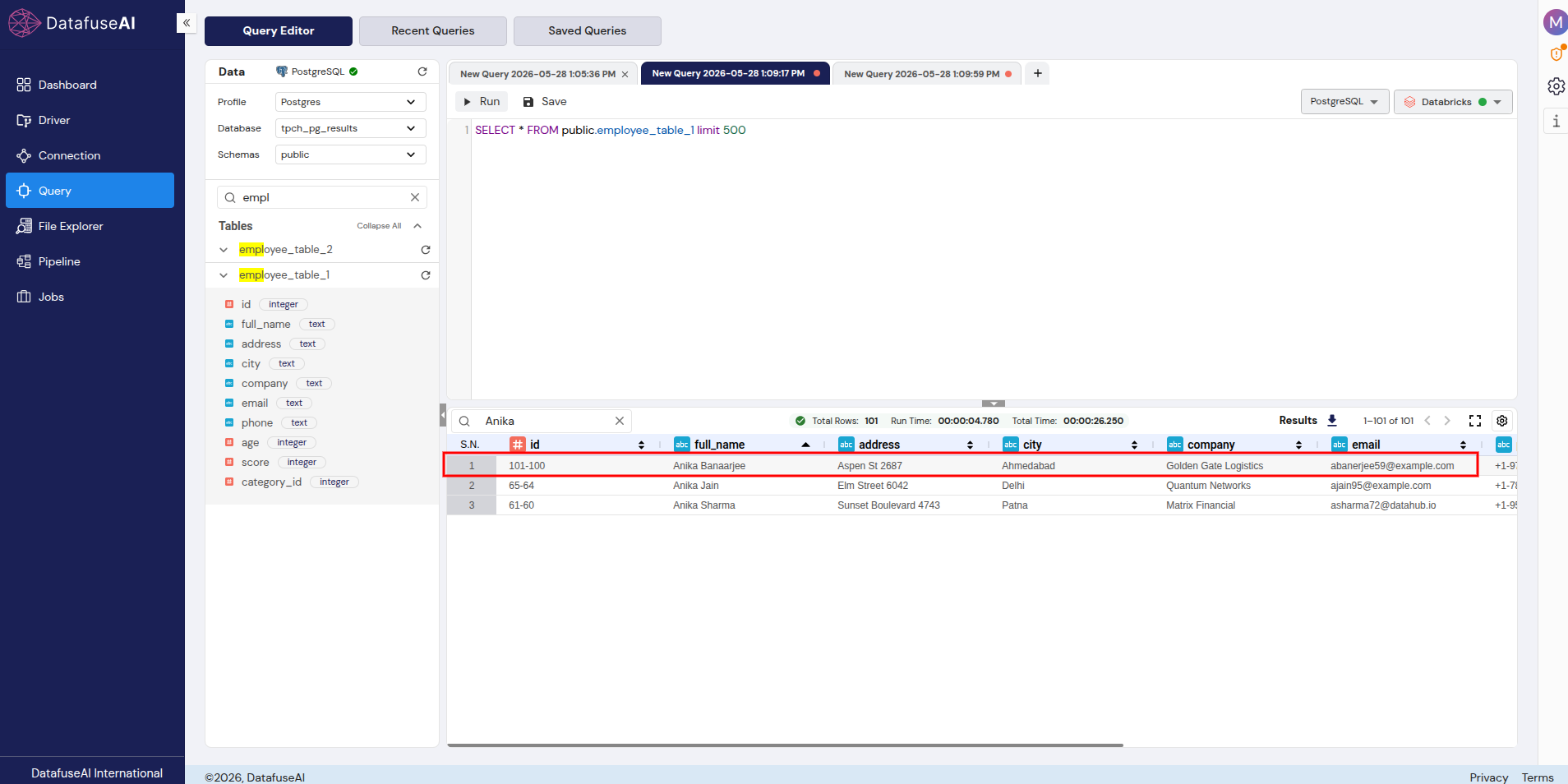
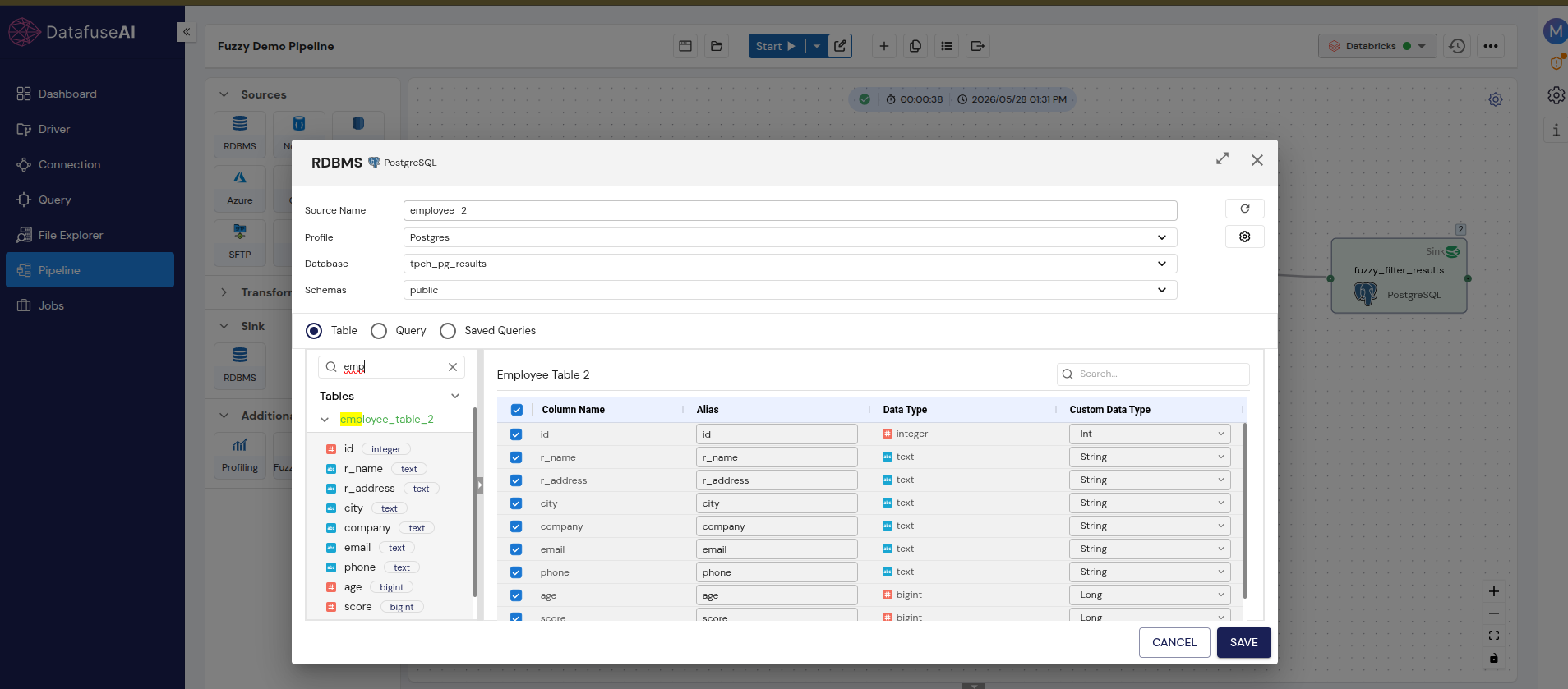
That is the scenario the demo pipeline addresses. employee_table_1 has 101 rows and stores the employee name as full_name. employee_table_2 has 49 rows and stores the same field as r_name. The same person appears as "Anika Banaarjee" in one table and "Anika Banerjee" in the other — same employer, same address (Aspen St 2687), same city (Ahmedabad), same email. The column name difference and the two-character spelling variation make an exact join return nothing.
 Enlarge
 full_name = "Anika Banaarjee" — the double 'a' typo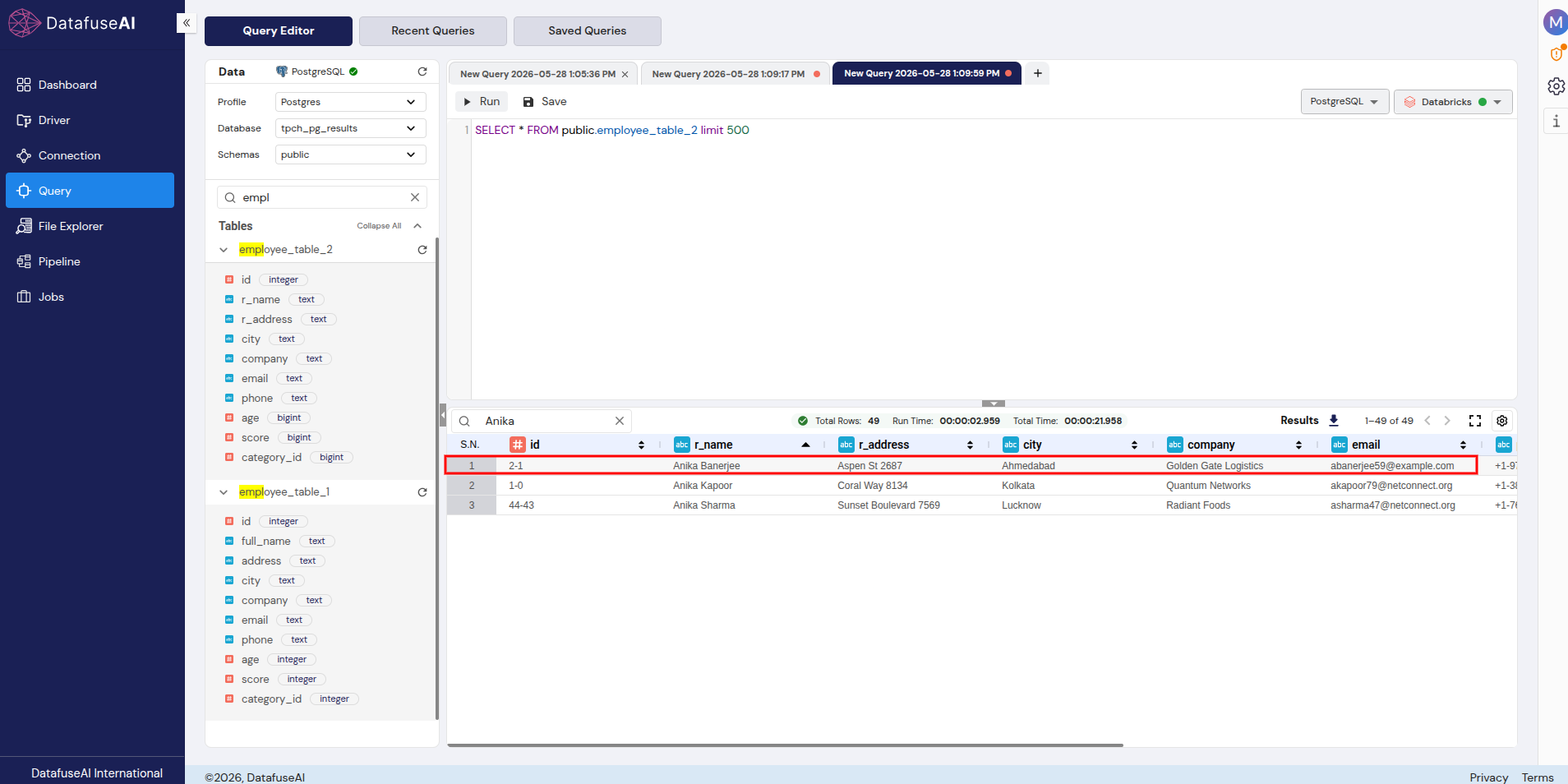 Enlarge
 r_name = "Anika Banerjee" — correct spelling, different column nameRunning a Fuzzy Filter at 85% threshold across the unioned dataset of 150 rows surfaces both records. The Fuzzy Join at the same threshold produces 16 cross-table matches from the full 101 × 49 row combination.
This pattern recurs whenever data from two or more systems needs to be linked without a guaranteed shared identifier. In customer operations, the same individual may appear across a CRM and an ERP with name variations introduced by different data entry staff — "Robert Smith" in one system, "Rob Smith" or "R. Smith" in another. A standard join finds nothing. A fuzzy join on the name column, combined with an exact match on a high-signal field like email where one is available, resolves the mismatch.
After merging two company databases, near-duplicate records that differ only in how names were formatted will inflate counts and corrupt analytics unless identified and collapsed. Post-merge deduplication with fuzzy matching finds those records systematically rather than leaving the cleanup to manual review.
Scale makes this problem structural. A study of 398,939 patient records with confirmed duplicates, published in the Journal of AHIMA,[2] found that misspellings accounted for 53.14% of first-name discrepancies and 33.62% of last-name discrepancies across the dataset. Exact matching doesn't surface that problem — it obscures it.
At a larger scale, researchers at the Institute for Clinical Evaluative Sciences (ICES) in Ontario tested fuzzy matching against a dataset of 12 million individual health records as an alternative to probabilistic record linkage, which required extensive manual review of ambiguous cases.[3] The fuzzy matching approach eliminated manual gray-area intervention while maintaining comparable linkage accuracy, with significant improvements to data timeliness and elimination of clerical review costs and human error introduced during manual disambiguation.
The pipeline walkthrough below covers how to implement both Fuzzy Filter and Fuzzy Join in DataFuseAI — the same transformations that sit within the broader no-code ETL platform architecture covered elsewhere.
Fuzzy Filter and Fuzzy Join in DataFuseAI: A Pipeline Walkthrough
Fuzzy Filter searches a single unified dataset for rows that approximate a target string. Fuzzy Join links two separate source tables by matching records across them based on string similarity between specified columns.
They solve different problems. Fuzzy Filter is a row selection operation: given a pool of records and a target value, return rows that are close enough. Fuzzy Join is a data integration operation: given two tables and a column pair, return matched records from each table based on string similarity. The walkthrough below uses both, built against the same two employee tables.
 Enlarge
 Configure the source nodes
Connect both PostgreSQL tables — note the schema difference that blocks an exact join
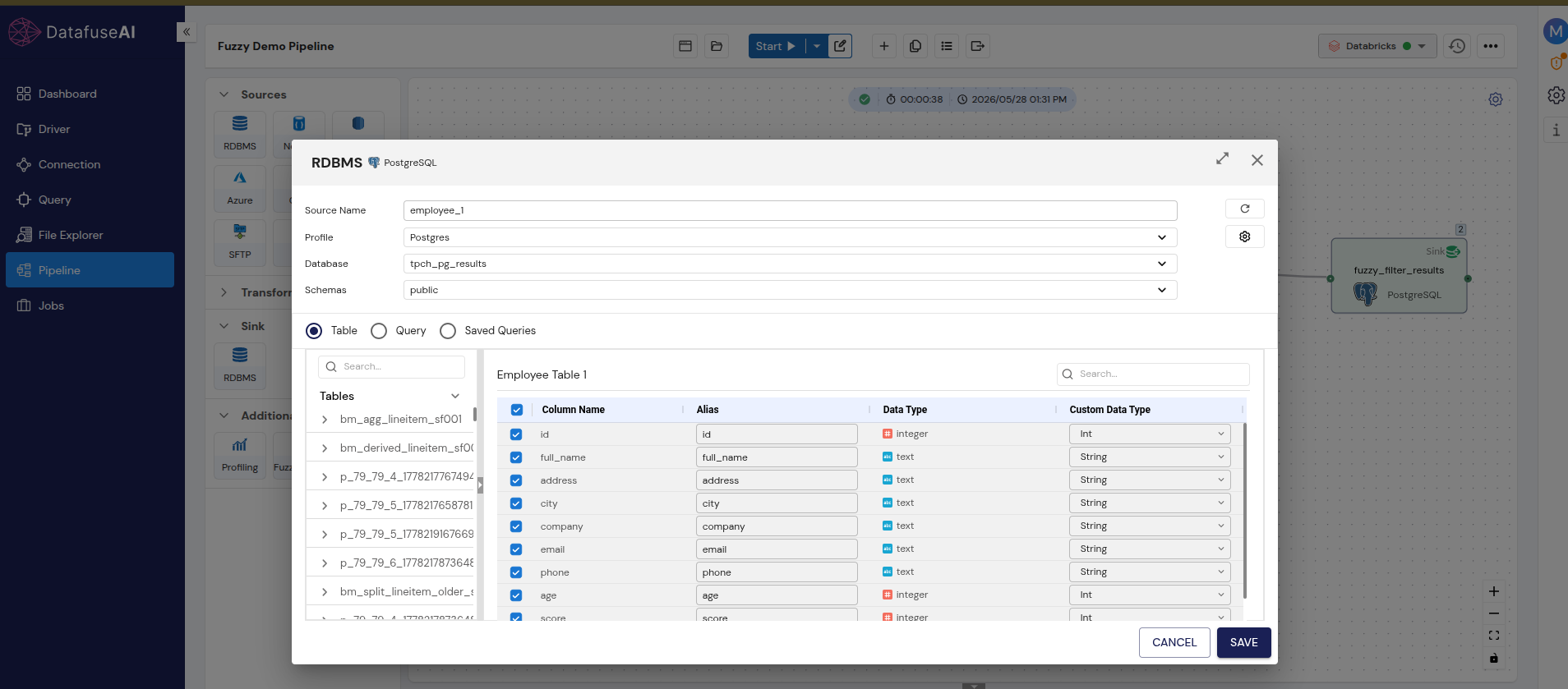
Add an RDBMS source node for employee_1. Connect it to the PostgreSQL profile, select the tch_pg_results database, public schema, and choose employee_table_1 (101 rows). Schema: id (integer), full_name (text), address, city, company, email, phone, age, score, category_id. All columns selected.
 Enlarge
employee_1 — name column is full_nameAdd a second RDBMS source node for employee_2. Same connection, same database and schema, this time selecting employee_table_2 (49 rows). Key difference: the name column is r_name, not full_name; the address column is r_address, not address.
 Enlarge
employee_2 — name column is r_name, not full_nameUnion (for the Fuzzy Filter path)
Merge both tables positionally — aligns mismatched column names without renaming
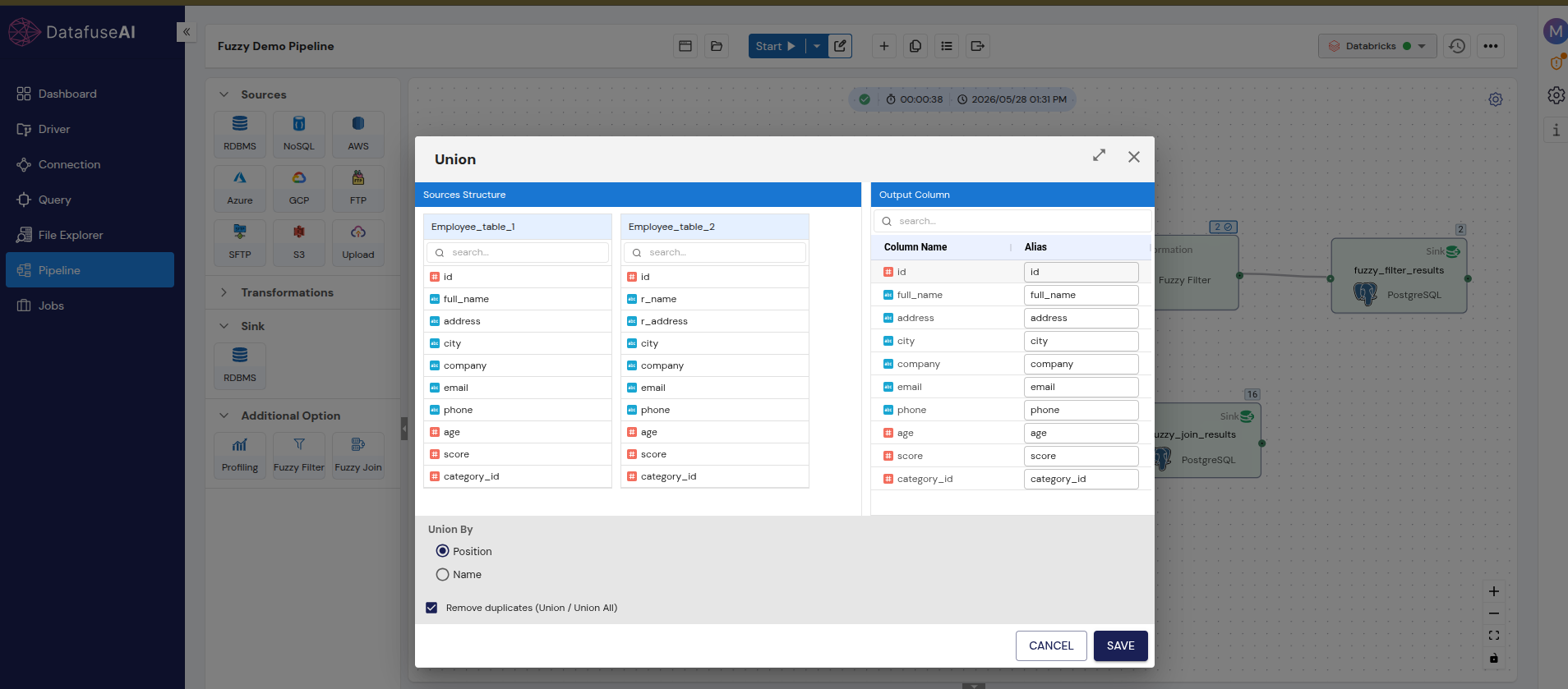
Connect both source nodes to a Union transformation node. In the configuration panel, set Union By to Position — this maps r_name from employee_table_2 positionally to full_name in the output schema, aligning the two name columns without requiring them to share a column name. Enable "Remove duplicates (Union / Union All)." The Union output is 150 rows: 101 from table_1, 49 from table_2.
 Enlarge
r_name from table_2 to the full_name position in the output schemaConfigure the Fuzzy Filter
Search within the unified 150-row dataset for variants of a target name
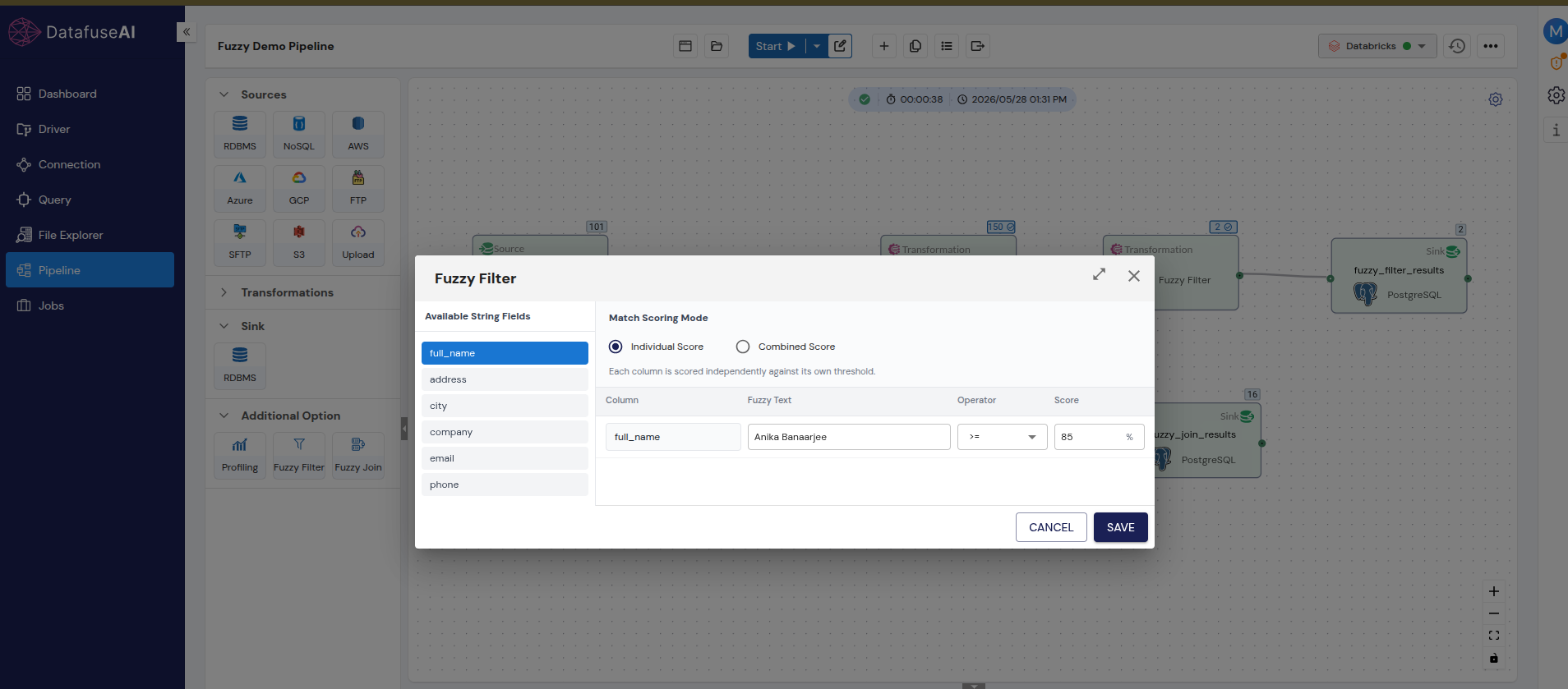
Connect the Union output to a Fuzzy Filter node. The configuration panel lists available string fields: full_name, address, city, company, email, phone. Select full_name.
Set Fuzzy Text to "Anika Banaarjee" — the misspelled name from employee_table_1. Set the operator to >=, score threshold to 85, and Match Scoring Mode to Individual Score. Save and run.
 Enlarge
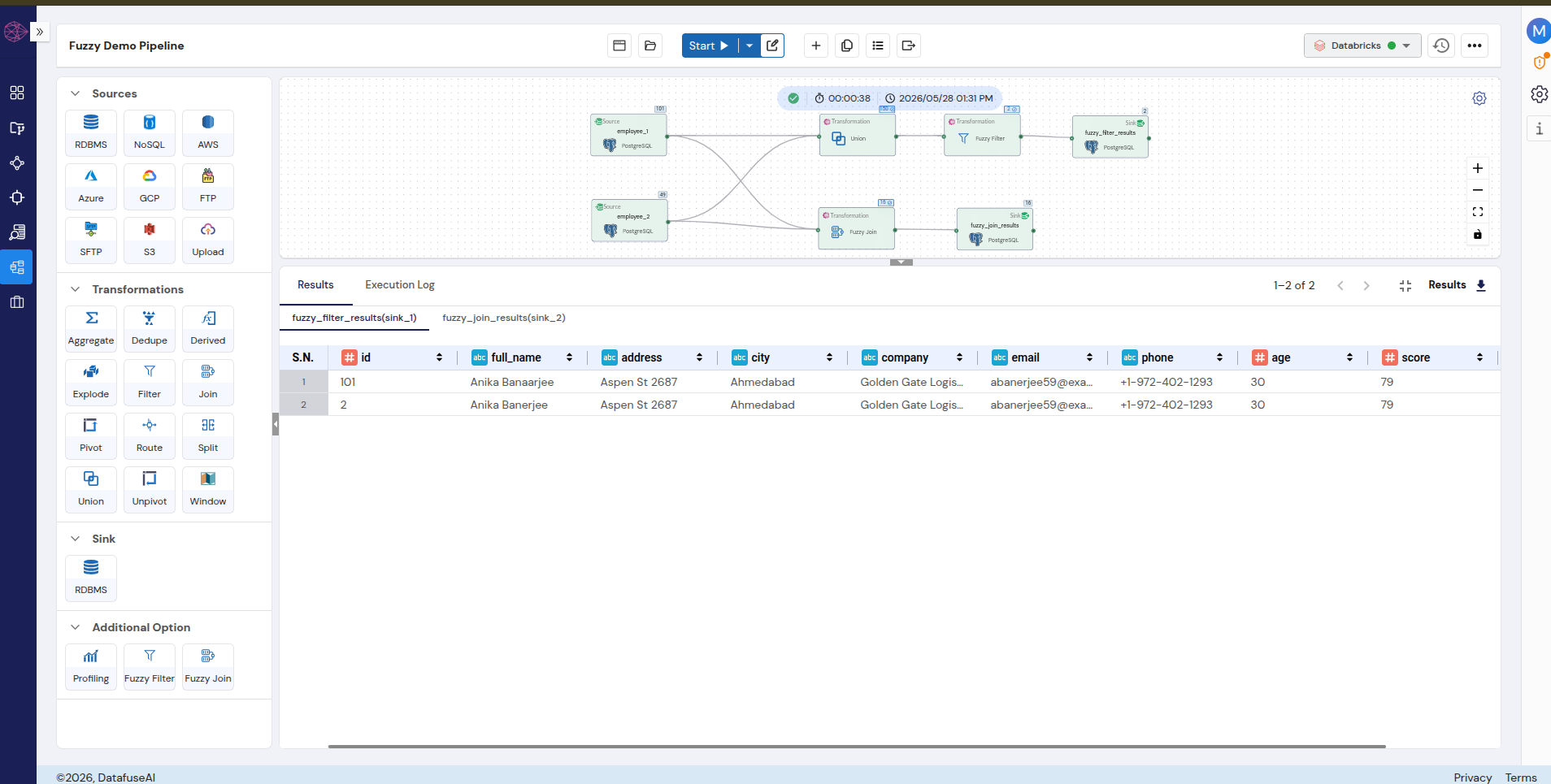
full_name for "Anika Banaarjee" at 85% Individual Score thresholdOutput: 2 rows. Row 1 is id 101 ("Anika Banaarjee") from employee_table_1. Row 2 is id 2 ("Anika Banerjee") from employee_table_2. Both share the same address, city, company, and email — confirming the same person across both tables despite the name difference.
 Enlarge
The similarity score for this pair — calculated using score = (1 - distance / max_length) × 100, with a distance of 2 and a max_length of 15 — is approximately 86.7%. The pair passes the 85% threshold by 1.7 percentage points.
Configure the Fuzzy Join
Link both source tables directly — no Union needed for cross-table matching
For the parallel branch, connect both source nodes directly to a Fuzzy Join node — no Union step needed, since Fuzzy Join operates across two tables directly.
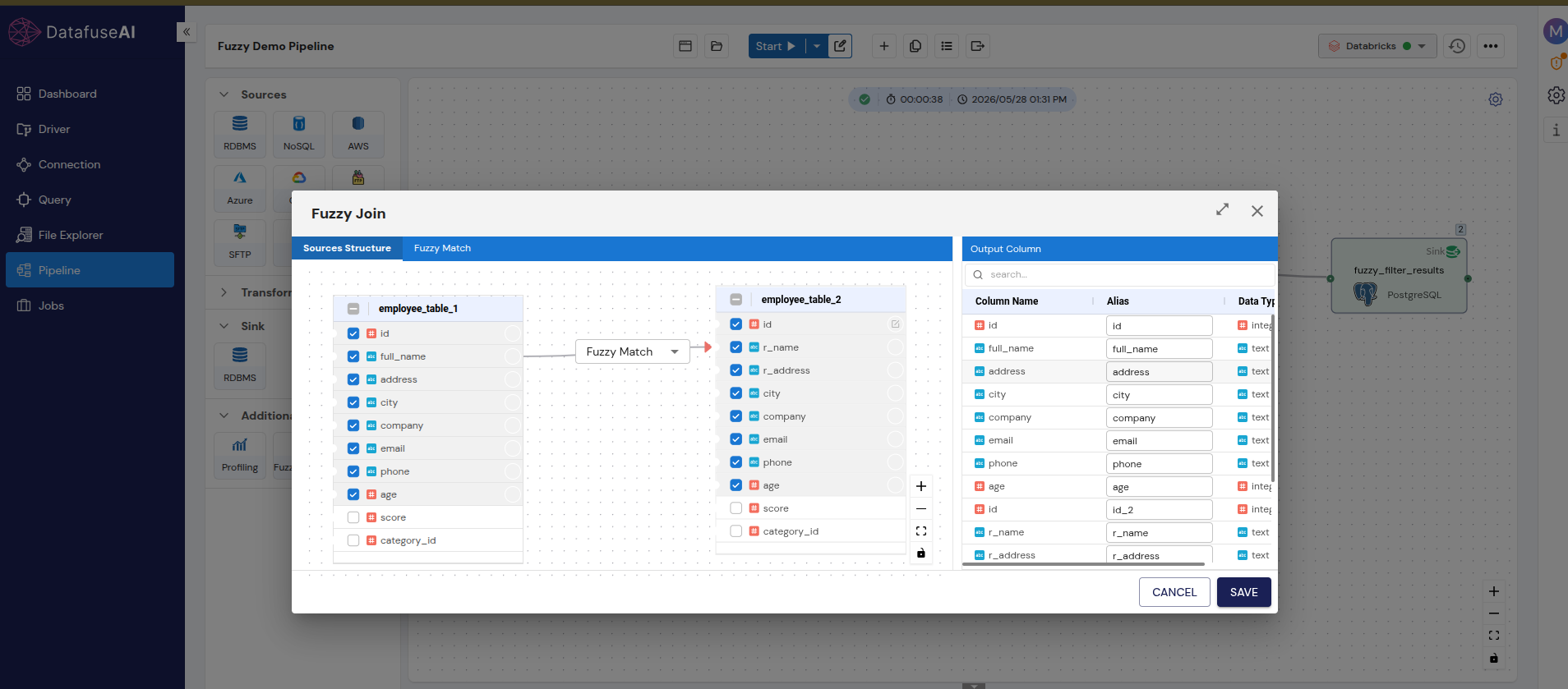
In the Sources Structure tab, employee_table_1 appears on the left and employee_table_2 on the right. Set the join connector to Fuzzy Match. Select the output columns from each side. The output schema contains full_name, address, city, company, email, phone, and age from table_1, plus id_2, r_name, and r_address from table_2.
 Enlarge
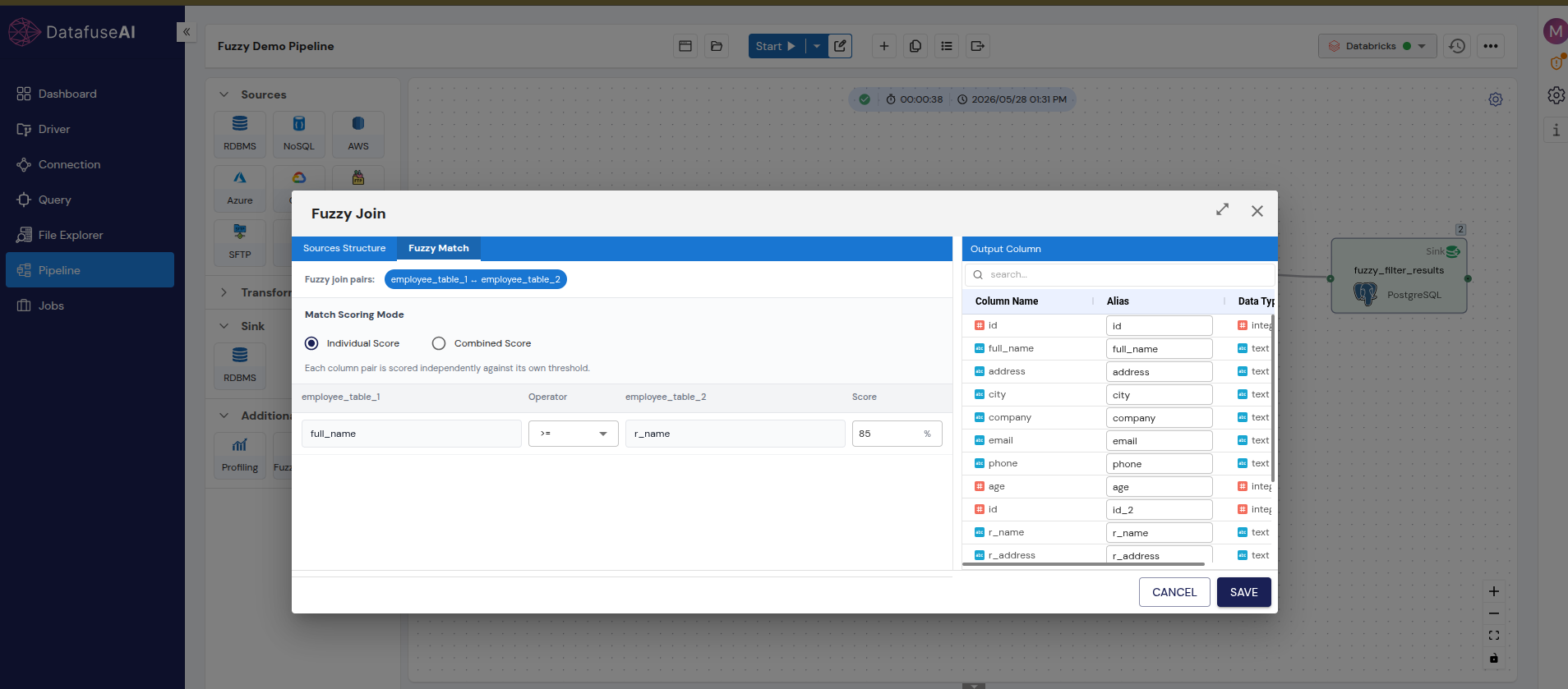
Open the Fuzzy Match tab. Set Match Scoring Mode to Individual Score. Add the rule: full_name >= r_name, score threshold 85.
 Enlarge
full_name >= r_name at 85%, Individual Score modeReview the results
Verify the cross-table match and inspect the threshold sensitivity example
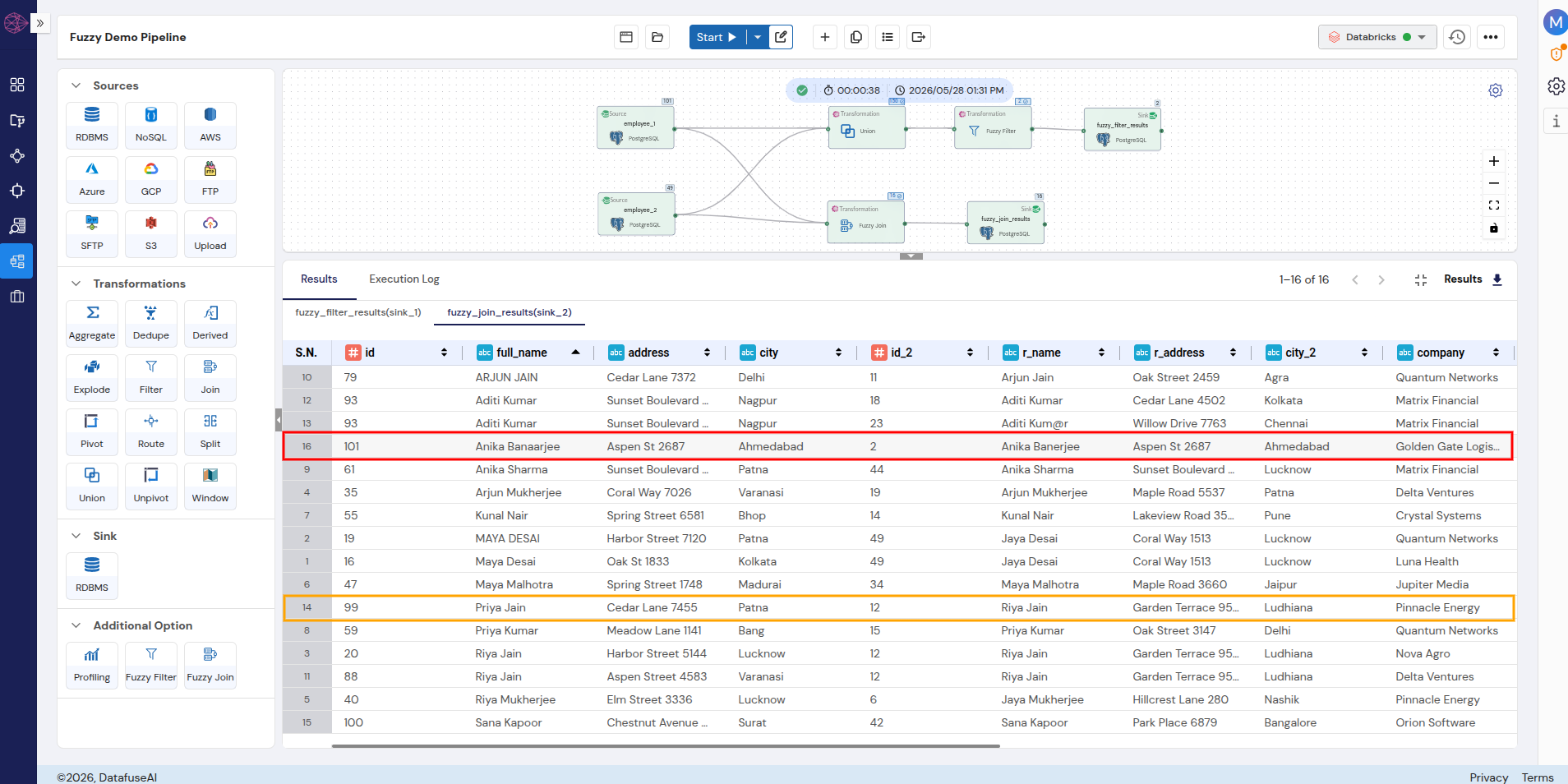
The Fuzzy Join returns 16 matched pairs.
Row 16 in the output — highlighted in red — is the Anika match: id 101 ("Anika Banaarjee") linked to id_2 2 ("Anika Banerjee"), same address, same city, same company. Cross-table fuzzy match confirmed.
Row 14 is worth looking at separately: id 99 ("Priya Jain") matched with id_2 12 ("Riya Jain"). "Priya" and "Riya" differ by two characters — a substitution and a deletion — which puts the pair above 85%. Whether this represents the same person or two different employees with similar names is a domain question the algorithm cannot answer. The threshold is where that judgment gets encoded, which the next section covers.
 Enlarge
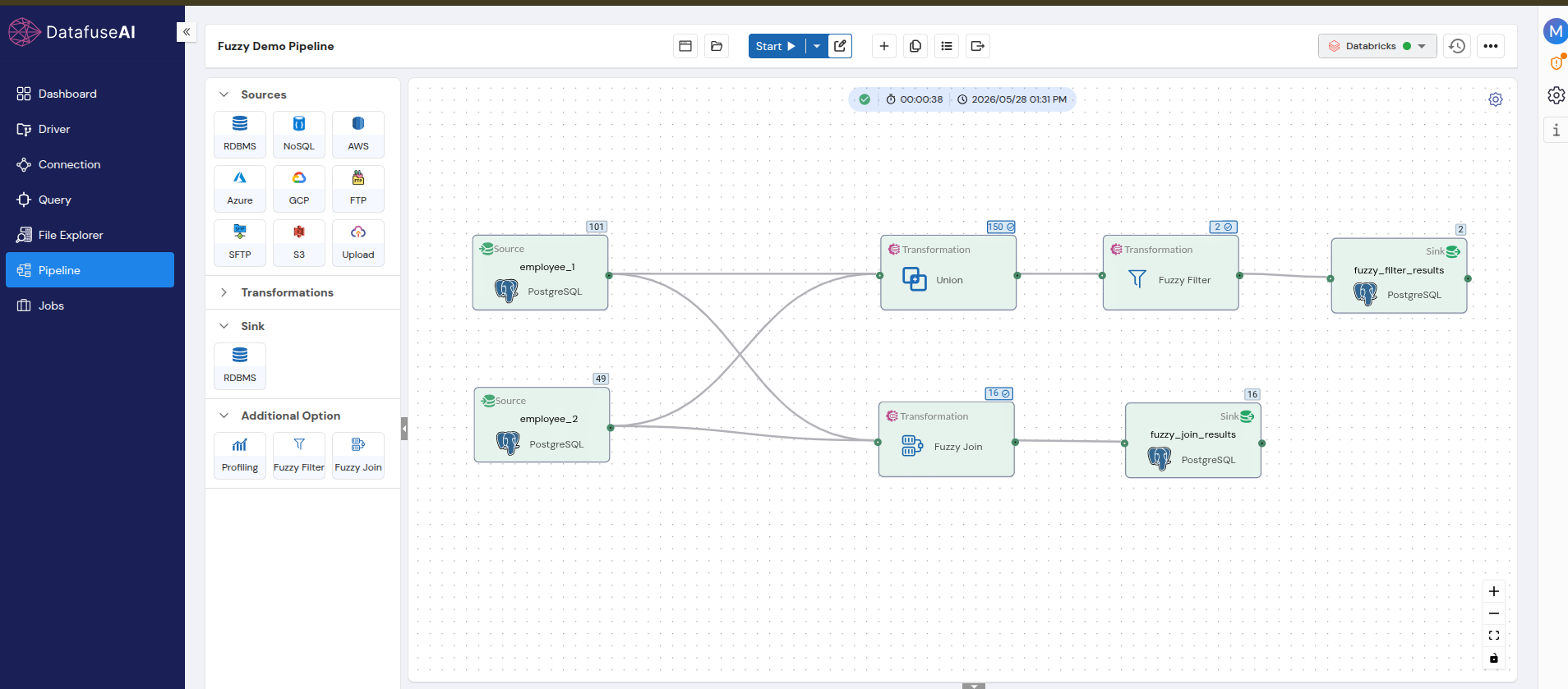
The full pipeline — two sources, Union, Fuzzy Filter, Fuzzy Join, two sinks — completed in 38 seconds running on Databricks compute.
Join direction note: Matching runs left to right: for each row in the left table, the closest-matching row in the right table is returned. A right-table row can appear multiple times if multiple left-table rows fuzzy-match to it. Reviewing for duplicate right-side matches is a useful post-run quality check.
Setting Thresholds and Choosing a Scoring Mode
There is no correct default threshold. A threshold is a data quality decision: how much variation are you willing to accept as a match, and what does a false match cost in this context? In a customer deduplication pipeline, a false merge is recoverable. In a healthcare record linkage pipeline, a false merge can associate the wrong medication history with the wrong patient.
Threshold guidance is usually presented as a number. Starting points are useful, but they don't substitute for testing against actual data and deciding what a false positive costs in a specific domain.
"There is no correct default threshold. A threshold is a data quality decision — not a technical setting to accept as-is."
How the threshold affects the Anika match
The demo pair illustrates how narrow the margin can be. "Anika Banaarjee" (15 characters) vs "Anika Banerjee" (14 characters) has a Levenshtein distance of 2, producing a similarity score of approximately 86.7%. That's 1.7 percentage points above the 85% threshold. Set it to 87%, and this match disappears. Set it to 85%, and it surfaces.
- Character-similar strings match regardless of entity identity
- False positive volume grows with dataset size
- Manual review becomes the bottleneck, not the pipeline
- In regulated contexts: false merges become compliance events
- Single-character typos and common spelling variants caught
- Raise to 90–95% for compliance, healthcare, fraud detection
- Use 65–75% for exploratory audits to measure variation scope first
- Validate against a labeled sample before committing to production
When threshold miscalibration has consequences
A peer-reviewed study of financial sanctions screening published in Frontiers in Artificial Intelligence (2024)[4] found that Levenshtein-based fuzzy matching produced false positive rates exceeding 90% of all alerts at operational thresholds. That figure is specific to name-matching against large watchlists, where common name combinations generate a high volume of incidental character-similarity matches — not a general property of fuzzy matching in ETL pipelines. It does, however, document what miscalibrated threshold logic looks like at scale.
The Priya/Riya pair from the demo pipeline is a smaller-scale version. "Priya Jain" and "Riya Jain" match at 85% because their names are character-similar. Whether they're the same person is a domain question the algorithm cannot resolve.
False positive risk at scale: At high-frequency name matching against large reference lists, even a well-chosen threshold produces false positives. Design for it: route matches above a high-confidence threshold to automatic merge, matches in a middle band to manual review, and everything below to no-match. Don't rely on a single threshold to serve all three outcomes.
Individual Score vs. Combined Score
When configuring fuzzy matching across multiple column pairs — name and address, for example — the scoring mode determines how the threshold is applied.
Individual Score evaluates each column pair independently against its own threshold. A match is returned only when every configured pair meets its individual threshold. No column's strong score compensates for another column's weak score. This mode is conservative: harder to pass, but when a pair passes, every column contributed.
Combined Score aggregates all configured column pair scores into a single value before applying the threshold. A high similarity on one field can offset a lower similarity on another. This is more permissive and useful when columns have unequal reliability — if the name field is clean but the address field has significant formatting variation across sources, Combined Score lets the cleaner signal carry more weight.
The scoring mode choice reflects how much trust you place in each individual field as a matching signal. For building validation checks around fuzzy matching output within a broader pipeline quality framework, data quality validation in ETL pipelines covers the relevant checks in depth.
Why Fuzzy Matching Rarely Makes Sense on Numeric Data
Fuzzy matching quantifies character-level similarity. Applied to a string field like a name or address, character similarity is a reasonable proxy for "same entity." Applied to a numeric identifier, it is not.
Consider two IDs: 12 and 123. Under Levenshtein distance, these differ by one character — an insertion of '3' — with a max_length of 3. That produces a similarity score of approximately 66.7%. Mathematically valid. Operationally meaningless. ID 12 and ID 123 are not the same record, regardless of how similar their digit sequences appear.
The core problem with numeric fuzzy matching: Numeric identity is binary. When ID 12 appears in one table and ID 12 appears in another, they represent the same entity. When ID 12 and ID 123 appear, they don't. There is no "somewhat the same" category for identifiers — which is the entire premise fuzzy matching is built on. This applies equally to IDs, foreign keys, product codes, account numbers, and invoice numbers.
This constraint is formalized in enterprise platforms. Most enterprise explicitly use and state that fuzzy matching precision applies only to string-type columns; integer, double, and datetime columns are locked to exact match and cannot be configured for fuzzy precision.
The practical rule: use exact matching for any field where identity is the point — IDs, foreign keys, product codes, account numbers. Use fuzzy matching for fields where human input introduces natural variation — names, addresses, company names, free-text descriptions. Applying the wrong method to the wrong category produces results that are technically computable but incorrect for the task.
Fuzzy Matching in ETL Pipelines: Common Questions
Fuzzy matching identifies strings that are similar but not identical, by computing a similarity score based on how many character-level edits separate the two values. Unlike exact matching, which requires a character-for-character match, fuzzy matching treats any pair above a configured threshold as a match — making it effective for data containing typos, name variations, and cross-system formatting inconsistencies.
Fuzzy Filter searches within a single unified dataset for rows that closely match a target string — it's a row selection operation. Fuzzy Join links two separate source tables by matching records across them based on string similarity between specified columns — it's a data integration operation. Use Fuzzy Filter when you need to find variants of a known value in a combined dataset. Use Fuzzy Join when you need to link records from two distinct source tables that don't share a common exact-match key.
Technically yes, practically no. Applying fuzzy matching to numeric identifiers produces a calculable score, but that score is semantically unreliable — ID 12 and ID 123 score approximately 66.7% similar under Levenshtein distance, even though they're categorically different records. Fuzzy matching belongs on string fields where character variation reflects genuine data entry inconsistency, not on identifiers where being different means being different.
There is no universal default. A threshold of 80–85% is a reasonable starting point for general name matching, where a single character difference is the expected error type. Raise it to 90%+ when false matches carry significant risk — compliance, healthcare, financial fraud detection. The right threshold comes from testing against a sample of your actual data and measuring how many false positives appear at different settings.
Individual Score evaluates each configured column pair independently against its own threshold — every pair must pass separately for a match to be returned. Combined Score aggregates all column pair scores before applying the threshold — a strong match on one field can offset a weaker match on another. Individual Score is more conservative; Combined Score is more permissive. The right choice depends on how reliable each field is as a matching signal in the dataset you're working with.
Fuzzy matching addresses a specific failure mode that exact matching cannot handle: the same entity, recorded across two systems with slightly different spellings, that a standard join can't link. The algorithm — Levenshtein distance in DataFuseAI's implementation — handles the similarity calculation. The threshold determines what counts as close enough. Those are two separate decisions, and only the second requires domain knowledge.
The worked examples here — 60% on "app" vs "apple," approximately 86.7% on the Anika name pair, a potential false positive on "Priya Jain" vs "Riya Jain" — illustrate what those numbers mean in practice. A threshold is an expression of tolerance for variation in a specific domain, not a technical setting to accept as a default.
In DataFuseAI, both Fuzzy Filter and Fuzzy Join are pipeline transformations available directly in the drag-and-drop builder, with per-column threshold configuration and Individual or Combined Score mode selection. The demo pipeline — 150 unioned records and a 101 × 49 cross-table fuzzy join — ran to completion in 38 seconds.

 Request a Demo