
Finance asks what each customer paid last quarter. The CRM gives one answer, billing gives another, and the operations spreadsheet gives a third. Nobody is wrong: the CRM records contract value at signing, billing records cash received, and the spreadsheet spells customer names its own way.
A data integration platform is software that turns reconciling those systems into a routine job instead of a monthly fire drill. The need is common: a MuleSoft survey of 1,050 IT leaders reported an average of 957 applications per enterprise, with 27% integrated [2]. The platform connects to each system, pulls the data on a schedule, matches and cleans it, checks the result, and delivers one table people can trust. Tomorrow it does the same again, and it tells you when something breaks.
Who this is for: data leaders, engineers, analysts and founders deciding whether they need a platform. Already comparing products? Our data integration tools decision framework covers specific vendors.
Key takeaways
- A data integration platform connects, moves, transforms, validates, schedules and governs data pipelines in one place. Products differ in how much of that they cover.
- Plenty of teams don't need one yet. A few stable sources and one engineer who owns them can run well on scheduled SQL.
- Pricing usually follows changed rows, data volume, credits, compute capacity or connectors. Engineering time and warehouse compute belong in the budget too, not just the licence.
- The most useful test is one real pipeline, on your own data, at production volume, with a check that is meant to fail.
Figures checked 4 November 2026; Fivetran pricing and DataFuseAI's architecture page re-checked 5 November 2026.
What is a data integration platform?
A data integration platform is software for building, running and monitoring the pipelines that combine data from several systems into datasets people and applications can use. Gartner describes the market as stand-alone products that combine data from multiple sources and handle access, transformation, enrichment and delivery [1]. The word "platform" usually means those jobs share one place for connections, schedules, logs and permissions.
Gartner notes buyers run these products as SaaS, on-premises, in public or private cloud, or hybrid [1], so the word describes scope, not hosting.
The problem a platform solves grows with the number of systems involved. MuleSoft's application figures come from its 11th annual Connectivity Benchmark, a survey the integration vendor runs [2]. Okta counts differently: its anonymised customer data covers apps connected through Okta and puts the average at 98 per customer for November 2024 to October 2025 [3]. MuleSoft's survey average of 957 and Okta's 98 [2] [3] use different populations and methods, so neither is "the" number, but both show more systems than most teams have connected.
How does a data integration platform work? A practical example
A data integration platform works by turning a description of sources, rules and destinations into a scheduled job with checks and alerts. The walkthrough below uses the CRM, billing and spreadsheet case. It is illustrative, not a DataFuseAI customer story.
- Connect. An engineer adds the CRM's API and the billing database as sources and the warehouse as the destination. Credentials are stored once, and each connection is tested before any pipeline uses it.
- Extract what changed. The pipeline pulls opportunities updated since the last run from the CRM, page by page, and new invoices from billing.
- Transform and match. Currency codes are standardized. Customer names that differ between systems ("Acme Ltd" and "ACME Limited") are matched, and invoices are joined to the deals they belong to.
- Validate. Checks confirm that every invoice has a customer, no invoice appears twice, and loaded totals reconcile with billing's own totals.
- Load. The validated table is written to the warehouse.
- Schedule and watch. The job runs each night after billing closes. If a check fails, the run stops and someone is alerted before the morning dashboard refreshes.
Step 4 is where the CRM-versus-billing disagreement becomes visible instead of silently landing in a report. The fix is usually a business decision, such as which definition of "revenue" the business adopts, rather than a technical one. Our guide on what to do when systems disagree on the same number covers how teams settle it.
What are the main components of a data integration platform?
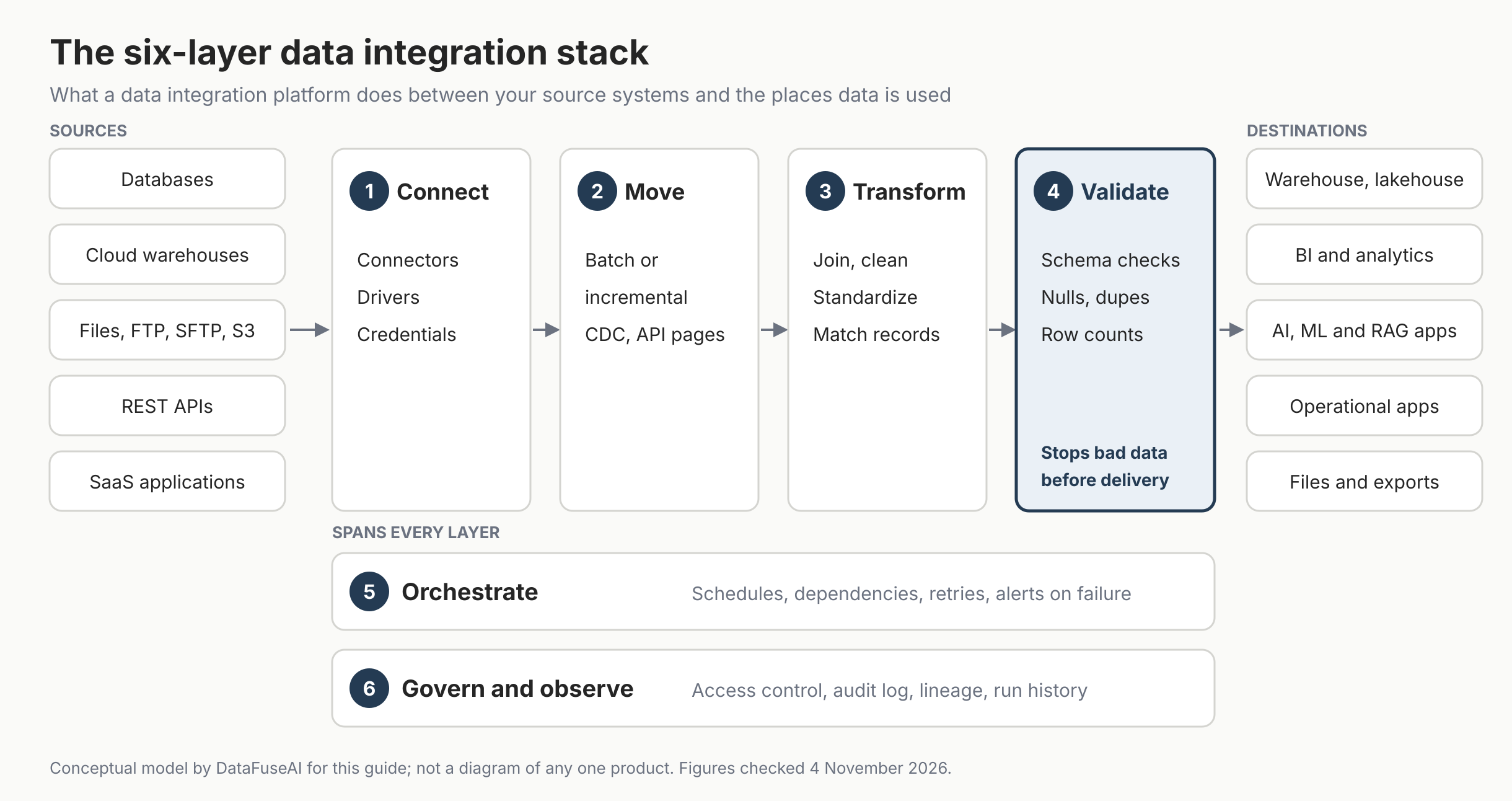
Most data integration platforms are built from six components: four that data passes through in order, and two that wrap around everything. We call this the six-layer data integration stack: a DataFuseAI editorial framework, not an industry standard. Many products cover only some layers and lean on other tools for the rest.
| Layer | What it does | What fails without it |
|---|---|---|
| 1. Connect | Holds connectors, drivers and credentials for each system | A changed password or driver breaks pipelines without warning |
| 2. Move | Extracts and loads data in full, incrementally, by change data capture or through API pages | Full reloads every night, or records that silently go missing |
| 3. Transform | Joins, cleans, standardizes and matches records | Each report calculates the same metric differently |
| 4. Validate | Checks schema, nulls, duplicates and totals before delivery | Runs finish on time and deliver wrong numbers |
| 5. Orchestrate | Schedules runs, orders dependencies, retries and alerts | Dashboards refresh before their inputs finish loading |
| 6. Govern and observe | Controls access, logs changes, keeps run history and lineage | Nobody can explain last night's numbers to an auditor |
Source: DataFuseAI editorial framework; layer names are ours, not a standard.
Validation is highlighted in Figure 1 because it is the layer a demo is least likely to exercise. A connector that works and a transformation that runs tell you nothing about whether the output is right. Our guide to data quality validation in ETL pipelines covers which checks to put where.
Do you need a data integration platform, or will scripts be enough?
Many teams don't need a data integration platform yet. If a few stable sources feed one warehouse, one person owns the jobs, and a failed run gets noticed the same day, scheduled SQL and scripts are often the cheapest reliable option. A platform starts to earn its cost when pipelines multiply, several teams depend on the same numbers, or someone has to prove where a figure came from.
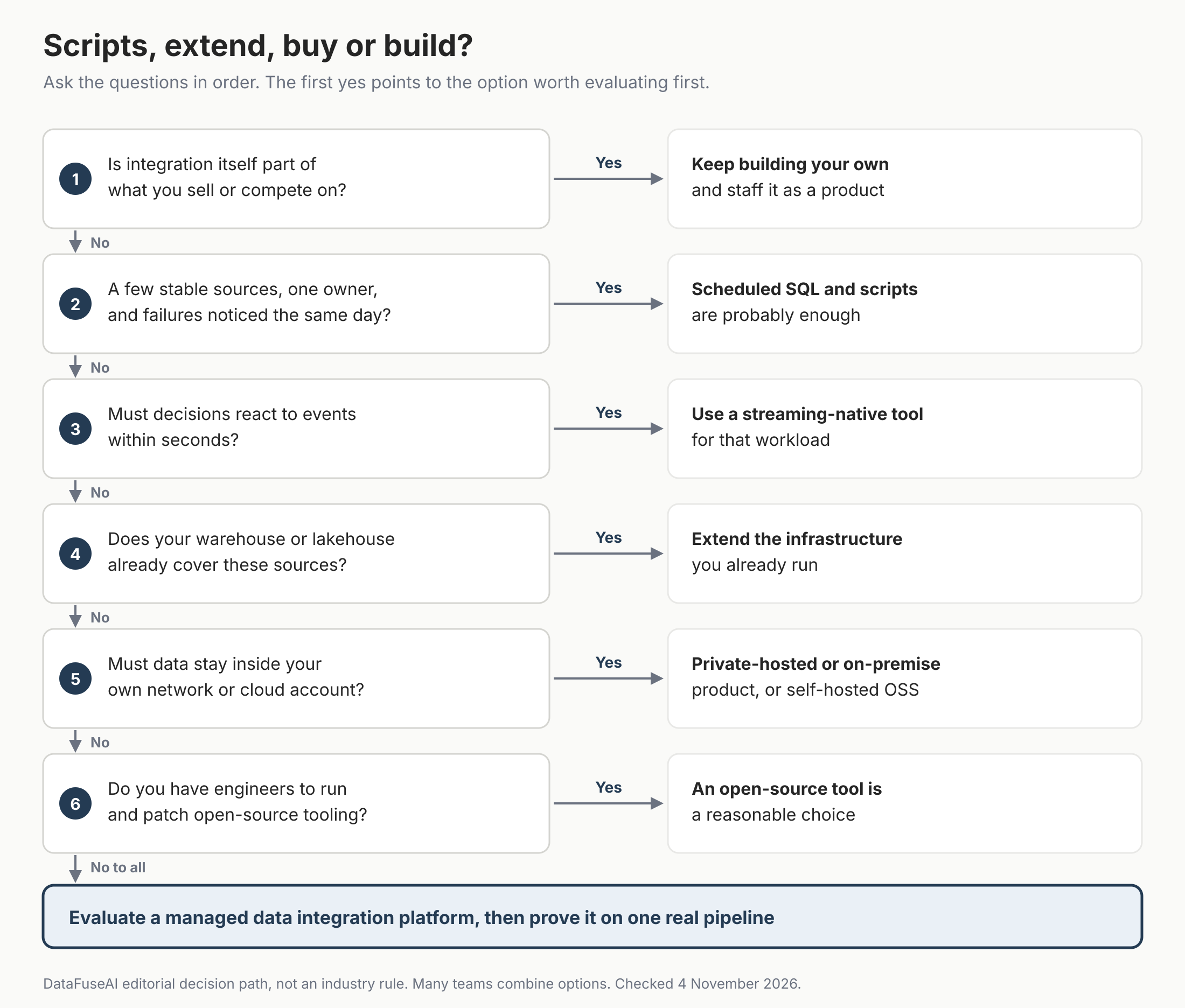
The decision path asks six questions in order, and the first yes points to the option worth evaluating first:
- Is integration itself part of what you sell or compete on? Keep building your own, and staff it as a product.
- Do you have a few stable sources, one owner, and failures noticed the same day? Scheduled SQL and scripts are probably enough.
- Must decisions react to events within seconds? Use a streaming-native tool for that workload.
- Does your warehouse or lakehouse already cover these sources? Extend the infrastructure you already run.
- Must data stay inside your own network or cloud account? Look at a private-hosted or on-premise product, or self-hosted open source.
- Do you have engineers to run and patch open-source tooling? An open-source tool is a reasonable choice.
If every answer is no, start with a managed platform. Each option trades money for engineering time in a different way:
- Scripts and scheduled SQL. Cheapest to start. The cost arrives later as undocumented logic, silent failures and one person who can't take a holiday.
- Extend what you already run. If your warehouse or lakehouse already ingests your sources, a platform may duplicate what you pay for. Check the usual gaps first: validation, matching and lineage.
- Open-source tools. No licence fee and full control. Your team takes on hosting, upgrades, connector fixes and on-call.
- Managed SaaS. The vendor runs the infrastructure and maintains connectors; your data passes through its service.
- Private-hosted or on-premise products. For data that can't leave your network or cloud account. The infrastructure is yours; who patches and monitors it varies by vendor, so ask.
- Streaming-native tools. For event-driven work where seconds matter, such as fraud checks. Overkill for a report read each morning.
- Keep building. Reasonable when integration is part of your product or no product meets a verified requirement. Staff it like a product.
Ownership matters as much as cost. Ask who fixes a pipeline at 2 a.m. when a source changes its schema, and whether that answer still holds when that person leaves. Our build vs buy data pipeline analysis argues the decision should rest on the yearly cost of maintaining what you build, not the one-time build.
Should you use ETL, ELT, CDC or streaming?
ETL transforms data before loading it into the destination, and ELT loads raw data first and transforms it inside the destination. Microsoft's architecture guide puts it plainly: ELT differs from ETL only in where the transformation happens, and it works well only when the target can transform data efficiently [5]. Change data capture and streaming answer a different question: how quickly changes need to arrive.
| Approach | How data moves | Typical freshness | Fits when | Watch for |
|---|---|---|---|---|
| ETL | Transformed in the integration layer, then loaded | Scheduled batches | Data must be cleaned, masked or validated before it lands | Transformation compute sits in the integration layer |
| ELT | Loaded raw, then transformed in the warehouse | Scheduled batches | The warehouse has spare compute and raw history is useful | Unvalidated data lands first; warehouse compute bills grow |
| Change data capture (CDC) | Reads inserts, updates and deletes from the source's change log | Seconds to minutes | Large tables where little changes between runs | Needs log access and handling for schema changes |
| Streaming | Processes events continuously as they arrive | Seconds or less | Fraud checks, live operations, event-driven apps | Higher running cost and operational effort than batch |
| API ingestion | Calls a SaaS or partner API, page by page | Scheduled or on demand | The source offers no database access | Rate limits, pagination and auth changes |
| Zero-ETL or managed replication | The warehouse vendor replicates supported sources automatically, which AWS says minimizes the need to build ETL pipelines [6] | Near real time | Your sources are on the vendor's supported list | Limited to supported pairs; transformation still happens later |
Source: ETL and ELT definitions from Microsoft [5]; patterns and zero-ETL sources from AWS [6]; freshness, "fits when" and "watch for" are DataFuseAI editorial guidance.
Two questions settle most choices. How old can the data be when someone uses it? Must anything be removed or masked before it leaves the source? For the longer reasoning, see ETL vs ELT pipeline architecture, batch vs CDC vs streaming and the limits of zero-ETL.
How is a data integration platform different from an ETL tool, iPaaS or warehouse?
A data integration platform overlaps with ETL tools, iPaaS products, warehouses and virtualization layers, and vendors in each group keep adding the others' features. The useful distinction is what each was built to do first. IBM describes iPaaS as a set of cloud tools that let applications, systems and databases exchange data and functions [7].
| Category | Built first to | Often also does | Usually still needs |
|---|---|---|---|
| ETL or ELT tool | Move and transform data into an analytics store | Scheduling; some offer monitoring, lineage and access control | Varies by product: validation, governance, cross-pipeline monitoring |
| Data integration platform | Build, run and govern many pipelines in one place | Most of the six layers in Figure 1 | Storage, BI and model training |
| iPaaS | Connect applications so an event in one triggers work in another | API management, workflow automation | High-volume batch loads, which IBM says iPaaS is generally not optimized for [7]; analytics-grade modeling |
| Data warehouse or lakehouse | Store and query data at scale | Native ingestion, replication and SQL transformation | Connectors for every source, cross-source matching and validation |
| Data virtualization or federation | Query data where it lives without copying it | Unified views across sources | Durable history; performance depends on the sources |
Source: DataFuseAI editorial comparison; IBM for the iPaaS description and its batch limit [7]. Individual products vary, so check each against your requirements.
The gap between a single ETL tool and a platform tends to show once pipelines multiply. Our comparison of an ETL tool and a data operations platform covers what changes at that point.
How much does a data integration platform cost?
A data integration platform's cost has two parts: the vendor's bill, and what your team spends running pipelines around it. Vendor pricing follows one of a handful of meters, and the meter matters more than the headline price because it decides what makes the bill jump.
| Pricing model | Public example (checked 4 Nov 2026; Fivetran 5 Nov) | What pushes the bill up | Ask the vendor |
|---|---|---|---|
| Changed rows | Fivetran bills Monthly Active Rows (MAR) per connection. Its pricing page applies a $5 base charge to connections with 1 to 1M MAR, except on the Free plan; its 2026 update notes name the Standard plan, with annual contracts changing at renewal [8] | Many small connections, full resyncs, many distinct rows changing. Outside history mode a row counts once a month however often it changes; from 1 January 2026, deletes count too, and history-mode changes are billed [8] | Which plan's base charge applies to us, and when does our contract renew? |
| Volume credits | Airbyte Standard starts at $20 a month with 5 credits (about 1 GB of syncs); Plus starts at $189 a month for 40 credits [9] | Volume spikes, new sources, backfills | What does one credit buy for databases versus APIs? |
| Capacity | Airbyte Pro prices by Data Workers at a flat annual rate; Enterprise Flex is quoted per deployment [9] | Adding parallel syncs or lower latency | How many syncs fit in one unit of capacity? |
| Data volume plus connectors | Estuary charges $0.50 per GB at capture and at each delivery, plus $100 a month per connector for the first six [10] | Fan-out to several destinations, connector count | Is data counted once or per destination? |
| API calls or endpoints | IBM notes iPaaS pricing can follow API call volume or the number of managed endpoints or connectors [7] | Chatty integrations, many endpoints | Are retries and polling calls billed? |
| Subscription or licence | Common for private-hosted and on-premise products; usually quoted on request | Seats, environments, support tier | What is included: support, upgrades, implementation? |
Source: vendor pricing pages and documentation as cited; prices change, so confirm on the day you buy.
The meter changes the shape of the bill, not just its size. Estuary's own documentation prices 100 GB a month from Postgres to Snowflake at $300: $50 to capture, $50 to deliver and $200 for two connectors [10]. Add a second destination and, at the same published rates, delivery doubles to $100 and a third connector adds $100, for $450 a month. That is our illustrative arithmetic, not a quote, but it shows why fan-out matters more than raw volume on that meter.
The vendor bill is rarely the whole cost. Budget for these as well:
- Warehouse compute. ELT transformations run on the destination's meter, not the integration vendor's.
- Data movement and storage. Cloud egress, staging storage and keeping raw history all cost money.
- Implementation. Mapping sources, agreeing definitions and building the first pipelines takes time from people who know the systems.
- Maintenance. Sources change schemas, APIs and credentials. Someone has to notice and fix each one.
- Monitoring and on-call. Alerts need an owner, and a missed failure has a business cost.
- Security and compliance reviews. Vendor assessments, data processing agreements and audit evidence take effort on both sides.
A fair comparison prices the same three or four real pipelines on each option, including your team's hours, for at least a year.
How should you evaluate and test a data integration platform?
Evaluate a data integration platform in the order that rules options out fastest: constraints, then fit, then operations, then cost. Test on your own data rather than the vendor's samples, because clean demo data never contains your duplicates, nulls and type mismatches.
What to check first, in order:
- Hard constraints. Where must the data stay, and how fresh must it be? A platform that can't run where your data lives, or can't meet the latency you need, is out regardless of features.
- Your actual sources. Native connectors for your two or three most important systems, not the size of the catalogue.
- Failure behavior. What stops a run when the output is wrong, not only when a connection drops.
- Operations. Alerts, run history, lineage, access control and who can change a pipeline.
- Cost model fit. Which meter your workload drives, and what makes that bill grow.
- Scale. Performance at today's volume and at the volume you expect next year.
- Exit. Whether you can export pipeline definitions, transformation logic and audit logs in a usable format if you leave. Our article on vendor lock-in in data infrastructure lists the questions to ask before you sign.
Then prove it on one pipeline. These tests expose most surprises before a contract is signed:
| Test | How to run it | Pass looks like |
|---|---|---|
| Real sources | Connect your two or three highest-priority systems | Data arrives without custom code or vendor engineering |
| Incremental loads | Change ten rows at the source | Only those ten rows move |
| A check that should fail | Feed in a duplicate key and a null in a required field | The run stops or quarantines the rows, and someone is alerted |
| Dependencies | Make an upstream job fail | The downstream job waits instead of running on stale data |
| Audit trail | Ask who changed a pipeline last week | The platform answers in minutes |
| Production scale | Run at current volume and at next year's expected volume | Timing holds, and you know where the bottleneck sits |
| Total cost | Price the pilot pipelines for twelve months, including your team's hours | The number survives finance's questions |
Source: DataFuseAI editorial checklist, following our five-phase ETL proof of concept framework.
Buying is probably the wrong decision if any of these apply:
- The real problem is definitions. If finance and sales disagree on what "revenue" means, a platform will deliver both versions faithfully.
- Nobody will own the pipelines. Platforms reduce maintenance; they don't remove it.
- The scope is one export. A one-time migration or file conversion rarely justifies a platform.
- The latency need is sub-second. A batch-oriented platform will disappoint; look at streaming infrastructure.
- Your existing stack already covers it. Paying twice for ingestion you already run is common and avoidable.
Deployment: cloud, private-hosted or on-premise
Deployment is usually the first hard constraint. If contracts or security policy forbid data from leaving your network, the platform must run inside it; if not, managed cloud is usually the fastest to start. Check that the model you need is generally available, not on a roadmap, and that features match across models.
| Model | Where it runs | Fits when |
|---|---|---|
| Managed cloud | Vendor-hosted; the vendor handles servers, upgrades and patches | A vendor may process the data, and your team wants nothing to operate |
| Private-hosted | Your servers or cloud account | Data must stay in your environment and you can provide the infrastructure |
| On-premise, offline | Inside your internal network, with no internet dependency | Policy allows no external connection at all |
Source: deployment models as described on DataFuseAI's deployment options page [15]; "fits when" is editorial guidance. Our deployment decision framework sets out the criteria in order.
What can a performance test prove, and what can't it?
A performance test proves how one configuration behaved on one dataset, and small tests mostly measure start-up costs rather than throughput. DataFuseAI's own benchmark ran 31 untuned runs on TPC-H data on one Databricks node with 2 cores and 16 GB of memory [11]. The largest table held about 60 million rows, or 75 million across both tables [11].
Two findings from its published tables carry over to any evaluation:
- Small runs measure overhead. Session setup, query planning and orchestration took 70.8% of runtime at the smallest size and 4.5% at the largest [11].
- Large runs measure the work. Writing to PostgreSQL rose from 12.3% to 57.1% of runtime [11]. At the largest size, destination writes limited four of the seven runs and transformation limited the other three [11].
The test is first-party: DataFuseAI designed, ran and published it, with no independent verification, and nothing was tuned. Its stated per-phase growth multipliers don't match what its published percentages imply, so we leave them out. The method is in the 60-million-row benchmark case study. The lesson that transfers: test at production volume, and expect the bottleneck to move as data grows.
Where DataFuseAI fits (and where it doesn't)
DataFuseAI is a data integration and preparation platform for scheduled batch and hybrid pipelines [12]. It brings data from several systems together, makes it reliable, and delivers it for analytics and AI. It suits teams that want to connect, transform, match, validate, schedule and govern data in one workspace, including inside their own environment. Details come from DataFuseAI's product pages, checked 4 and 5 November 2026.
It is likely a fit if you need:
- Database, warehouse, file and API sources in one place. The connector page lists native integrations across relational databases, NoSQL stores, AWS, Azure and GCP services, files, FTP, SFTP and S3 [13].
- Matching and validation before delivery. In DataFuseAI's data integration platform, each connection is checked before go-live [16]. Pipelines can standardize, fuzzy-match and validate records before they reach RAG, machine learning or analytics [17].
- A choice of where pipelines execute. Pipelines run on the built-in native engine (labelled Recommended), an existing Databricks workspace (Enterprise), or Spark through Apache Livy (Advanced), chosen per engine profile [14].
- Deployment inside your perimeter. Managed, private-hosted and local on-premise deployment, including an offline mode with no internet dependency [15].
- Role-based access and audit logs. Permissions are assigned to groups and set per action, and user actions and system operations are logged with context [19].
Other options are likely better if you need:
- Streaming sources. DataFuseAI does not support streaming sources such as Kafka, Kinesis or Pub/Sub [12]. A streaming-native tool fits better.
- Mature ELT today. DataFuseAI describes its ELT capability as in beta rather than generally available [12].
- A vector database or embedding service. DataFuseAI prepares the structured data that RAG and machine learning use; it does not store embeddings [17].
- Very little to integrate. If two sources and a nightly script work, keep them.
If you have a recurring workflow that combines data from several systems, the next step is to test one representative pipeline with your actual sources and validation rules. DataFuseAI's free 30-day POC asks for one recurring workflow, two or three data sources and a technical contact [18]. Applications are reviewed before scoping, not every applicant is accepted, there is no POC fee or obligation to continue, and any external infrastructure cost stays with you [18].
Frequently Asked Questions
Is data integration the same as data migration?
No. A migration moves data once, from an old system to a new one, and then it is finished. Data integration keeps several live systems combined on an ongoing schedule. A data integration platform can run a migration, but buying one only for a single migration is usually hard to justify. A migration tool or a scripted, well-tested one-off load is often enough.
What are examples of data integration platforms?
Here are examples grouped by what they were built for first, not ranked. Managed pipeline services include Fivetran and Airbyte [8] [9]. Cloud providers offer AWS Glue, Azure Data Factory and Google Cloud Data Fusion [20] [21] [22]. Enterprise suites include Informatica Intelligent Data Management Cloud and IBM DataStage [23] [24]. Application integration products include MuleSoft and Boomi [25] [26]. The groups overlap.
Can a data integration platform prepare data for AI?
Partly. A platform can connect sources, remove duplicates, standardize fields, match records and validate data before it reaches an AI application, which covers much of what makes structured data usable. Gartner predicts that through 2026, organizations will abandon 60% of AI projects unsupported by AI-ready data [4]. Embedding documents and storing vectors are separate steps.
How long does it take to set up a data integration platform?
It depends on the number of sources, how long access approvals take and how messy the data is, so be wary of any single figure. Plan in two stages: prove one representative pipeline first, then add sources one at a time. DataFuseAI, for example, scopes its free POC to one recurring workflow over 30 days [18]. Budget time for access approvals and agreeing definitions.
Is open-source data integration software free?
The licence is free; running it is not. Self-hosting means your team pays for infrastructure and handles upgrades, connector fixes, monitoring and compliance logging. That trade is often worth it for teams with platform engineers and mostly standard sources. Our analysis of open source ETL versus a commercial platform after year one covers the costs that tend to arrive later.
Does a data integration platform replace a data warehouse?
No. A warehouse stores data and runs queries on it. A data integration platform gets data into the warehouse, and often out of it, from the systems where it is created, checking it on the way. Many warehouses now include some native ingestion, so check whether yours already covers your sources before buying a second tool.
Methodology
Pages for this guide were read on 4 November 2026, between about 12:30 and 13:20 UTC. Definitions draw on Gartner [1], Microsoft [5], AWS [6] and IBM [7]. Application counts come from MuleSoft's survey as reported by Computer Weekly [2] and from Okta's anonymised customer data [3]; they measure different things and are not combined. MuleSoft's own report page could not be opened from our research environment. Pricing comes from each vendor's own pricing page or documentation [8] to [10] on the same date. Fivetran, Airbyte and Estuary were chosen as examples because each publishes prices for a different meter. The example products in the FAQ [20] to [26] come from vendor pages read on 4 November 2026; the grouping is ours. On 5 November 2026, between about 05:50 and 06:40 UTC, we re-read both Fivetran pricing pages [8] and DataFuseAI's architecture page [19]. We read Fivetran's 2026 update page again at about 10:30 UTC. The two Fivetran pages describe the base charge's plan scope differently, so the table quotes both.
Benchmark figures are quoted from DataFuseAI's April 2026 case study [11] and were not re-run. Its averages appear to be unweighted per-run means; it lists the seven runs at the largest size but not the runs in smaller tiers; and its stated per-phase multipliers don't match its published percentages, so they are omitted. Product statements come from DataFuseAI's own pages [12] to [19]. The six-layer stack, decision path and test checklist are DataFuseAI editorial frameworks. The revenue example is illustrative. Limits: survey figures are self-reported, vendor prices change often, and product capabilities can change after the check date.
References
- Gartner Peer Insights. "Data Integration Tools" market description. Accessed 4 November 2026. https://www.gartner.com/reviews/market/data-integration-tools
- Computer Weekly, CW Developer Network. "Salesforce analysis: the road to multi-agents is paved with connected orchestration." Reports MuleSoft's 11th annual Connectivity Benchmark (the vendor's own survey of 1,050 IT leaders). Undated page, accessed 4 November 2026. https://www.computerweekly.com/blog/CW-Developer-Network/Salesforce-analysis-the-road-to-multi-agents-is-paved-with-connected-orchestration
- Okta Japan. "Businesses at Work 2026" press release (Japanese), 30 April 2026. Anonymised Okta Integration Network data, 1 November 2024 to 31 October 2025. https://www.okta.com/ja-jp/newsroom/press-releases/okta-businesses-at-work2026/
- Gartner. "Lack of AI-Ready Data Puts AI Projects at Risk." Press release and analyst Q&A, 26 February 2025. https://www.gartner.com/en/newsroom/press-releases/2025-02-26-lack-of-ai-ready-data-puts-ai-projects-at-risk
- Microsoft Learn, Azure Architecture Center. "Extract, transform, and load (ETL)." Updated 30 October 2025. https://learn.microsoft.com/azure/architecture/data-guide/relational-data/etl
- Amazon Web Services. "What is a Data Integration Platform?" Vendor guide, accessed 4 November 2026. https://aws.amazon.com/what-is/data-integration-platform
- IBM Think. "PaaS vs. iPaaS." Nick Gallagher and Michael Goodwin, 19 March 2026. https://ibm.com/think/topics/paas-vs-ipaas
- Fivetran. "Usage-Based Pricing" and "2026 Pricing Updates" documentation. Accessed 4 and 5 November 2026. https://www.fivetran.com/docs/usage-based-pricing and https://fivetran.com/docs/usage-based-pricing/pricing-updates/2026-pricing-updates
- Airbyte. "Pricing" page. Undated, accessed 4 November 2026. https://www.airbyte.com/pricing
- Estuary. "Estuary Pricing" documentation. Accessed 4 November 2026. https://docs.estuary.dev/getting-started/pricing/
- DataFuseAI. "Case Study: How DataFuseAI Processed 60 Million Rows Without a Single Line of Code." First-party benchmark, 3 April 2026. https://www.datafuseai.com/blogs/case-study-how-datafuseai-processed-60-million-rows-without-a-single-line-of-code
- DataFuseAI. "Batch vs CDC vs Streaming: A Leadership Decision Framework." 24 August 2026. https://www.datafuseai.com/blogs/batch-vs-cdc-vs-streaming
- DataFuseAI. "Data Connectors" product page. Accessed 4 November 2026. https://www.datafuseai.com/platform/data-connectors
- DataFuseAI. "Processing Engines" product page. Accessed 4 November 2026. https://www.datafuseai.com/platform/engines
- DataFuseAI. "Deployment Options" product page. Accessed 4 November 2026. https://www.datafuseai.com/platform/deployment-options
- DataFuseAI. "Data Integration for Modern Data Teams" solution page. Accessed 4 November 2026. https://www.datafuseai.com/solutions/data-integration-platform
- DataFuseAI. "AI-Ready Data" solution page. Accessed 4 November 2026. https://www.datafuseai.com/solutions/ai-ready-data
- DataFuseAI. "Free 30-Day Data Pipeline POC" page. Accessed 4 November 2026. https://www.datafuseai.com/free-poc
- DataFuseAI. "Platform Architecture" product page. Accessed 5 November 2026. https://www.datafuseai.com/platform/architecture
- Amazon Web Services. "AWS Glue pricing." Accessed 4 November 2026. https://aws.amazon.com/glue/pricing/
- Microsoft Learn. "Integration runtime in Azure Data Factory." Accessed 4 November 2026. https://learn.microsoft.com/azure/data-factory/concepts-integration-runtime
- Google Cloud. "Cloud Data Fusion pricing." Accessed 4 November 2026. https://cloud.google.com/data-fusion/pricing
- Informatica. "Pricing" page (Intelligent Data Management Cloud). Accessed 4 November 2026. https://www.informatica.com/pricing
- IBM. "IBM DataStage" product page. Accessed 4 November 2026. https://www.ibm.com/products/datastage
- MuleSoft documentation. "Mule Runtime Engine Overview." Accessed 4 November 2026. https://docs.mulesoft.com/mule-runtime/
- Boomi documentation. "Boomi Pay-As-You-Go." Accessed 4 November 2026. https://help.boomi.com/bundle/atomsphere_platform/page/atm-Atomsphere_Go.html
 Request a Demo