
Closing November, the bank statement holds 24 lines from the card processor and 458 customer transfers. A script matches each payment to the first open invoice with the same amount, and the ledger looks reconciled. Payment reconciliation is the work of linking each payment to the invoices it settles; ERPNext's documentation puts it as linking party payments to invoices, while bank reconciliation checks ledger entries against the statement [1]. Done by amount alone, it quietly puts money on the wrong customer.
We tested that on illustrative synthetic data: 1,188 invoices and 482 bank lines whose true links are known. Five matching passes, each accepting a match only when one candidate fits, linked 448 lines with none wrong and left 34 for a person. Adding one loose rule that takes the first invoice with the same amount produced 339 wrong links when it ran first.
Figures checked 16 November 2026. This guide is for finance operations and data teams who own the bank-to-invoice match. For why two systems can report different totals in the first place, read multi-source data conflicts.
Key Takeaways
- Accept a match only when one candidate fits. A rule that takes the first of several same-amount invoices was the source of every wrong link in our test.
- Run strong keys first. The loose rule run first produced 339 wrong links; run last, it touched 7 lines and got 4 wrong.
- Card money needs the processor's report. 22 payout credits settled 680 card invoices, and no payout amount equalled any invoice amount.
- Subscription prices make amounts common. 326 of 458 transfers had more than one open invoice with the same amount issued in the previous 14 days.
- Keep a review queue. 34 bank lines (7.1%) were left for a person, 27 of them partial payments that no rule should guess.
What does payment reconciliation involve?
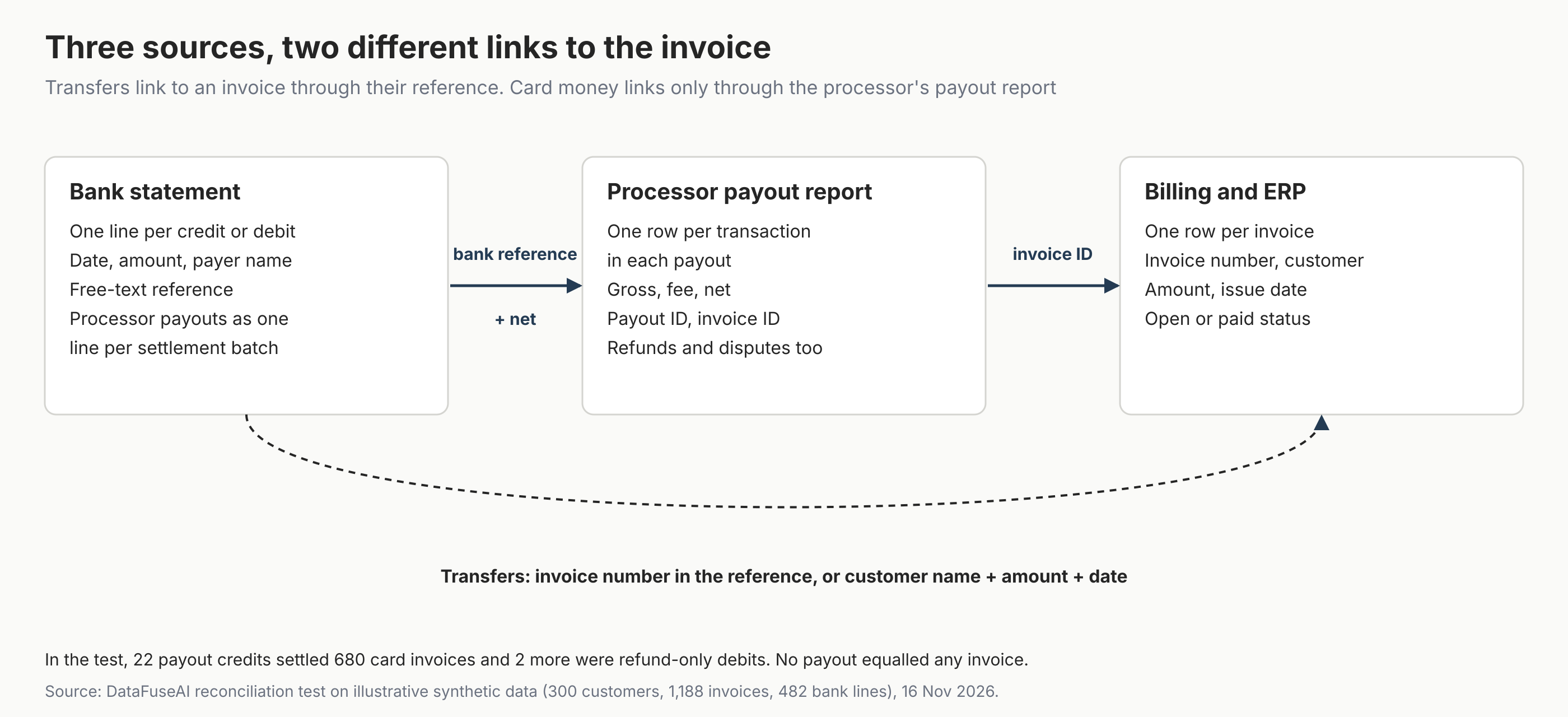
Payment reconciliation joins three records that were never designed to share a key: the bank statement, the payment processor's settlement data and the invoices in billing or the ERP. Each holds a different piece, and the link between them differs by payment method.
| Source | What one row is | What links it onward |
|---|---|---|
| Bank statement (camt.053, BAI2 or CSV) | One booked credit or debit | Free-text remittance reference, payer name, amount, date |
| Processor payout report | One transaction inside one payout | A reference the bank can show, plus the net amount, back to the bank; invoice ID forward to billing |
| Billing or ERP | One invoice | Invoice number, customer, amount, issue date |
Source: field names from Nordea's camt.053 guideline and Stripe's payout reconciliation report, read 16 November 2026; the BAI2 and CSV labels are editorial.
The bank's references are weaker than they look. In Nordea's camt.053 guideline, the end-to-end identification is optional and capped at 35 characters, and each unstructured remittance field is capped at 140 [2]. Whatever the customer typed is what you get.
The processor's report carries the stronger link. Stripe's payout reconciliation report matches each payout received in the bank to the batch of payments, refunds and fees it settles [3]. Its itemised export includes gross, fee and net by default, and can include the invoice ID for Stripe Billing payments [3].
On the bank side, Stripe's report offers a reference token that displays on the beneficiary's bank statement and the bank's trace ID [3]. It also warns that most banks truncate the payout statement descriptor and show it inconsistently [3]. Check which of those your bank actually shows before building the join.
How we tested matching rules
We built one illustrative month of synthetic billing data with every true link known, then ran the same 482 bank lines through five rule sets. Nothing in it is customer data, and the processor fee is an illustrative 2.9% plus 0.30, not any processor's quoted price.
- Billing: 300 customers and 1,188 invoices issued in November 2026. About three in four invoices (868 of 1,188) sit on four plan prices (49, 99, 199 and 499); the rest are one-off amounts.
- Card payments: 717 invoices paid by card. Payments settle into business-day payouts, net of fees and of 16 refunds, arriving two business days later. Two of the 24 payout lines are refund-only debits.
- Transfers: 471 invoices paid by bank transfer, in 458 bank lines. References were exact on most and mangled, missing or partial on the rest, and 13 transfers paid two invoices at once.
The statement runs to 9 December so that late November payments arrive. The Methodology section lists what this test cannot tell you.
What makes a matching rule safe?
A matching rule is safe when it accepts a match only if exactly one candidate fits, and it is safest run after rules with stronger keys. In our test, every wrong link came from one rule that took the first open invoice with the same amount and date, and where that rule ran decided how far the damage spread.
| Rule set | Correct | Wrong | Left for review |
|---|---|---|---|
| Five passes in order of certainty | 448 | 0 | 34 |
| Same five, plus a loose amount rule run first (first open invoice wins) | 106 | 339 | 37 |
| Same five, plus the loose amount rule run last | 451 | 4 | 27 |
| Same five, plus an amount rule that needs exactly one candidate, run first | 450 | 0 | 32 |
| Four transfer passes only, no processor payout report | 411 | 0 | 71 |
Source: DataFuseAI reconciliation test, illustrative synthetic data, 16 November 2026. Correct means linked to exactly the bank line's true invoices.
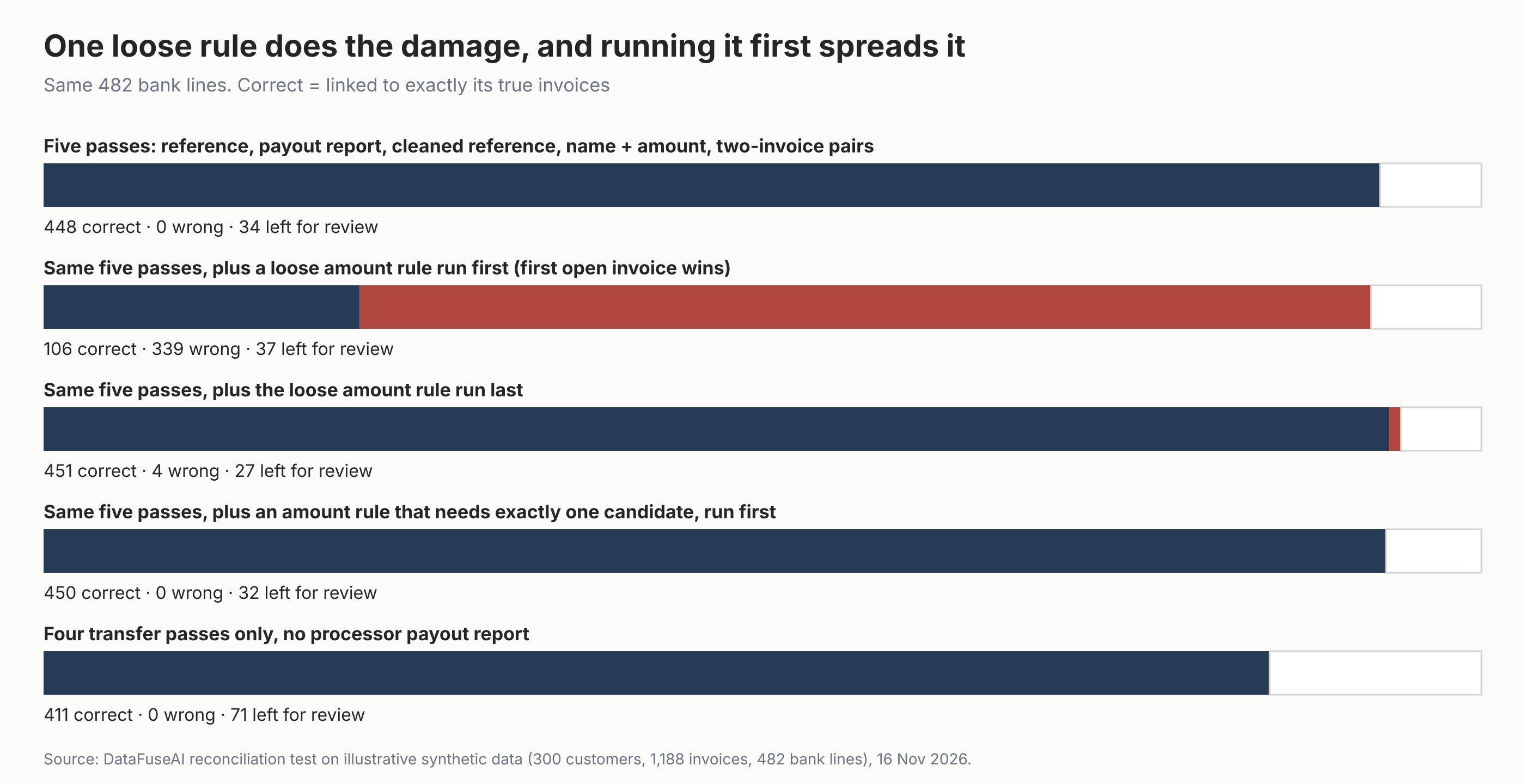
Run first, the loose rule did more than mislink transfers. It accepted card invoices as matches for transfers, so 18 of the 22 payouts that carried invoices later failed to tie out against their own invoices. Requiring exactly one candidate made the same amount rule safe in this data, wherever it ran.
Why does amount matching fail on subscription billing?
Amount matching assumes amounts are rare, and subscription billing makes them common. In our data, 363 of 471 transfer invoices sat on four plan prices. Of the 458 transfers, 326 had more than one open invoice with the same amount issued in the 14 days before the payment.
When several invoices fit, a rule that takes the first one is guessing. Run first, the loose rule took the right invoice for 94 of the 415 lines it accepted. A match that looks complete in the ledger can still have the wrong customer marked as paid.
Why can't card payouts be matched to invoices directly?
A processor payout arrives as one net credit for a batch of payments, so its amount equals no single invoice. In our test, none of the 24 payout amounts equalled any of the 1,188 invoice amounts. Without the processor's itemised report, all 680 card invoices stayed open.
Stripe's report covers this case with conditions worth checking against your own processor:
- Automatic payouts. The report is available to accounts with automatic payouts, or platforms whose connected accounts use them; for instant payouts, Stripe says it can't identify which transactions are included [3].
- Dates differ. The report groups payouts by estimated arrival date, not the date your bank posts the deposit, and report data can be ready after the payout arrives [3].
- Refunds and fees net off. The itemised export lists every payment, refund, dispute and fee in the payout, so the payout total is net of all of them [3].
In our run, joining each payout line to its report rows and confirming the net total cleared all 680 card invoices with no wrong links. The report's 16 refund rows still need their own entry, such as a credit note against the refunded invoice; our pass listed them but did not post them.
The five-pass payment match
The five-pass payment match is a DataFuseAI editorial framework, not an industry standard. It orders payment reconciliation rules from the strongest key to the weakest, and each pass runs only on the bank lines and invoices that earlier passes left. Anything still unmatched goes to a person.
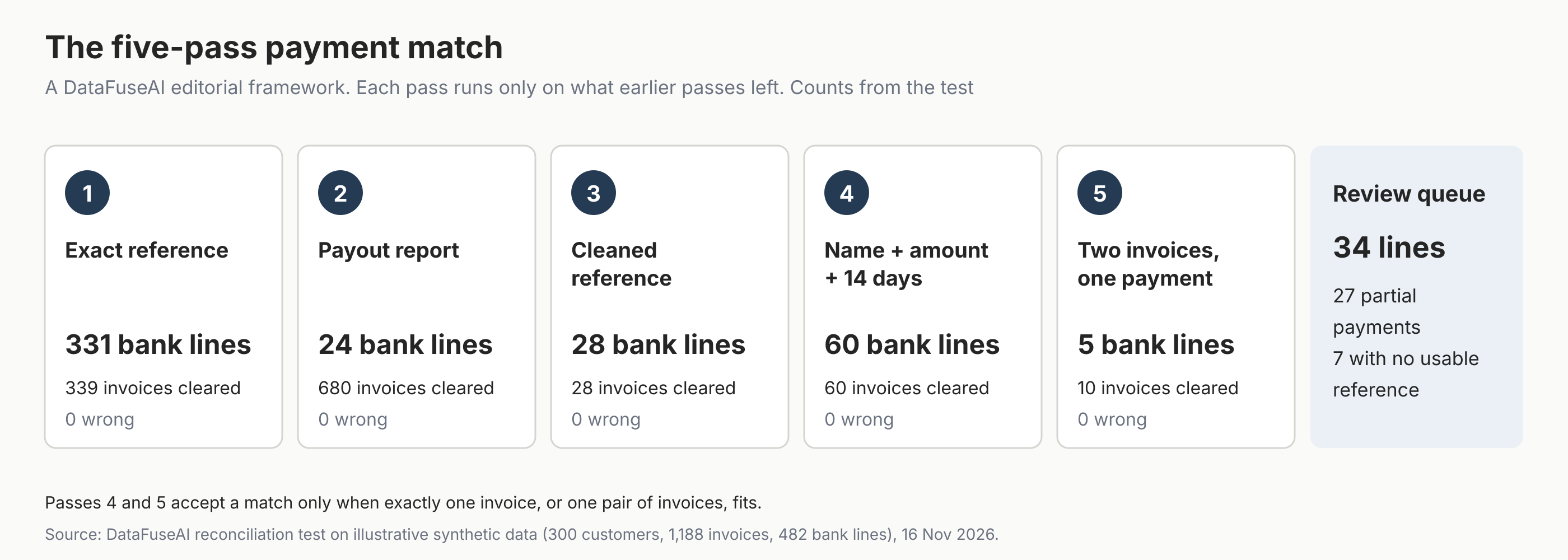
- Exact reference. Accept a transfer when its reference holds open invoice numbers whose amounts sum to the payment. This pass linked 331 bank lines and cleared 339 invoices, including transfers that named two invoices.
- Processor payout report. Join each payout line to the report by a reference the bank shows, confirm the net total, then clear the invoices on its charge rows. This pass cleared 680 invoices from 24 bank lines.
- Cleaned reference. Strip spaces, hyphens and words, then look for an invoice number whose amount matches exactly. This recovered 28 references such as "INV10234" and "inv 10234".
- Customer name, amount and window. Accept a payment when exactly one open invoice has the same amount, was issued in the previous 14 days, and belongs to a customer whose standardised name scores 85 or more against the payer on a fuzzy matching score. This linked 60 lines.
- Two invoices, one payment. Accept a payment from a matching customer when exactly one pair of their open invoices sums to it. This linked 5 lines and cleared 10 invoices.
What should the review queue hold?
The review queue should hold every payment no rule can link with certainty, and nothing should be forced to clear it. Zone & Co, a reconciliation software vendor, makes the same point, saying automation should not blindly force a match [4]. In our run, 34 bank lines (7.1%) reached review.
- 27 partial payments. The reference was right but the amount was a half or a quarter of the invoice, a decision for credit control rather than a rule.
- 7 transfers with no usable reference. References such as "PAYMENT" or "MONTHLY SUBSCRIPTION". Four failed the name score because the bank cut payer names to 22 characters, leaving fragments such as "PARTNE"; three had more than one invoice that fitted.
Record what reviewers decide for each line. Those decisions show which references customers get wrong most often, and that is where a clearer invoice layout or payment instruction pays back.
Mistakes to avoid
- Taking the first of several candidates. In the test, that one rule caused all 339 wrong links when it ran first.
- Reconciling card payouts against invoices. Payout lines are net batches; tie them to the processor's report, then the report to invoices.
- Assuming the bank shows the processor's payout ID. Check which reference your bank actually displays before building the join.
- Treating unmatched lines as failures. Partial payments and unreferenced transfers need a person, and forcing them hides an open balance.
- Ignoring dates across systems. Processor arrival dates, bank posting dates and invoice dates differ, so use windows rather than equal dates.
Where DataFuseAI fits (and where it doesn't)
DataFuseAI can run the matching side of this as a scheduled pipeline. Its finance industry page walks through a CRM-to-ERP reconciliation that first removes rows repeating on fields that should be unique, then fuzzy-joins names in Combined Score mode at a threshold of 70% [5]. Flagged pairs are output for review, not merged automatically [5].
The same page describes scheduling the reconciliation daily, at period close or before a submission window, with runs and access events recorded [5]. Every run of a fuzzy match records when it ran, how many rows matched and the threshold used, per the data reconciliation page [6].
Some of what this guide describes is not on DataFuseAI's pages. None of the pages we read describes a connector that parses camt.053 or BAI2 statements, a payment processor connector, or posting matched receipts back into an ERP. The finance page also says nothing in the core stack is replaced and claims no PCI DSS validation for DataFuseAI [5]. Check those points with the team before relying on them.
To test the five passes on one recurring reconciliation, DataFuseAI's free 30-day POC asks for one recurring workflow and two or three data sources [7]. Applications are reviewed for fit, there is no POC fee or obligation, and external cloud costs stay with you [7].
Frequently Asked Questions
What is the difference between payment reconciliation and bank reconciliation?
Payment reconciliation links each payment to the invoices it settles. Bank reconciliation confirms that the ledger's cash entries agree with the bank statement and tracks when they clear [1]. Most finance teams need both: bank reconciliation proves the cash arrived, and payment reconciliation proves which customer and invoice it belongs to.
How often should payments be reconciled?
There is no fixed rule. Our editorial recommendation is to match on the cycle your cash arrives: card payouts as each payout lands, transfers at least weekly. A shorter cycle keeps the review queue small while customers still remember what they paid, so month-end confirms work already done.
How do I handle a payment that covers several invoices?
Accept it automatically when the reference names the invoices and their amounts sum to the payment, as in our exact-reference pass. Without a reference, accept a pair only when exactly one pair of the customer's open invoices sums to the payment. In our test, that rule linked 5 such payments and wrongly linked none.
Can I reconcile card payments without my processor's payout report?
Not reliably. A payout is one net credit for many payments after fees and refunds, so its amount rarely equals any invoice. In our test, none of 24 payout lines equalled any invoice amount. Use the processor's itemised payout report, then match its rows to invoices by invoice ID.
Methodology
Data. Synthetic and illustrative, generated with a fixed seed: 300 customers, 1,188 invoices issued 1 to 30 November 2026, 717 paid by card and 471 by transfer. Card payments settle into business-day payouts, net of an illustrative fee of 2.9% plus 0.30, arriving two business days later. 680 card invoices fall in payouts; 37 were paid after 30 November and stay open.
Bank lines. 482 lines dated 2 November to 9 December, 85 of them in December. 458 are transfers: 313 with exact references, 55 mangled, 50 missing, 27 partial payments and 13 paying two invoices. Payer names are upper-cased, lose suffixes such as "Ltd" and are cut to 22 characters. Each payout line carries the payout ID the report also holds, which a real bank may not show.
Rules. Exact reference requires every named invoice open and amounts summing to the payment. Payout matching requires the report's net total to equal the bank line. Name matching uses a Levenshtein similarity of at least 85 after standardising, an exact amount and a 0 to 14 day window. Passes 4 and 5 accept only a single candidate or pair.
Measures. A bank line counts as correct only when linked to exactly its true invoices. Ties in the loose rule break by issue date, then invoice number, so results repeat exactly. Refunds are counted inside payout totals but not posted to invoices. Scripts ran in Python on 16 November 2026, between 18:11 and 18:27 UTC.
Limits. Real references, payer names and processor reports are messier, and real partial payments, credit notes and currency conversion add cases this test leaves out. The results show how rules behave, not the match rate any team will get. The test measures matching rules, not any product.
References
- Frappe. "Bank Reconciliation." ERPNext documentation. Accessed 16 November 2026. https://docs.frappe.io/erpnext/user/manual/en/bank-reconciliation
- Nordea. "Corporate eGateway Message Implementation Guideline: camt.053.001.02 BankToCustomerStatement." MIG version 1.9, 19 October 2023. Accessed 16 November 2026. https://www.nordea.com/en/doc/nordea-mig-bank-to-customer-statement-camt.053.001.02.pdf
- Stripe. "Payout reconciliation report." Stripe documentation. Accessed 16 November 2026. https://docs.stripe.com/reports/payout-reconciliation
- Zone & Co. "How to automate payment reconciliation for high-volume transactions." 12 June 2026, updated 17 June 2026. Accessed 16 November 2026. https://www.zoneandco.com/articles/automate-payment-reconciliation-for-high-volume-transactions
- DataFuseAI. "Finance Data Integration for Banking Teams." Accessed 16 November 2026. https://www.datafuseai.com/industries/finance
- DataFuseAI. "Data Reconciliation: Fuzzy Matching Across Systems." Accessed 16 November 2026. https://www.datafuseai.com/solutions/data-reconciliation
- DataFuseAI. "Free 30-Day POC." Accessed 16 November 2026. https://www.datafuseai.com/free-poc
 Request a Demo