
Approved data sources are the sources an AI assistant may use for the person it works for, and discovery is how it finds them, their contents and their owners. Ask an assistant to build a monthly revenue pipeline and its first question is where the data lives. Over MCP, the specification lets a server's tool list vary with the caller's authorization [1]. If discovery shows everything, the assistant can draft against a source it shouldn't use.
We built three MCP discovery server designs over one synthetic catalogue of 48 sources and tested them for three roles. With an open list, a scripted client standing in for a finance analyst's assistant saw 35 sources its role may not use and could read every schema, including 56 columns tagged as personal data. With discovery scoped on the server, it saw only the 13 sources its role may use.
Figures checked 17 November 2026. This guide is for data platform owners and engineers designing what an assistant can see over MCP. For how a pipeline platform fits together, read DataFuseAI's guide to what a data integration platform is.
Key Takeaways
- A rule in a tool description is a request, not a control. The open design asked the model to use approved sources and still listed all 48.
- Approval flags don't hide anything. The flagged design listed the same 48 sources and grew the list from 5,419 to 8,114 characters.
- Scope discovery on the server. The scoped design listed only sources the role may use and refused drafts naming any other.
- Withhold sensitive column names. Scoping hid all 56 personal-data columns from every role.
- Refuse with a reason. In the MCP Python SDK we used, a tool's anticipated error, raised as ToolError, passes its message to the model; a crash's text stays on the server.
What does an assistant need to discover before drafting a pipeline?
An assistant needs four things for each source: that it may use it, what it contains, who owns it, and whether it is current. Without them, an assistant picks sources by name. In our test, a role may use a source only if the source's status is approved, the role is granted its domain, and it isn't restricted.
In our catalogue, names like sales_raw_02 and marketing_us_03 gave no hint that one was pending review and the other retired.
MCP gives a server two ways to offer this. Tools are functions for the model to execute, and resources are context and data for the user or the model to use [2]. A list_sources tool is an example of the first. The specification allows a server's tool list to vary with the authorization on the request, so different callers can see different tools [1]. A resource list may vary the same way, returning only what the caller's granted scopes permit [3]. Neither list may vary per connection, so scope from each request's credentials, not from session state [1].
How did three discovery designs compare?
Only the scoped design kept sources the role may not use out of view. We built all three as real MCP servers with the MCP Python SDK 2.3.0 [4]. Each offered the same three tools: list_sources, get_source_schema and create_draft. They differed in what they returned and refused.
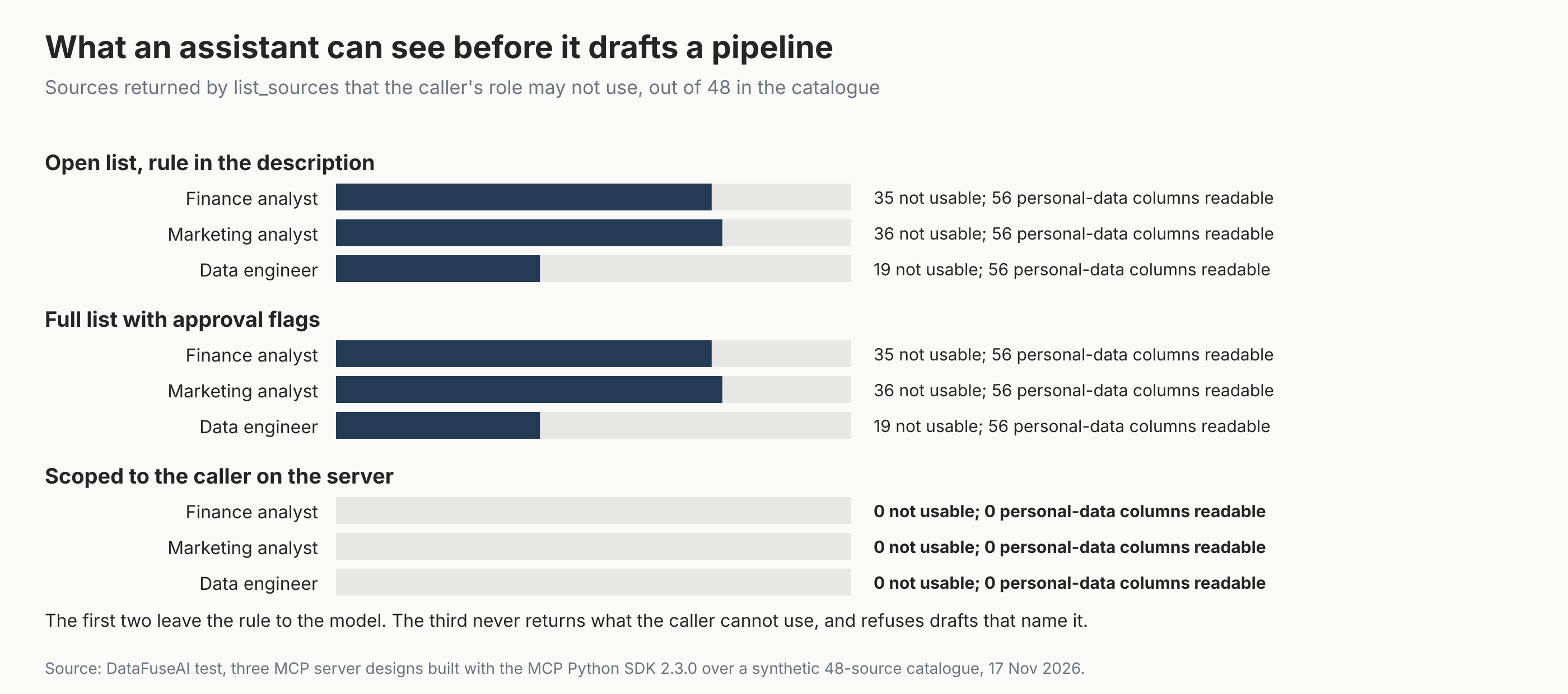
| Design | What list_sources returns | Not-usable sources listed | Personal-data columns readable | Draft naming a not-usable source |
|---|---|---|---|---|
| Open list, rule in the description | All 48 sources, with status | 35 | 56 | Accepted |
| Full list with approval flags | All 48, each with status, sensitivity and an approved-for-you flag | 35 | 56 | Accepted |
| Scoped to the caller on the server | Only the 13 sources this role may use | 0 | 0 | Refused with a reason |
Source: DataFuseAI test with the MCP Python SDK 2.3.0, 17 November 2026. 48 synthetic sources; finance analyst shown. The 56 columns are seven personal-data column names repeated across 40 schemas; 43 sit in sources this role may not use.
The marketing analyst and data engineer showed the same pattern: 36 and 19 sources they may not use in the first two designs, and none when scoped. Of the finance analyst's 35, 22 had status approved but sat outside its granted domains. The scoped list was also shorter: 1,193 characters of JSON, against 5,419 open and 8,114 flagged.
Why doesn't a rule in the tool description work?
Because it depends on the model choosing to follow it. The open design's description said to use only approved sources the caller is permitted to use, and its list showed each source's status. The server still returned all 48, and it never checked drafts.
The open server saved a draft that included a restricted HR source, and another naming a source pending review. Nothing in the protocol makes a model obey descriptive text.
The specification also tells clients to treat tool annotations as untrusted unless they come from trusted servers [1]. Annotations and descriptions help a model choose well. They do not stop a model, a prompt injection or a confused user from asking for something else.
Four rules for source discovery over MCP
Safe discovery comes down to four rules, all enforced on the server for every caller. They are a DataFuseAI editorial framework, not part of the MCP specification. Rules 1, 2 and 4 are the ones our scoped server applied.
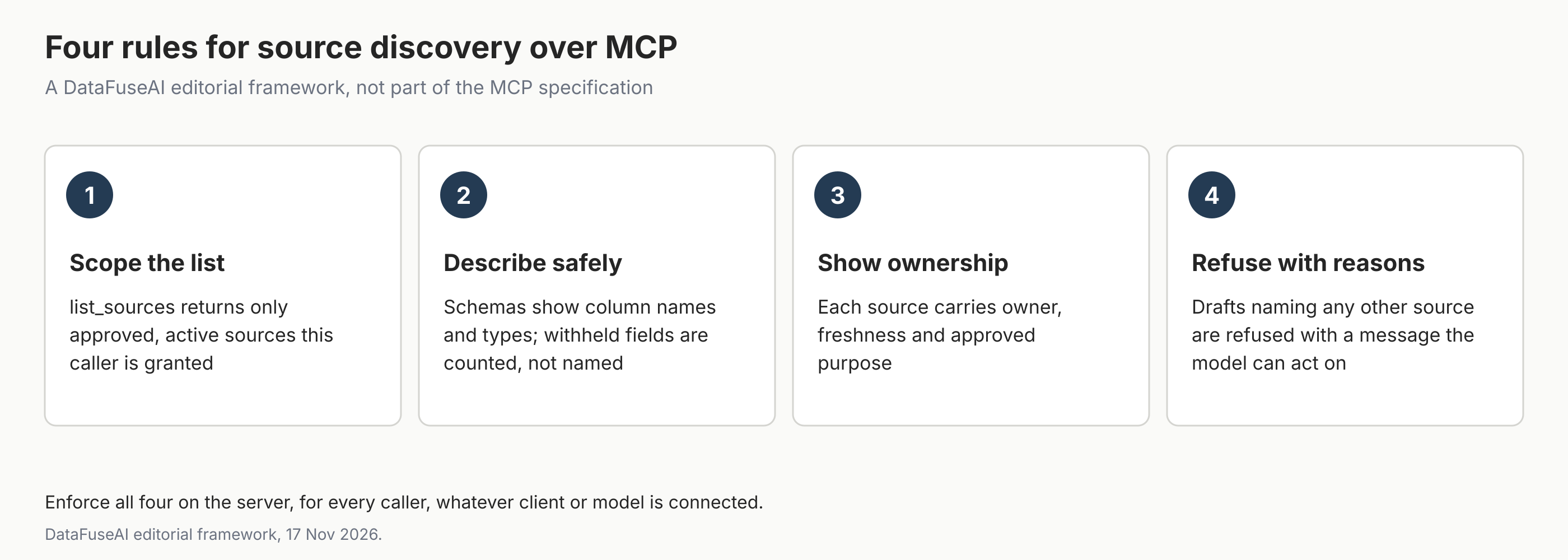
- Scope the list. list_sources returns only approved, active sources this caller is granted.
- Describe safely. Schemas list columns; withheld sensitive fields are counted, not named.
- Show ownership. Each source carries its owner, freshness and approved purpose, so the assistant can say whom to ask. Freshness is one of the signals in our guide to data observability.
- Refuse with reasons. A draft naming any other source is refused with a message the model can act on.
What should a refusal say?
A refusal should say what was refused and what to do instead. Our scoped server answered a draft naming src_02 with "Draft refused: src_02 not approved for this caller. Call list_sources to see the sources you can use." The client received it with the SDK's prefix, "Error executing tool create_draft:", in front. The specification says tool execution errors give the model feedback it can use to correct itself [1].
How the error is raised matters. In the MCP Python SDK 2.3.0, an ordinary Python exception reached the client as "Error executing tool plain", with the reason withheld. Raising the SDK's ToolError passed the reason through. We checked both in the same test run. The SDK's error-handling guide says the split is deliberate: a crash's exception text stays on the server, which logs it, while ToolError is how a tool tells the model what went wrong [5].
How do published MCP servers scope what a caller sees?
Two published servers show the range of approaches. Fivetran's server filters its tools by a scope set when the server starts, read by default, with an optional denylist [6]. That tool filter applies to the whole server; when run over HTTP, each request carries the caller's own Fivetran key [6].
Keboola's server can pin a session to one workspace. In its strict mode, the session offers five tools whatever the authorization headers say, and headers can narrow that list but not widen it [7]. Per-caller scoping like our test's needs the server to know who is calling.
Mistakes to avoid
- Listing everything and trusting the model to choose. Our open design never checked drafts, so it saved them against a restricted source and a pending one.
- Returning sensitive column names in schemas. Names alone can reveal what a table holds.
- Scoping the server, not the caller. A read-only server for everyone is safer than nothing, but it isn't per-user.
- Hiding a source from the list but not from the draft tool. Our scoped server refused known IDs too.
- Dropping the reason from errors. An assistant can't fix "Error executing tool" with nothing after it.
Where DataFuseAI fits (and where it doesn't)
DataFuseAI is a data integration vendor. Here we describe the MCP protocol, other vendors' servers and a test harness we wrote for this article, not a DataFuseAI feature.
What DataFuseAI does publish are access controls for people working in the platform. Its governance page describes permission groups that set what each group can do module by module [8]. The page also describes an audit log of who changed what, and private workspaces shared only with named Read, Write or Allow Manage access [8]. Those pages describe controls for people in the platform, not source discovery for an AI assistant. Our guide to audit-ready data operations covers why that log matters.
To test a pipeline workflow on your own data, DataFuseAI's free 30-day POC asks for one recurring workflow and two or three data sources [9]. Applications are reviewed for fit, there is no POC fee or obligation, and external cloud or compute costs, if any, stay with you [9].
Frequently Asked Questions
Should source discovery over MCP use tools or resources?
Either can work. Tools suit discovery the model drives, such as listing sources for a request, because the model can call them when it needs to. Resources suit context that the application or user chooses to load, because the specification makes them application-driven [3]. Whichever you use, scope the result to the caller on the server.
Can an MCP server show different sources to different users?
Yes. The specification allows a server's tool list to vary with the authorization presented on each request [1]. The results a tool returns can be filtered the same way. That needs the server to know who is calling, usually through the specification's OAuth-based authorization flow for HTTP servers [10].
Is it enough to mark sources as approved or not approved?
Not on its own. In our test, a list with approval flags still showed every source, and a server that doesn't check drafts saved one naming a source the role may not use. Flags help the model choose, but only a server-side refusal stops the draft.
What should a data catalogue tool return about each source?
Its ID, a readable name, its kind, owner, freshness and approved purpose, plus column names and types without sensitive fields. Return only sources the caller may use. Keep the response short, because everything it returns uses the model's context window and adds to the cost of every request.
Methodology
Catalogue. 48 synthetic sources across six domains, generated in Python with seed 20261218. 35 had status approved, 6 pending review and 7 retired; 8 were restricted. Seven column names were tagged as personal data; they appear 56 times across 40 schemas.
Roles. Three roles with grants over two to five domains. A role may use a source only if it is approved, in a granted domain and not restricted, which gave 13, 12 and 29 usable sources.
Servers. Three server designs built with the MCP Python SDK 2.3.0, each with list_sources, get_source_schema and create_draft, tested over an in-memory transport. Each design was instantiated once per role, with the role fixed at start, as a stand-in for per-request credentials; no authentication was exercised, and all designs expose the same three tools. Only the scoped design checks drafts, so the accepted drafts in the other two are guaranteed by design.
Drafts. For each role, the scripted client listed sources, requested every schema and submitted two drafts. The first took up to three listed finance or HR sources, deliberately including HR; the second named a source ID the role may not use.
Runs. Scripts ran on 17 November 2026 between 07:05 and 07:07 UTC. The figures were first drawn at 07:07 UTC, and Figure 1 was redrawn at 15:30 UTC to remove stubs on zero bars; an independent re-run reproduced results.json byte for byte.
Limits. No language model was used; the client was scripted. Personal-data counts are column names, not values. The test measures discovery designs, not any product.
References
- Model Context Protocol. "Tools" (specification version 2026-07-28). Accessed 17 November 2026. https://modelcontextprotocol.io/specification/2026-07-28/server/tools
- Model Context Protocol. "Specification" (version 2026-07-28). Accessed 17 November 2026. https://modelcontextprotocol.io/specification/2026-07-28
- Model Context Protocol. "Resources" (specification version 2026-07-28). Accessed 17 November 2026. https://modelcontextprotocol.io/specification/2026-07-28/server/resources
- Model Context Protocol. "Python SDK" (version 2.3.0). Accessed 17 November 2026. https://github.com/modelcontextprotocol/python-sdk
- Model Context Protocol. "Handling errors." MCP Python SDK documentation (v2). Accessed 17 November 2026. https://py.sdk.modelcontextprotocol.io/v2/servers/handling-errors/
- Fivetran. "fivetran/fivetran-mcp: README" (commit b6675b6, 3 November 2026). Accessed 17 November 2026. https://github.com/fivetran/fivetran-mcp/blob/b6675b66a114ea378d8a9b2d77b6fdef155310c4/README.md
- Keboola. "keboola/mcp-server: README" (commit 050d9b3, 16 November 2026). Accessed 17 November 2026. https://github.com/keboola/mcp-server/blob/050d9b360edc5cd018676fcf5a965f6b1131fb89/README.md
- DataFuseAI. "Data Governance & Compliance: RBAC, Audit Logs, Isolation." Accessed 17 November 2026. https://www.datafuseai.com/solutions/data-governance-compliance
- DataFuseAI. "Free 30-Day Data Integration POC." Accessed 17 November 2026. https://www.datafuseai.com/free-poc
- Model Context Protocol. "Authorization" (specification version 2026-07-28). Accessed 17 November 2026. https://modelcontextprotocol.io/specification/2026-07-28/basic/authorization
 Request a Demo