
AI assistants for data pipelines can reach a pipeline platform two ways: a chat assistant built into the product, or the customer's own assistant connected over MCP [1]. Both front ends draft and change the same pipelines, so the question that matters is where the rules live: in each front end, or in the one core they share.
We demonstrated the difference with one pipeline core, two front ends and 400 scripted build sequences. Both front ends produced identical canvases for all 200 valid drafts and identical errors for all 200 broken ones. When the review-before-publish rule lived only in the chat screen, the MCP path published all 85 valid drafts that had no review.
Figures checked 17 November 2026. This guide is for data teams choosing pipeline tools with AI features, and for platform teams building them. For how a pipeline platform fits together, read DataFuseAI's guide to what a data integration platform is.
Key Takeaways
- Two front ends, one core. In our test, both paths gave the same build result (canvas or refusal) for all 400 sequences because both called the same service.
- Rules in a screen are skipped by the other path. A publish rule kept in the chat builder let every unreviewed valid draft through MCP.
- Advisory text is not enforcement. Fivetran's README says its write tools ask the model to confirm, but the server does not enforce it.
- One server can serve both. Keboola's README describes its agent Kai calling the same MCP server, with an optional stricter tool list.
- Identity must reach the core. Each call should carry the user's own identity, so the core applies the same permissions on both paths.
- Errors must carry reasons. Our own coding slip produced errors the SDK reported to the client with no reason at all.
What are the two ways to work with a pipeline platform through AI?
Two ways are common in the products we checked. An in-product chat builder runs inside the platform's own interface and knows what screen you are on. An external MCP client, such as an assistant in an editor or desktop app, reaches the platform through an MCP server alongside your other tools.
| In-product chat builder | External MCP client | |
|---|---|---|
| Where it runs | Inside the platform's interface | In the user's own MCP host |
| Who chooses the model | The platform vendor | The user or their company |
| Context it has | The current screen, project and canvas | Whatever the user connects: code, tickets, docs, other servers |
| Best at | Guided building with a live preview | Work that crosses tools, such as a pipeline from a ticket |
| Who controls confirmation prompts | The platform | The MCP host, per the specification's guidance |
Editorial comparison by DataFuseAI, 17 November 2026.
The MCP specification says hosts should show which tools are exposed and should prompt for confirmation on sensitive operations [1]. Those prompts belong to the host, not the platform. A platform that wants a guaranteed check has to make it in its own service.
What happened when both front ends shared one core?
They behaved identically, as designed. We replayed 400 scripted build sequences, half of them with one planted defect, through a chat front end calling the core directly and an MCP client calling an MCP server over the same core. Every outcome and every error message matched.
| Measure | Result |
|---|---|
| Valid drafts that produced a canvas, on each path | 200 |
| Canvases identical between the two paths | 200 of 200 |
| Broken drafts refused, on each path | 200 |
| Refusal messages identical between the two paths | 200 of 200 |
Source: DataFuseAI test with the MCP Python SDK 2.3.0, 17 November 2026. Illustrative synthetic sequences.
Identical results are what one shared core should give, so this half is a check that the test works. The useful part is the second half: what changes when a rule sits in only one front end.
What happens when a rule lives in only one front end?
The other front end skips it. We added a publish step and a rule that a draft needs a recorded review before publishing. With the rule in the core, neither path published an unreviewed draft. With the rule only in the chat screen, the MCP client published every one of the 85 valid drafts without a review.
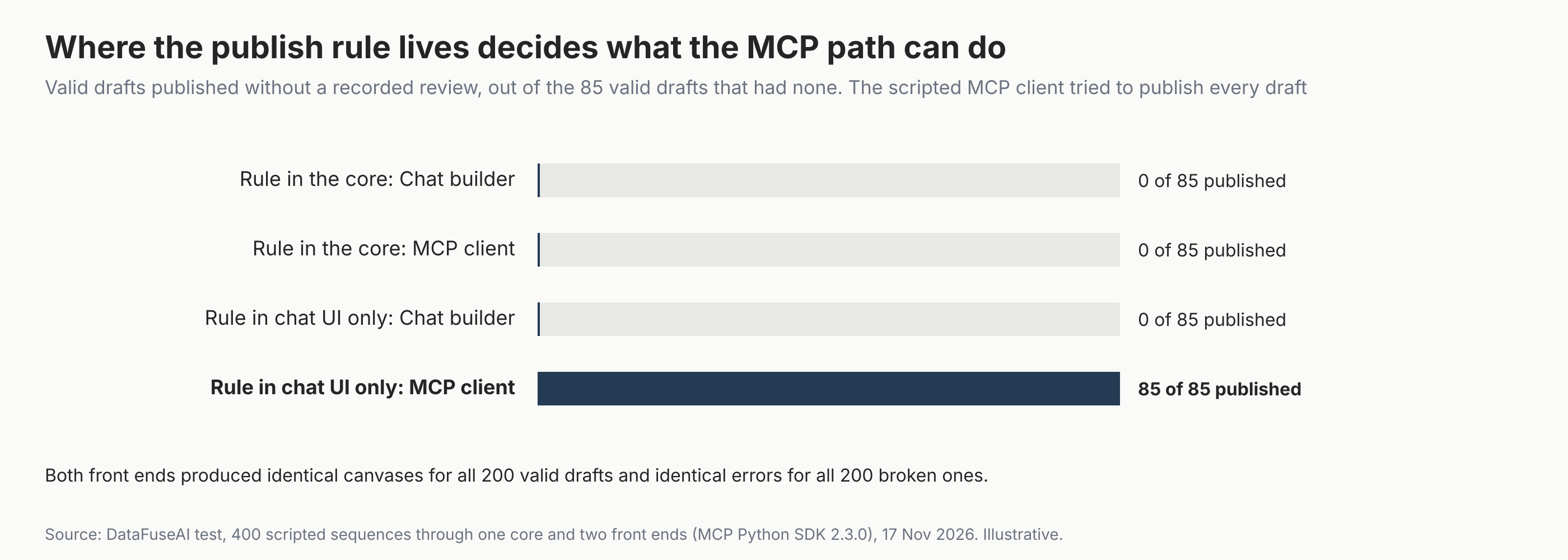
The 85 is a demonstration, not a rate: our scripted MCP client tried to publish every valid draft, so every unreviewed one went through. A real assistant might publish fewer. The point is that nothing on the MCP path stopped it.
Real servers show both patterns. Fivetran's README says its write and delete tools carry advisory instructions asking the model to confirm, and that the server does not enforce confirmation [2]. Keboola documents a merge-request flow in which approval is valid only while a request is in review and never for its creator [3]. Approval is opt-in: projects with the default of zero required approvals never enter review [3].
Can one MCP server serve both front ends?
Yes. Keboola's README describes its agent, Kai, calling the same MCP server from inside a Data App with a pinned workspace [4]. An optional strict mode limits that session to five tools, and authorization headers can narrow the list but not widen it [4].
That is the pattern to look for: one service, with the caller's context deciding what is available. The specification allows a server's tool list to vary with the caller's authorization [1]. A front end may hide tools for convenience, but the server decides what is possible.
How do the user's identity and permissions carry through MCP?
They carry through only if the MCP server passes the caller's own identity to the core on every call. Otherwise the core sees one service account and applies its permissions to everyone. How identity arrives depends on how the server runs.
| How the server runs | Where the caller's identity comes from | What the specification says |
|---|---|---|
| Locally over stdio | Credentials in the environment of whoever started the process | Stdio servers should not use the authorization flow and should read credentials from the environment [5] |
| Remotely over HTTP | An access token sent with every request | The MCP server acts as an OAuth 2.1 resource server and must check the token was issued for it [5] |
Source: MCP specification, Authorization (version 2026-07-28), read 17 November 2026.
Authorization is optional in MCP, so check what a given server does [5]. A server that does use it must accept only tokens issued for its own resources and must not pass other tokens through [5]. When a token lacks a permission, the server should answer with HTTP 403 and name the scopes the operation needs [5].
Two vendor servers show what this looks like in practice. Fivetran's HTTP mode takes each caller's Fivetran key from the request and refuses to start if a shared key is set, because one operator's credentials would then apply to every caller [2]. Its README also says its OAuth resource-server support is scaffolding that doesn't work yet [2]. Prefect's security notes say its permission checks apply to every API call the server makes, bounded by the credential in use [6].
Prefect's notes add a warning that applies to any platform. The server's permissions and the client's are independent: a client with shell access can run the vendor's command-line tool under its own login, which a read-only MCP credential doesn't constrain [6]. So the core, not the MCP server, is where permissions should be enforced, whichever path a request takes.
What should live in the core, not in a front end?
Five things belong in the core service, so every front end gets them. These are a DataFuseAI editorial checklist, drawn from the test and the servers above; our test core implemented validation and the publish rule only. A front end can still add helpful prompts on top.
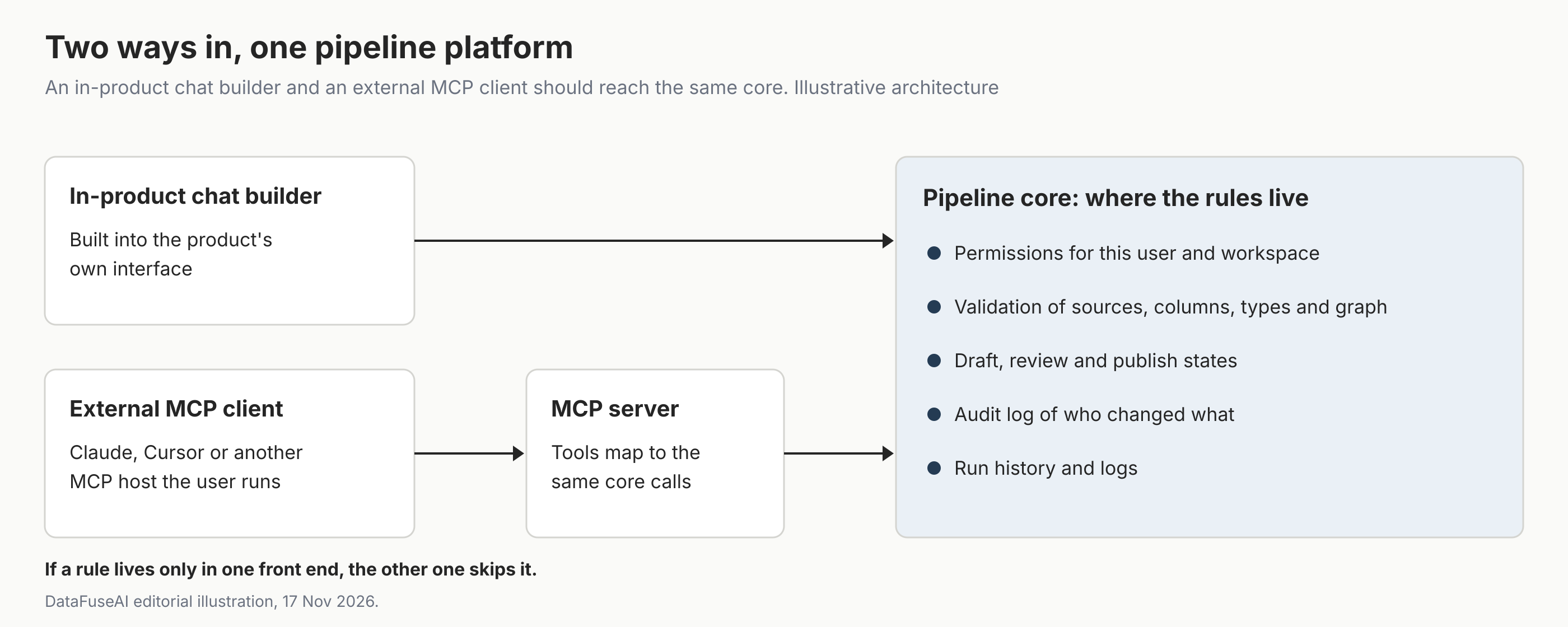
- Permissions. What this user may see, draft, run and publish in this workspace.
- Validation. Sources, columns, types, join keys and graph shape, with refusals that name the problem. For checks on the data itself, see our guide to data quality validation in ETL pipelines.
- Draft, review and publish states. Including who may approve, and that it is never the drafting identity.
- Audit. Who changed what, through which front end, with old and new values. Our guide to audit-ready data operations covers which logs make that checkable.
- Run history. Each run's status and log, whoever triggered it.
Why do error messages matter more with two front ends?
Because a model can only fix what it is told. The specification says tool execution errors carry feedback a model can use to correct itself [1]. In our final runs, every refusal from the core named the problem, such as an unknown column with the list of valid ones.
Our first run showed the opposite. A parameter-name clash in our own test code made all 200 valid drafts fail with "Error executing tool add_step" and nothing more, and hid the reasons for 75 of the broken ones too. In our test with the MCP Python SDK 2.3.0, unexpected exceptions reached the client without their text, while a declared tool error passed its message through. The SDK's error-handling guide says this is deliberate: a crashed tool's exception text stays on the server, and ToolError is how a tool tells the model what went wrong [7]. We fixed the clash, but the lesson stands: raise deliberate, readable errors from the core.
Mistakes to avoid
- Copying rules into each front end. Two copies drift; keep one in the core.
- Trusting the host's confirmation prompt. It depends on the client and its settings.
- Giving the MCP path broader defaults than the product. Start it narrower, then widen.
- Logging only the user, not the path. Record whether a change came from the chat builder or an MCP client.
- Returning bare error codes. A model can't fix "Error executing tool" with no reason.
Where DataFuseAI fits (and where it doesn't)
DataFuseAI is a data integration vendor. Here we describe the MCP protocol, Fivetran's, Keboola's and Prefect's servers, and a test harness we wrote for this article, not a DataFuseAI feature.
Three of the five core controls above appear on DataFuseAI's product pages. Its governance page describes permission groups set module by module and an audit log of who changed what, with old and new values [8]. Its pipeline automation page describes scheduled jobs that keep a log for every run [9]. Its data quality page describes validations written as canvas filters or SQL, and profiling that runs as part of the pipeline [10]. The pages don't describe a draft-review-publish step or checks on a pipeline's structure as it's drafted.
To test a pipeline workflow on your own data, DataFuseAI's free 30-day POC asks for one recurring workflow and two or three data sources [11]. Applications are reviewed for fit, there is no POC fee or obligation, and external cloud or compute costs, if any, stay with you [11].
Frequently Asked Questions
Should a pipeline platform build its own AI assistant or support MCP?
It can do both, and the choice is about the user, not the engine. An in-product builder suits guided work with a live canvas; MCP suits users who already work in an assistant and want to combine tools. Either way, keep permissions, validation and review in the platform's core service.
Is an MCP client less safe than an in-product AI builder?
Not by nature. Safety depends on what the server allows and where the rules are enforced. In our test, both paths were equally safe when the publish rule lived in the core, and the MCP path was unsafe only when the rule lived in the chat screen.
Who confirms a risky action when the assistant runs in an MCP client?
The MCP host does. The specification's key principles say hosts must obtain explicit user consent before invoking any tool [12], and its tools page says they should prompt on sensitive operations [1]. A platform cannot rely on that prompt. If an action must be reviewed, the platform's own service should refuse it until a reviewer approves.
Do both front ends need separate audit logs?
No. One audit log in the core is better, with a field for which path made the change. That way a reviewer can see every change to a pipeline in one place, whether it came from a chat screen, an MCP client or the visual editor.
Methodology
Core. A small pipeline-draft service written for this test, with four synthetic sources and checks for sources, columns, types, join keys and graph shape. It is illustrative and not any product's code; it has no permissions, audit or run history.
Sequences. 400 scripted build sequences, each adding two sources, a filter, a join, an aggregate and an output; the 25 missing-output sequences leave out the output step. 200 were clean and 25 carried each of eight planted defects, generated with seed 20261225. A draw with seed 20261221 gave each sequence a 60% chance of a recorded review; it marked 227, leaving 85 valid drafts without one. The sequences were generated by the script for our MCP adapter test, with the same seed, and ship in this article's editorial pack.
Front ends. The chat front end called the core in Python. The MCP path used the MCP Python SDK 2.3.0 with an in-memory client and server, and tried to publish every valid draft. Canvases were compared by a hash of each canvas (nodes and edges, excluding the draft ID); error texts were compared after removing the SDK's "Error executing tool" prefix.
Runs. Scripts ran on 17 November 2026, between 06:48 and 06:50 UTC, with identical results across repeated runs. The first run's failure was found and fixed in that window; no log of it was kept.
Limits. No language model was used; the sequences stand in for a model's tool calls. Server facts come from each vendor's repository on the date checked.
References
- Model Context Protocol. "Tools" (specification version 2026-07-28). Accessed 17 November 2026. https://modelcontextprotocol.io/specification/2026-07-28/server/tools
- Fivetran. "fivetran/fivetran-mcp: README" (commit b6675b6, 3 November 2026). Accessed 17 November 2026. https://github.com/fivetran/fivetran-mcp/blob/b6675b66a114ea378d8a9b2d77b6fdef155310c4/README.md
- Keboola. "keboola/mcp-server: TOOLS.md" (commit 050d9b3, 16 November 2026). Accessed 17 November 2026. https://github.com/keboola/mcp-server/blob/050d9b360edc5cd018676fcf5a965f6b1131fb89/TOOLS.md
- Keboola. "keboola/mcp-server: README" (commit 050d9b3, 16 November 2026). Accessed 17 November 2026. https://github.com/keboola/mcp-server/blob/050d9b360edc5cd018676fcf5a965f6b1131fb89/README.md
- Model Context Protocol. "Authorization" (specification version 2026-07-28). Accessed 17 November 2026. https://modelcontextprotocol.io/specification/2026-07-28/basic/authorization
- Prefect. "PrefectHQ/prefect-mcp-server: SECURITY.md" (commit 48efd28, 23 September 2026). Accessed 17 November 2026. https://github.com/PrefectHQ/prefect-mcp-server/blob/48efd289bdb2b94a78e35b1331fbefc4fa3f6411/SECURITY.md
- Model Context Protocol. "Handling errors." MCP Python SDK documentation (v2). Accessed 17 November 2026. https://py.sdk.modelcontextprotocol.io/v2/servers/handling-errors/
- DataFuseAI. "Data Governance & Compliance: RBAC, Audit Logs, Isolation." Accessed 17 November 2026. https://www.datafuseai.com/solutions/data-governance-compliance
- DataFuseAI. "Data Pipeline Automation, Scheduling & Monitoring." Accessed 17 November 2026. https://www.datafuseai.com/solutions/data-pipeline-automation
- DataFuseAI. "Data Transformation & Data Quality Profiling." Accessed 17 November 2026. https://www.datafuseai.com/solutions/data-quality-transformation
- DataFuseAI. "Free 30-Day Data Integration POC." Accessed 17 November 2026. https://www.datafuseai.com/free-poc
- Model Context Protocol. "Specification" (version 2026-07-28). Accessed 17 November 2026. https://modelcontextprotocol.io/specification/2026-07-28
 Request a Demo