

An MCP adapter for data pipelines turns an AI assistant's MCP tool calls [1] into steps of a visual pipeline, and refuses calls that would build something broken. The assistant sends tool calls, while the person reviewing its work expects to see a pipeline on a canvas. The adapter maps each call to an operation on the platform's own pipeline objects and keeps the draft.
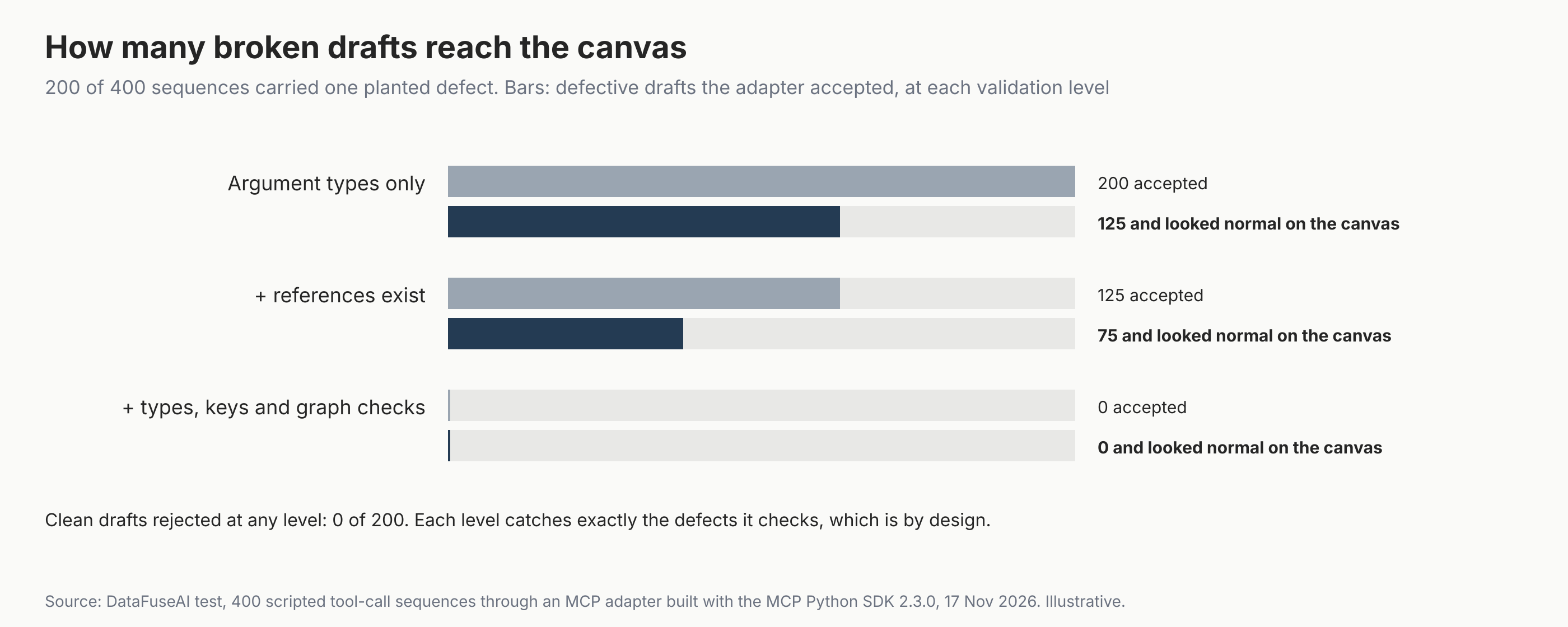
We demonstrated why that refusal matters with 400 scripted tool-call sequences, half carrying one planted defect of eight kinds. With checks on argument types only, every broken draft reached the canvas, and five of the eight defect kinds looked normal there. With reference, type and graph checks, none got through and no clean draft was refused.
Figures checked 17 November 2026. This guide is for engineers designing an MCP server for a pipeline or ETL tool, and for teams evaluating one. For how a pipeline platform fits together, read DataFuseAI's guide to what a data integration platform is.
Key Takeaways
- Schema checks aren't enough. All 200 planted defects were well-typed, so all passed the SDK's type checks; a wrong column name is still a valid string.
- Some defects look fine on a canvas. Type mismatches, unknown sources and unknown columns all drew a normal-looking graph in our demonstration.
- Reference checks caught three of eight kinds. Unknown sources, columns and input steps were refused once the core checked they exist.
- Type and graph checks caught the other five kinds. Mismatched join keys, numeric filters given text, sums of text, reused step IDs and missing outputs were refused only at this level.
- Refusals must carry a reason. Our core wrote a reason into every refusal, and the reference errors also listed the valid options.
What does an MCP adapter do?
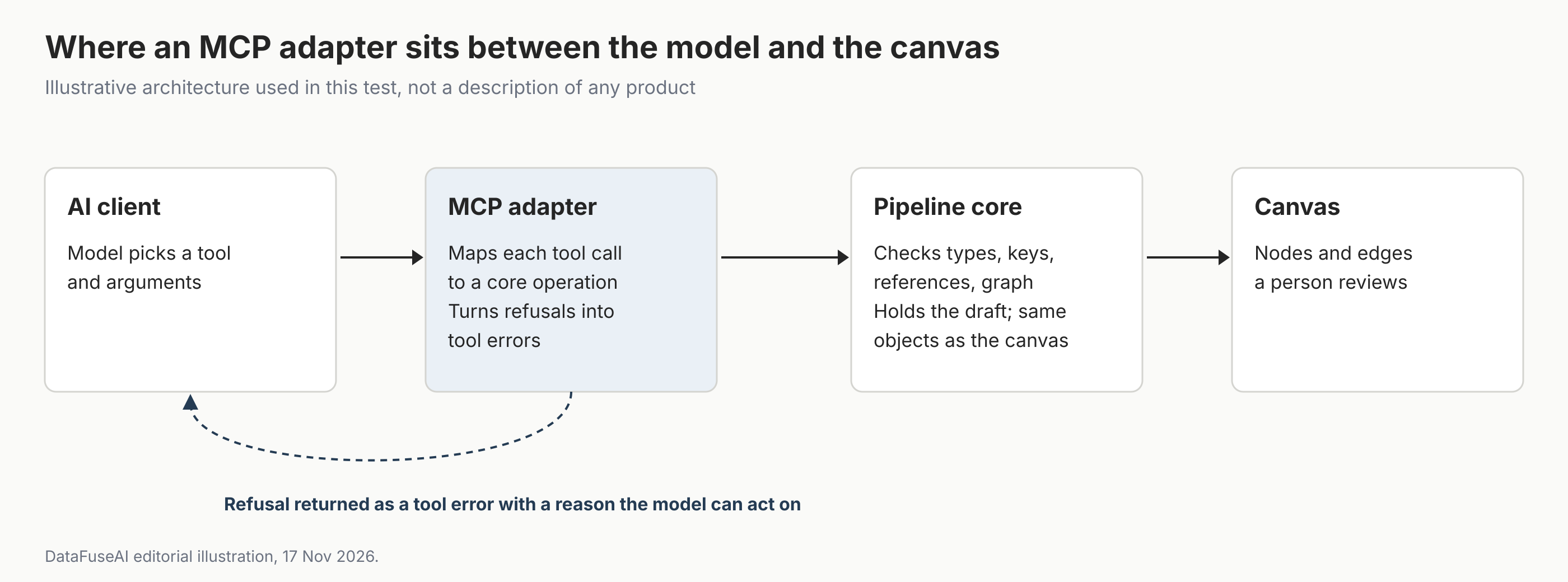
An MCP adapter does four jobs between the assistant and the pipeline. It exposes tools, maps each call to a platform operation, holds the draft between calls, and decides whether each step is allowed. The MCP specification leaves the last part to the server: servers must validate all tool inputs [1].
| Tool the assistant calls | What the adapter checks before accepting | What appears on the canvas |
|---|---|---|
| list_sources, describe_source (not in our test) | (Production: return only sources and columns the caller may use) | Nothing; the assistant learns names before drafting |
| create_draft | (Production: caller may create drafts) | An empty draft with an ID |
| add_source | Source exists (production: and the caller may use it) | A source node |
| add_filter | Input step and column exist; value type matches the column | A filter node linked to its input |
| add_join | Both inputs and keys exist; key types match | A join node with two inputs |
| add_aggregate | Group and measure columns exist; measure is numeric | An aggregate node |
| add_output | Input step exists (production: and the target is allowed) | An output node |
| get_canvas | An output exists; every step connects to it | The full graph for review |
Design used in this test. The discovery row and checks marked "production" were not implemented in the test; authorization belongs in a real server. Illustrative, not any product's tool list.
Our test had no discovery tool, so the reference refusals listed the valid options instead. A real adapter should let the assistant look up sources and columns before it drafts, scoped to what the caller may use.
Why aren't JSON Schema checks enough?
Because most mistakes are well-formed. Each MCP tool declares a JSON Schema for its inputs [1], and the SDK validates arguments against it. In our test it converted some values, such as "5" to 5, rather than rejecting them. A filter on column "amt" instead of "amount" is a valid string, so it passes. The schema can't know which columns exist in this draft.
We ran the same 400 sequences through three adapter levels. Level 0 checked argument types only. Level 1 added checks that sources, columns and input steps exist. Level 2 added type, join-key, step-ID uniqueness and graph checks.
| Planted defect (25 sequences each) | Level 0: reached canvas | Level 0: looked normal | Level 1: reached canvas | Level 2: reached canvas |
|---|---|---|---|---|
| Unknown source name | 25 | 25 | 0 | 0 |
| Unknown column | 25 | 25 | 0 | 0 |
| Input step that doesn't exist | 25 | 0 | 0 | 0 |
| Join keys of different types | 25 | 25 | 25 | 0 |
| Number filter given text | 25 | 25 | 25 | 0 |
| Sum of a text column | 25 | 25 | 25 | 0 |
| Step ID reused | 25 | 0 | 25 | 0 |
| No output step | 25 | 0 | 25 | 0 |
Source: DataFuseAI test with the MCP Python SDK 2.3.0, 17 November 2026. "Looked normal" means six nodes, every edge resolving and an output present.
Each level catches exactly the defects it checks, by design, and every sequence of a given defect kind behaved the same. So the counts are 25 times the number of defect kinds, not measured rates. What the demonstration shows is which kinds look normal: five of eight at level 0 and three at level 1.
What should an adapter refuse, and how?
An adapter should refuse anything that would fail at run time, and say why. The specification says clients should pass tool execution errors to the model to enable self-correction [1]. In our test, the core wrote a reason into every refusal, such as "Column 'amt' is not in step 'src_a'", followed by the available columns.
How the error is raised decides whether the reason arrives. In the MCP Python SDK 2.3.0, raising an ordinary exception reached the client as a bare "Error executing tool" message. Raising the SDK's ToolError passed our message through, as the SDK's error-handling guide describes [2]. Our test adapter maps every refusal from the core to a ToolError.
Should tools be granular or one large create_pipeline call?
Granular tools suit an assistant that builds step by step, because each call is checked and refused on its own. A single call that takes a whole pipeline as JSON is shorter, but one error refuses everything. Our test used granular tools and a draft ID returned by create_draft. The specification's guidance on stateful tools describes this handle pattern, and says the server should check the caller's authorization against the handle on every call [1]. For servers without authentication, it recommends a high-entropy handle, such as a UUIDv4, with a bounded lifetime [1]. Our test skipped authorization and used sequential IDs such as draft_1, which a production server shouldn't.
| Design | Strength | Watch for |
|---|---|---|
| Granular step tools with a draft ID | Each step is checked; errors point at one call | More calls; the adapter must keep draft state |
| One create_pipeline call with full JSON | Fewer calls; easy to diff | One mistake refuses the whole pipeline; long inputs |
| Both, with validate before save | Assistant can check a whole draft first | Two paths to keep consistent |
Editorial comparison by DataFuseAI, 17 November 2026.
Prefect's MCP server takes the whole-document route with a validate step before saving. Its experimental execution-plan tools, which are off by default and described in the code as Cloud-only, get the plan schema, validate a draft without saving it, and validate and publish a draft as a new version [3].
Mistakes to avoid
- Trusting the tool schema to validate the pipeline. It checks shapes, not meaning. Checks on the data itself are a separate layer, covered in our guide to data quality validation in ETL pipelines.
- Letting the canvas be the check. In our demonstration, five of eight defect kinds looked normal at level 0. A pipeline that looks and runs fine can still be wrong, as our post on silent data quality failures shows.
- Silently overwriting a step with the same ID. Refuse it and ask for a new ID.
- Raising plain exceptions. In the SDK we used, the reason never reached the model.
- Saving drafts straight to production. Keep the adapter's drafts separate until a person approves them.
Where DataFuseAI fits (and where it doesn't)
DataFuseAI is a data integration vendor. Here we describe the MCP protocol, Prefect's server and a test harness we wrote for this article, not a DataFuseAI feature.
What DataFuseAI does publish is a visual pipeline model of the kind this guide describes. Its pipeline automation page describes pipelines built on a visual canvas from sources, transform nodes such as Join and Aggregate, and sinks [4]. They are saved as jobs with a cron recurrence, and each run's duration, status and step log are kept [4]. Those pages don't describe an assistant building on that canvas, and this guide doesn't either.
To test a pipeline workflow on your own data, DataFuseAI's free 30-day POC asks for one recurring workflow and two or three data sources [5]. Applications are reviewed for fit, there is no POC fee or obligation, and external cloud or compute costs, if any, stay with you [5].
Frequently Asked Questions
What is an MCP adapter in a pipeline tool?
It is the layer that turns an assistant's MCP tool calls into operations on the pipeline tool's own objects. It maps calls to sources, transforms and outputs, keeps the draft between calls, validates each step and returns refusals as tool errors. The canvas then shows the result for review.
Can an AI assistant build a pipeline that a person then edits visually?
It can, if the adapter writes drafts as the same objects the visual editor uses. Then the canvas shows an assistant's draft as normal nodes and edges, ready to edit, approve or reject. Our test produced canvas-ready nodes and edges but included no visual editor.
Why did broken drafts look normal on the canvas?
Because a graph shows structure, not meaning. A join on keys of different types or a sum of a text column still draws as connected nodes. In our demonstration, five of eight defect kinds at the lowest validation level produced six nodes, resolving edges and an output.
How does the assistant learn which sources and columns exist?
Through a discovery tool, ideally, that lists the sources and columns the caller may use before drafting. Our test had none, so it relied on refusals: the 75 refusals for unknown sources, columns and input steps each listed the valid options. That works, but it costs a failed call per guess, so add discovery in a real adapter.
Should the adapter or the platform core do the validation?
The core. Put validation in the service every front end calls, and keep the adapter thin. In our test, the adapter only mapped calls and turned the core's refusals into tool errors, so every check lived in the core. Any other front end, such as a visual builder, could call the same checks.
Methodology
Core and adapter. A small pipeline-draft service written for this test, with four synthetic sources and three validation levels, wrapped in an MCP server built with the MCP Python SDK 2.3.0 [6]. A client called it over an in-memory transport. The filter tool's value parameter accepted a number or text, so a text value for a numeric column passed the type check and was left to the core to refuse.
Sequences. 400 scripted sequences, each building two sources, a filter, a join, an aggregate and an output. 200 were clean and 25 carried each of eight planted defects, generated with seed 20261225.
Measures. A sequence was refused if any call returned a tool error. For accepted drafts, the canvas looked normal if it had six nodes, every edge resolved and an output existed. The study script ran at 06:47 UTC on 17 November 2026 and the figures were drawn at 06:50. After a counting correction to one error measure, we re-ran the study at 15:31 UTC; all other results were identical.
Limits. No language model was used, so the test says nothing about how often a model makes these mistakes. Each level catches what it checks by construction, and each defect kind behaved identically across its 25 sequences; the result to take away is which kinds looked normal.
References
- Model Context Protocol. "Tools" (specification version 2026-07-28). Accessed 17 November 2026. https://modelcontextprotocol.io/specification/2026-07-28/server/tools
- Model Context Protocol. "Handling errors." MCP Python SDK documentation (v2). Accessed 17 November 2026. https://py.sdk.modelcontextprotocol.io/v2/servers/handling-errors/
- Prefect. "PrefectHQ/prefect-mcp-server: src/prefect_mcp_server/execution_plans.py" (commit 48efd28, 23 September 2026). Accessed 17 November 2026. https://github.com/PrefectHQ/prefect-mcp-server/blob/48efd289bdb2b94a78e35b1331fbefc4fa3f6411/src/prefect_mcp_server/execution_plans.py
- DataFuseAI. "Data Pipeline Automation, Scheduling & Monitoring." Accessed 17 November 2026. https://www.datafuseai.com/solutions/data-pipeline-automation
- DataFuseAI. "Free 30-Day Data Integration POC." Accessed 17 November 2026. https://www.datafuseai.com/free-poc
- Model Context Protocol. "Python SDK" (version 2.3.0). Accessed 17 November 2026. https://github.com/modelcontextprotocol/python-sdk
 Request a Demo