
Robert Smith is in your CRM twice, in your ERP as "SMITH, ROBERT" and in your support desk as "Rob Smith". Grouped by email as stored, a query finds none of those four records; after trimming and lower-casing, it finds two. Another Robert Smith, in Denver, is a different person entirely, and both names were among the five most common in the 2020 Census [1].
To detect duplicate customers across databases, put every system's records in one table, normalise the identifiers, and group on exact keys such as email and phone. Then compare only plausible pairs and send similar names to a person for review before anything is merged. In our 28-record sample, normalised email or phone found 17 of 19 duplicate pairs. Name-only matching joined different people as often as it found the same one.
Who this is for: data engineers and analysts who need to know how many real customers they have before they merge, report or feed customer data to anything else. For how similarity scores and thresholds behave, see our guide to fuzzy matching in ETL pipelines.
Key takeaways
- Detection comes before merging. Find and count candidate duplicates first; merge only pairs that pass review.
- Normalise before you compare. In the sample, trimming and lower-casing email raised the pairs it found from 7 to 10.
- Exact keys go first. In the sample, normalised email or phone made no false matches at all.
- Names alone are not evidence. Robert and Smith are among the most common US first and last names [1].
- Blocking keeps the work small. Comparing only records that share a ZIP code, phone or email cut 378 possible pairs to 25.
Figures checked 7 November 2026. All records in the sample are invented.
What does it mean to detect duplicate customers?
Detecting duplicate customers means finding records, in one database or several, that describe the same person or company. It is a separate step from merging. The output is a list of candidate pairs or groups, each with the rule that found it, so someone can check them before any record changes. A duplicate count from that list also tells you how far your customer totals are inflated.
Duplicates hide across databases for three reasons. Each system issues its own IDs, so there is no shared key. Each stores names, emails and phone numbers in its own format. And common names collide: the 2020 Census lists Robert among the five most common first names and Smith among the five most common last names [1]. Two records saying "Robert Smith" prove little on their own.
What does the Robert Smith sample contain?
The examples in this post come from a small sample dataset we built for this series: 28 invented customer records across a CRM, an ERP and a support desk. They belong to 14 people, so 14 records are duplicates. Because we know who is who, we can score every detection rule exactly. Eight of the records mention a Smith:
| Record | System | Name as stored | Phone | ZIP code | Person | |
|---|---|---|---|---|---|---|
| C-1001 | CRM | Robert Smith | robert.smith@example.com | (312) 555-0142 | 60601 | A |
| C-1002 | CRM | R. Smith | (blank) | 312-555-0142 | 60601 | A |
| E-501 | ERP | SMITH, ROBERT | Robert.Smith@Example.com | 312.555.0142 | 60601 | A |
| S-9001 | Support | Rob Smith | rsmith@example.net | +1 (312) 555-0142 | 60601 | A |
| C-1003 | CRM | Robert Smith | robert.smith@example.org | (720) 555-0119 | 80202 | B |
| S-9002 | Support | Robert Smith | robert.smith@example.org | 720-555-0119 | 80202 | B |
| S-9007 | Support | Robert Smith | (blank) | (blank) | 60614 | C |
| C-1004 | CRM | Roberta Smith | roberta.smith@example.com | (312) 555-0187 | 60601 | D |
Source: DataFuseAI sample dataset (invented records; example domains and 555-01xx numbers). The ERP email also carries a trailing space. The person column is a test label that real systems don't have.
Person A has four records, none of which agree on name format or email. Persons B and C share A's name and are different people.
How do you detect duplicate customers? Six steps
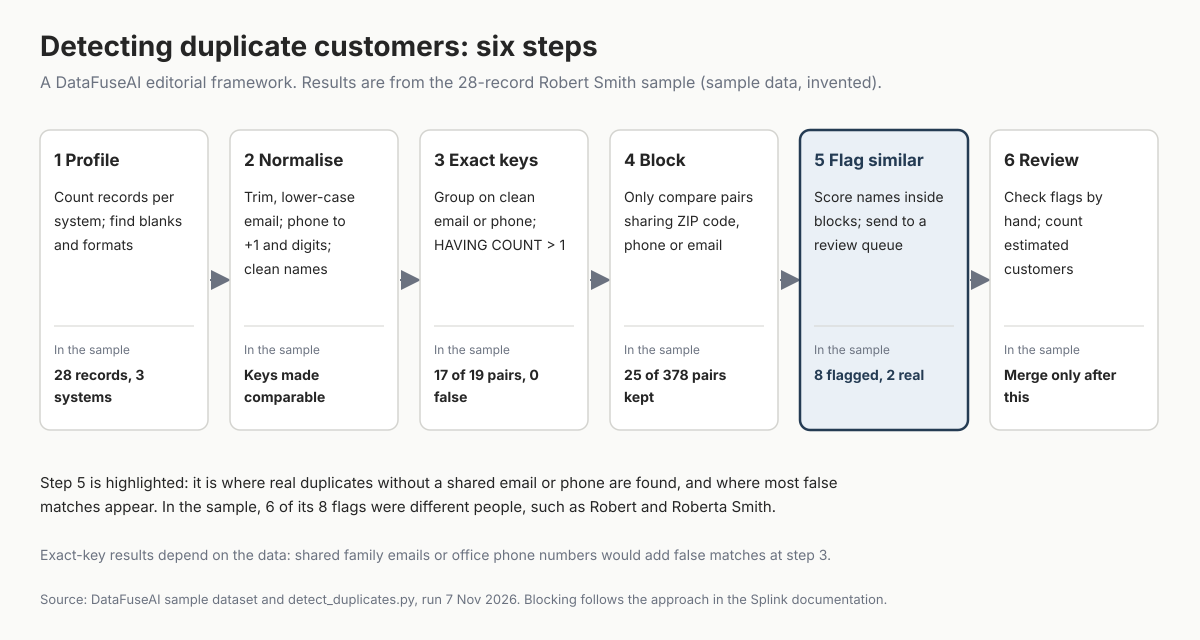
Detecting duplicate customers works best as a fixed sequence: profile the data, normalise identifiers, group on exact keys, limit comparisons to plausible pairs, flag similar records, then review and measure. Each step narrows the work for the next one. This is our editorial framework, built from standard record-linkage practice, not an industry standard.
1. Profile each source
Count records per system and look at how each field is filled before writing any rule. Note blank emails and phones, name formats such as "LAST, FIRST", and test or placeholder values. In the sample, the CRM has 12 records, the ERP 8 and the support desk 8. Two Smith records have no email, and one has neither email nor phone.
2. Normalise the identifiers
Normalising means building a comparison key from each value while keeping the stored value unchanged. The point is to make equal things look equal:
| Field | Variants in the sample | Normalising rule | Watch for |
|---|---|---|---|
Robert.Smith@Example.com, JJohnson@Example.com |
Trim spaces, lower-case | Shared inboxes such as info@ or a family address | |
| Email (Gmail only) | Not in the sample | For personal @gmail.com addresses, dots in the local part can be ignored [2] | Google says dots do change work, school and organisation addresses [2] |
| Phone | (312) 555-0142, 312.555.0142, +1 (312) 555-0142 |
Keep digits, add the country code, as in the ITU's E.164 numbering plan [3] | Office switchboards shared by many people |
| Name | SMITH, ROBERT, María García, Sarah O'Neil |
Reorder "LAST, FIRST", strip accents and punctuation, fold case | Nicknames such as Rob or Jen need a lookup table, not a rule |
| Company name | Not in the sample | Strip legal suffixes such as Inc, Ltd or LLC and punctuation, fold case | Parent and subsidiary accounts are related, not duplicates |
Source: DataFuseAI sample dataset; Gmail rule from Google's Gmail Help [2]; phone format from ITU-T E.164 [3].
In the sample, matching email exactly as stored found 7 of the 19 duplicate pairs. After trimming and lower-casing, the same rule found 10, with no false matches. Capital letters in a CRM email (JJohnson@Example.com) and the ERP's trailing space and capitals had hidden the other three.
3. Group on exact keys
Once keys are normalised, put every system's records into one staging table with a source column, then group on each key. This is the cheapest and most reliable test. In PostgreSQL:
-- staging.customer_keys: one row per record from CRM, ERP and support,
-- with email_key and phone_key built by the normalising rules above
SELECT phone_key, count(*) AS records,
       string_agg(record_id, ', ' ORDER BY record_id) AS record_ids
FROM staging.customer_keys
WHERE phone_key IS NOT NULL
GROUP BY phone_key
HAVING count(*) > 1;
On the sample, the phone version returns eight groups, including all four of Person A's records under +13125550142. Phone alone found 15 of the 19 pairs; email or phone together found 17, and neither produced a false match. The Methodology describes the full script, detect_duplicates.sql, including the view that builds the normalised keys.
The sample has no shared inboxes or switchboard numbers, which is why exact keys made no mistakes there. Real data usually has some. Check the largest exact-key groups by hand: a phone number shared by 40 records is more likely an office than a person.
4. Block before comparing names
Comparing every record with every other record grows quickly. The number of pairs is n(n−1)/2, so it grows with roughly the square of the record count [4]. Our 28 records make 378 pairs; a million records would make about 500 billion. Blocking means comparing only pairs that share something, such as a ZIP code, a phone or an email.
In the sample, blocking on ZIP code, phone or email kept 25 of the 378 pairs, and all 19 true duplicate pairs were among them. The Splink record-linkage documentation recommends several blocking rules for this reason, comparing any pair that satisfies at least one of them [4]. A single strict rule misses duplicates: it would miss a true match where the name has a typo, as Splink's own example notes [4]. A customer who moved would fail a ZIP code block.
5. Flag similar names for review
Inside the blocks, score how similar the names are on the pairs that exact keys didn't already link. In PostgreSQL, the pg_trgm extension's similarity() returns a value from 0 (completely dissimilar) to 1 (identical) [5]. Its % operator uses a default threshold of 0.3 [5]. Treat any such level as a starting point for review, not a merge rule.
These scores make a review queue, not a merge list. In the sample, the queue held 8 pairs at our illustrative flag level (a difflib ratio of 0.6 in our Python script; the PostgreSQL version, at pg_trgm 0.5, returns 7). Two were real duplicates that no email or phone connected: David Brown, whose support record had a new email and no phone, and Anika Patel, whose name was misspelt "Patell". The other six were different people, such as Robert and Roberta Smith in the same ZIP code.
The record-linkage theory published by Fellegi and Sunter in 1969 has three outcomes for a pair: a link, a non-link and a "possible link" [6]. The authors noted that possible links "will require expensive manual linkage operations" [6]. That is still the trade-off: the wider the review queue, the more people-hours it costs.
How to set the score at which pairs reach the queue is a separate decision. DataFuseAI's fuzzy matching guide explains the main similarity algorithms behind those scores.
6. Review, then measure
Review every flagged pair against a second field before accepting it: an address line, an account number or an order history. Then count estimated customers, the number of groups after accepted links. The duplicate rate is (records − estimated customers) ÷ records. In the sample:
| Rules applied | Estimated customers | Groups mixing different people |
|---|---|---|
| None (every record counts) | 28 | 0 |
| Email exactly as stored | 22 | 0 |
| Normalised email or phone | 16 | 0 |
| Name only | 14 | 3 |
| Email or phone, plus every similar-name flag accepted without review | 12 | 2 |
Source: DataFuseAI sample dataset, 14 real people; our calculation in code.
The name-only row gets the total right by accident. It leaves three people split across groups, Robert Smith among them, and merges three groups of different people. By normalised email or phone, the duplicate rate is (28 − 16) ÷ 28, about 43%; the true rate in the sample is 50%. Accepting every flag without review produces too few customers, because Roberta Smith and the second Maria Garcia join someone else's record. Report the estimate with the rules that produced it. For example: "16 estimated customers from 28 records, by normalised email or phone; 8 pairs awaiting review." Then run the same count on a schedule; our guide to data quality validation checks in ETL pipelines covers where recurring checks belong.
How well does each detection rule work?
On the Robert Smith sample, exact rules on normalised email or phone found most duplicates with no false matches, while name rules found fewer and added false ones. The chart compares each rule against the 19 true duplicate pairs in the sample, and counts the pairs it flagged that were different people.
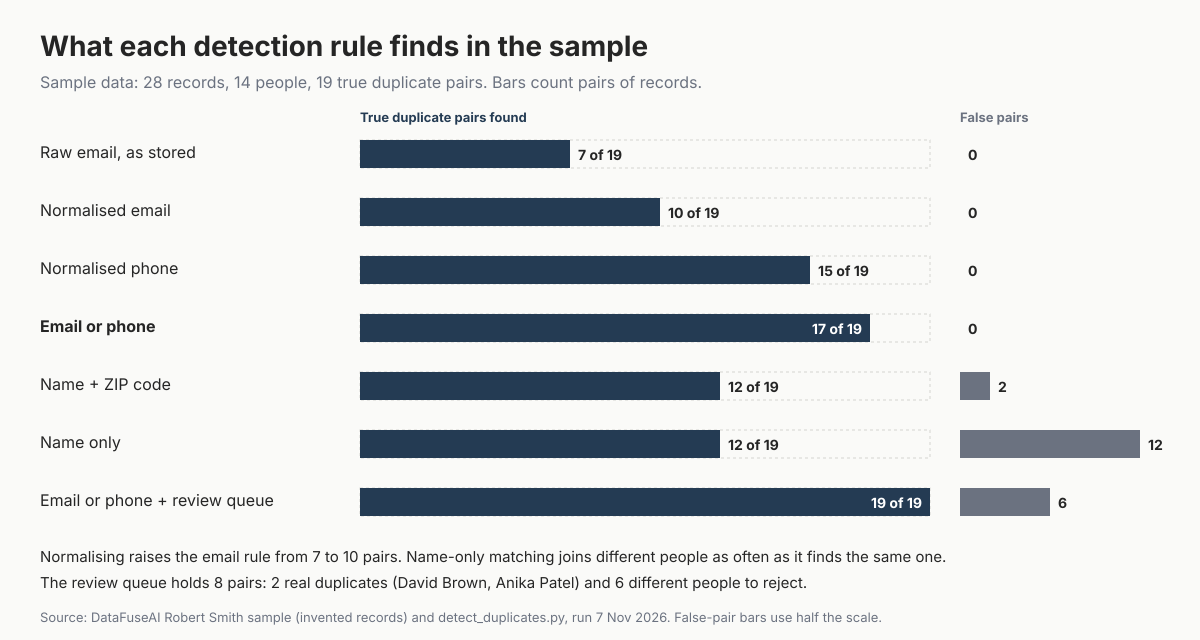
The pattern to take away: normalisation is cheap and, in the sample, only added true pairs, while names were useful only inside a block and in front of a reviewer. Your own data will produce different numbers, so run the same rules on it and count.
Mistakes to avoid
- Grouping on raw values. Capitals and trailing spaces hid three of the ten email pairs in the sample.
- Treating a name match as a duplicate. Two different Robert Smiths in Chicago share a name and a city, and nothing that identifies them.
- Comparing every pair. Pair counts grow with the square of the records, so block first.
- Merging straight from a similarity score. Six of the eight flagged pairs in the sample were different people.
- Overwriting source values. Keep the stored email and phone; build normalised keys beside them.
- Reporting one duplicate number without its rules. "16 customers" means little without "by normalised email or phone".
Where DataFuseAI fits (and where it doesn't)
DataFuseAI, the publisher of this guide, builds batch pipelines on a visual canvas [7][8]. Its data quality and transformation and data reconciliation pages describe most of the pieces this six-step method needs, with three limits worth knowing before you test it.
Fits:
- Exact-key checks. The Query Editor can run a
GROUP BY … HAVING COUNT(*) > 1query to show duplicates before removal [7], and the Dedupe transform "defines the columns that determine uniqueness" [8]. - Similar-record flags across systems with no shared key, through Fuzzy Filter and Fuzzy Join, with a threshold you set [8]. The reconciliation page suggests starting "around 80–85 on a sample you can eyeball" [8].
- Large comparisons, where the reconciliation page advises "narrowing the candidate set first" [8], the blocking step above.
May not fit:
- Deduplication at the point of entry. DataFuseAI's reconciliation page names "continuous, real-time deduplication at the point of entry" as a case its fuzzy matching is the wrong tool for [8].
- Phonetic or nickname matching. DataFuseAI's fuzzy matching post says Fuzzy Filter and Fuzzy Join use Levenshtein distance, and describes Soundex and Metaphone only as other algorithms [9]. Nicknames such as Rob and Robert still need a lookup table.
- A built-in review queue. The reconciliation page describes thresholds and run history; it doesn't describe a queue for reviewing possible matches, so plan where reviewers will work [8].
To test the method on your own customer data, DataFuseAI's free 30-day POC covers one recurring workflow with two or three data sources. Applications are reviewed, and any external cloud or compute costs stay with you [10]. A deduplication check across a CRM and a billing system fits that scope.
Frequently Asked Questions
How do I find duplicate customers in one table with SQL?
Build a normalised key column, then group on it: SELECT email_key, count(*) FROM customers WHERE email_key IS NOT NULL GROUP BY email_key HAVING count(*) > 1. Repeat for phone and any account number. Group on raw values only as a first look, because capitals, spaces and punctuation hide duplicates. For names, use the block-and-review steps instead of grouping.
What is a normal duplicate rate for customer data?
There isn't a reliable single figure, because duplicate rates depend on how each system captures customers and how many systems you combine. Measure your own. Count records, run normalised exact-key rules, review flagged pairs, and report the rate as (records − estimated customers) ÷ records, with the rules used. Repeat the count monthly to see whether duplicates are growing or shrinking.
Should I remove duplicates in the source systems or in the warehouse?
Detect them in a staging area first, where you can compare every system without changing any of them. Fix confirmed duplicates in the system that created them, so they stop coming back. Where a source can't be changed, keep a mapping table that links its record IDs to one customer ID downstream.
How is detecting duplicates different from matching records?
Detection produces candidates and a count: which records might be the same customer, and how many customers you really have. Matching, or entity resolution, decides which candidates are the same and builds the linked record. Detection comes first, because a match decision needs the reviewed candidate list that detection produces.
Methodology
The sample. We built 28 invented customer records across three systems: a CRM (12), an ERP (8) and a support desk (8). They represent 14 people, labelled for testing. Emails use reserved example domains and phone numbers use the 555-01xx range. We will reuse the same file, robert-smith-sample.csv, in later posts in this series.
The rules. A Python script, detect_duplicates.py, normalised email (trim, lower case), phone (digits, +1 country code) and names (reordered, accents and punctuation removed, case folded). It scored each rule against all 19 true duplicate pairs. Similar names were scored with Python's difflib ratio, at an illustrative flag level of 0.6, inside blocks sharing ZIP code, phone or email. Estimated customers are connected groups of linked records.
The SQL. detect_duplicates.sql, in which a view called staging.customer_keys builds the normalised keys, ran the same normalising rules and exact-key groups on PostgreSQL 16.15, with matching results. Its review step used pg_trgm similarity at an illustrative 0.5 within a ZIP code block. That produced 7 pairs rather than 8, including the same two real duplicates, because trigram scores differ from difflib's.
Versions. The pg_trgm references are to the PostgreSQL 18 documentation; our run used pg_trgm 1.6 on PostgreSQL 16.15, where show_limit() also returned the 0.3 default.
Limits. A small invented sample shows how the rules behave, not how often each problem occurs in real data. The sample has no shared inboxes or office phone numbers, so its exact keys made no false matches. Scripts were run, and the Census, Google, ITU, Splink and PostgreSQL pages read, on 7 November 2026, between about 09:18 and 09:37 UTC, including a re-run after fixes.
References
- U.S. Census Bureau. "List of Top 15 Last Names in the United States Has Changed Less in the Last 230 Years Than You Might Think." 14 April 2026. https://www.census.gov/library/stories/2026/04/2020-census-names-data.html
- Google Gmail Help. "Dots don't matter in Gmail addresses." Accessed 7 November 2026. https://support.google.com/mail/answer/7436150
- ITU-T. "Recommendation E.164 (02/26): The international public telecommunication numbering plan." Approved 13 February 2026. https://www.itu.int/rec/T-REC-E.164-202602-I/en
- Splink documentation, UK Ministry of Justice. "What are Blocking Rules?" Accessed 7 November 2026. https://moj-analytical-services.github.io/splink/topic_guides/blocking/blocking_rules.html
- PostgreSQL Global Development Group. "PostgreSQL 18 Documentation, F.35. pg_trgm." Accessed 7 November 2026. https://www.postgresql.org/docs/18/pgtrgm.html
- Fellegi, I. P. and Sunter, A. B. "A Theory for Record Linkage." Journal of the American Statistical Association 64(328), pp. 1183–1210. December 1969 (reprint hosted by the IRS). https://www.irs.gov/pub/irs-soi/1985preprintar28.pdf
- DataFuseAI. "Data Transformation and Data Quality Profiling." Accessed 7 November 2026. https://www.datafuseai.com/solutions/data-quality-transformation
- DataFuseAI. "Data Reconciliation: Fuzzy Matching Across Systems." Accessed 7 November 2026. https://www.datafuseai.com/solutions/data-reconciliation
- DataFuseAI. "Fuzzy Matching in ETL Pipelines: Algorithms and No-Code Implementation." 29 May 2026. https://www.datafuseai.com/blogs/fuzzy-matching-etl-pipelines
- DataFuseAI. "Free 30-Day Data Integration POC." Accessed 7 November 2026. https://www.datafuseai.com/free-poc
 Request a Demo