
Ask your CRM, your ERP and your support desk how many customers you have, and you will get three different answers. Part of the gap is how each system defines a customer. The rest is copies, typed and keyed differently in each system. To match customer records across systems is to decide which copies describe the same real person, then link them under one customer ID. Statisticians call this record linkage; its standard model was formalised in 1969 by Ivan Fellegi and Alan Sunter [1].
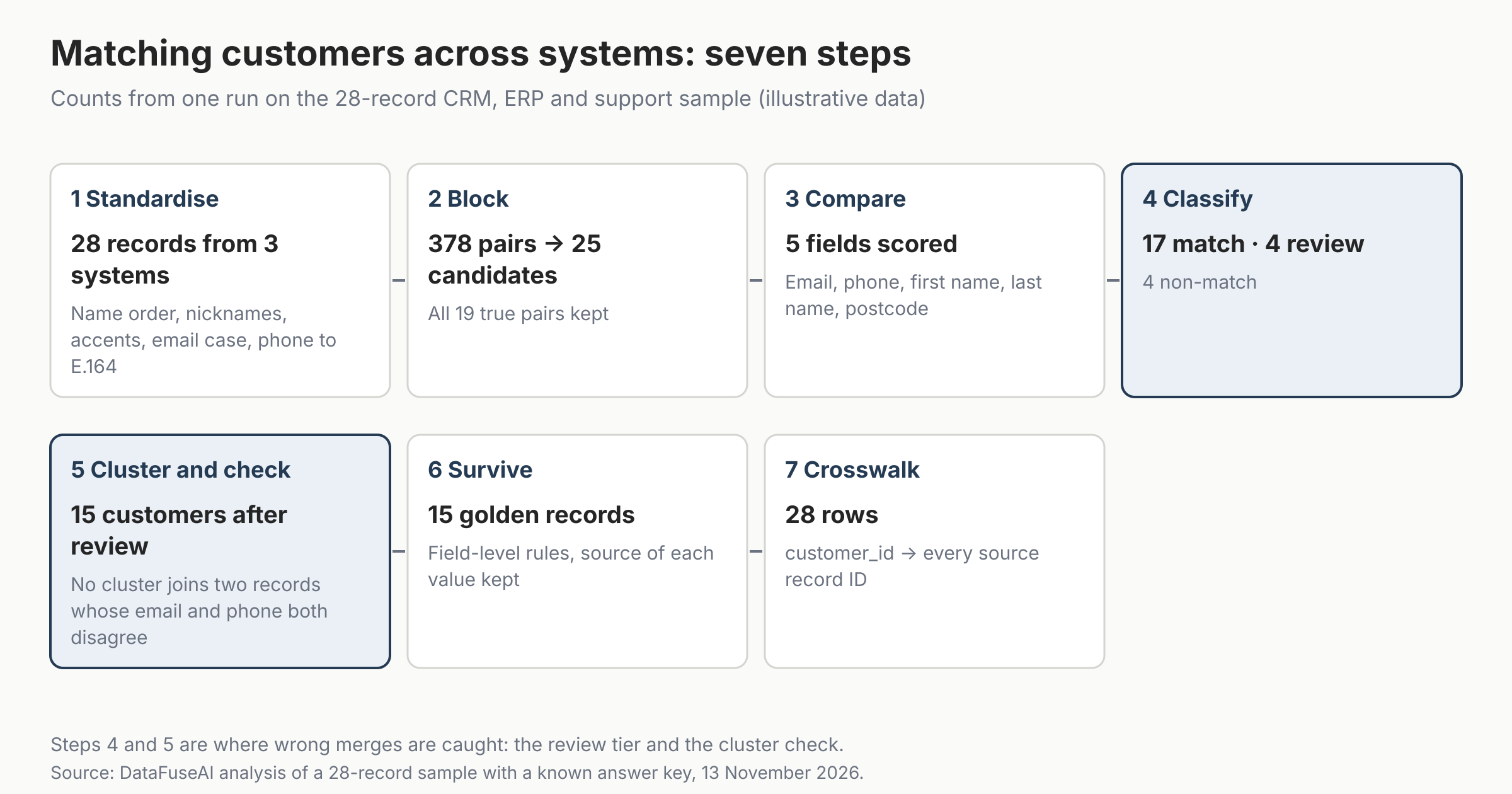
This guide walks through the seven steps on a small, labelled dataset: 28 records from a CRM, an ERP and a support desk, covering 14 real people. Because the right answer is known, every step has a measured result, including the mistakes. Figures checked 13 November 2026, when the Python and SQL were run.
Who this is for: data engineers and analysts who need one customer list across systems that don't share a key, and who want to know what goes wrong before it reaches a dashboard.
Key Takeaways
- Matching is seven steps, not one join. Standardise, block, compare, classify, cluster, survive and publish a crosswalk. Stopping after classification leaves you with pairs, not customers.
- Standardise before you compare. A join on the raw email column linked 7 of the 19 true pairs. Trimming and lower-casing the emails raised that to 10. The other 9 needed names, phones and postcodes.
- Blocking cut 378 possible pairs to 25 and kept all 19 true pairs.
- A review band beats one threshold. With auto-match set at 11 and review at 5, no pair was wrongly merged, and 4 pairs went to review.
- A correct customer count can hide wrong merges. At a looser threshold the run produced exactly 14 customers, the right number, while two different people had been merged.
- The one miss was a short surname. "Patel" and "Patell" score 83% on Levenshtein similarity, under an 85% cut-off. "Robert" and "Roberta" score 86%.
What does it mean to match customer records across systems?
Matching customer records across systems means finding the records in different systems that describe the same customer, and giving them one shared customer ID. The output is two tables: a crosswalk that maps each source record to a customer ID, and a golden record that holds the best value of each field.
Three related jobs often get mixed up:
| Job | Question it answers | Output |
|---|---|---|
| Duplicate detection | Which records might be the same customer? | A list of candidate pairs |
| Record matching (linkage) | Which pairs really are the same customer? | Match decisions, then customer clusters |
| Merging (survivorship) | Which value wins for each field? | One golden record per customer |
Matching sits between detection and merging. This guide covers all three, with most of the space on matching. Source: DataFuseAI editorial definitions.
Matching across systems is harder than deduplicating one table, because each system stores the same person differently. In our sample, the ERP stores "SMITH, ROBERT" in capitals, the support desk has "Rob Smith", and the CRM has two records for the same man.
What sample did we test the steps on?
We tested every step on one labelled sample of 12 CRM records, 8 ERP records and 8 support records. Each record carries a hidden label, true_person, that says which of 14 people it belongs to. The matching and scoring steps never read that label. We use it to measure the result and to stand in for a reviewer's decisions.
The data is illustrative and was built to include the traps real customer data has:
- One person, four records. Robert Smith of Chicago appears twice in the CRM, once in the ERP and once in support, with four name spellings.
- Same name, different people. A second Robert Smith lives in Denver. A third, at ZIP 60614, has no email or phone. Roberta Smith shares the first Robert's postcode.
- Same name and postcode, different people. Two María Garcías live in the same Miami ZIP code.
- Small typing differences. "Anika Patell" in support is "Anika Patel" in the ERP.
Step 1: Standardise each source before you compare anything
Standardising means putting every field into one comparable form, in every system, before any matching starts. In our sample, a join on the raw email column linked 7 of the 19 true pairs. After trimming spaces and lower-casing, the same join linked 10. The other 9 pairs had no shared email at all and needed the other fields.
| Field | Raw values in the three systems | Standardised key |
|---|---|---|
| Name order | "SMITH, ROBERT" (ERP), "Robert Smith" (CRM) | first: robert, last: smith |
| Nicknames | "Rob Smith" (support) vs "Robert Smith" (CRM), "Jen Lee" vs "Jennifer Lee" | rob and jen kept; matched to robert and jennifer through the nickname list at the compare step |
| Accents and punctuation | "María García", "Sarah O'Neil", "Sarah ONeil" | maria garcia, sarah oneil |
| "Robert.Smith@Example.com " (trailing space) | robert.smith@example.com | |
| Phone | "(312) 555-0142", "312.555.0142", "+1 (312) 555-0142" | +13125550142 |
| Postcode | "02108" | kept as text, so the leading zero survives |
Standardisation rules used in our run. Source: DataFuseAI analysis, 13 November 2026.
Four rules matter more than the rest:
- Parse names, don't just lower-case them. "SMITH, ROBERT" and "Robert Smith" only line up once you split first and last name.
- Use a nickname list, not string similarity. "Rob" and "Robert" are three letters apart. We used an open nickname dataset of English given names, licensed under Apache 2.0 [2]. It links rob to robert, and also to roberto, robin, bob and bobby, so treat a nickname hit as evidence, not proof.
- Store phones in one international format. We converted every number to the E.164 international numbering format, so "+13125550142" is the same string in every system [3]. Our code assumes North American numbers; international data needs a country-aware parser.
- Keep the match key apart from the display value. The key "maria garcia" has lost its accent. Use it for comparison only, never as the name you show customers.
Step 2: Block, so you only compare likely pairs
Blocking means comparing only records that share something cheap to check, instead of every record against every other. With 28 records there are 378 possible pairs. With 1 million records there are about 500 billion, which is too many to score one by one.
We kept a pair if the two records shared any one of these:
- the same standardised email
- the same E.164 phone number
- the same last name and postcode
- the same first initial and postcode
Those four rules cut 378 pairs to 25 candidates and kept all 19 true pairs. Use several loose rules joined by OR. One strict rule, such as same email only, would have dropped every pair where a customer used two addresses.
Blocking can hide a match. The Robert Smith at ZIP 60614 has no email or phone and no other record in his postcode, so he was never compared with anyone. Here that was correct, because he is a different person. In your data, test blocking recall on a labelled sample before you trust it.
Step 3: Compare fields and weight the evidence
Each candidate pair is compared field by field, and each field's result adds evidence for a match or takes it away. A shared email counts for more than a shared surname. The standard way to set those weights comes from the Fellegi–Sunter model [1], which Splink and other open-source linkage tools implement [4].
Two probabilities drive each weight [4][5]:
- m is the chance a field agrees when the two records are the same customer.
- u is the chance it agrees when they are different customers.
The weight of an agreement is log2(m ÷ u). A field that rarely agrees by chance, such as an email address, earns a large weight. A field that often agrees by chance, such as a common surname, earns a small one. The total score is the sum of the field weights [4]. Splink also adds a prior weight for how often two random records match; we left it out, which shifts every pair by the same amount.
We measured u on our sample by comparing all 378 pairs, almost all of which are non-matches. Splink's documented method for estimating u from random pairs works the same way and needs no labels [5]. We set m by hand, as a team would before it has labelled data.
| Field | Agrees exactly | Partial agreement | Disagrees |
|---|---|---|---|
| +4.38 | none | −1.69 | |
| Phone | +3.88 | none | −2.65 |
| First name | +3.47 | nickname +2.45, initial +1.26, close spelling +1.67 | −4.13 |
| Last name | +2.99 | close spelling +2.99 (capped) | −5.46 |
| Postcode | +3.72 | none | −3.22 |
Match weights from our run. u values measured on the 28-record sample; m values assumed. A missing value scores 0. Source: DataFuseAI analysis, 13 November 2026.
Two things in this table are worth noticing:
- Last name earns less than email. Eight of our 28 records have the surname Smith, so two random records often share a surname. In a real customer base, a rare surname would earn more.
- We left city out. City and postcode carry nearly the same information, and the model assumes fields are independent. Scoring both would count the same evidence twice.
The cap on "close spelling" stops a partial agreement from outscoring a full one. On a small sample a rare level gets a tiny u, which can push its weight above the exact match.
Step 4: Sort pairs into match, review and non-match
Use two thresholds, not one. Fellegi and Sunter's original rule has three outcomes: a link, a non-link, and a "possible link" for pairs with too little evidence either way [1]. In practice, the middle band becomes a review queue for a person.
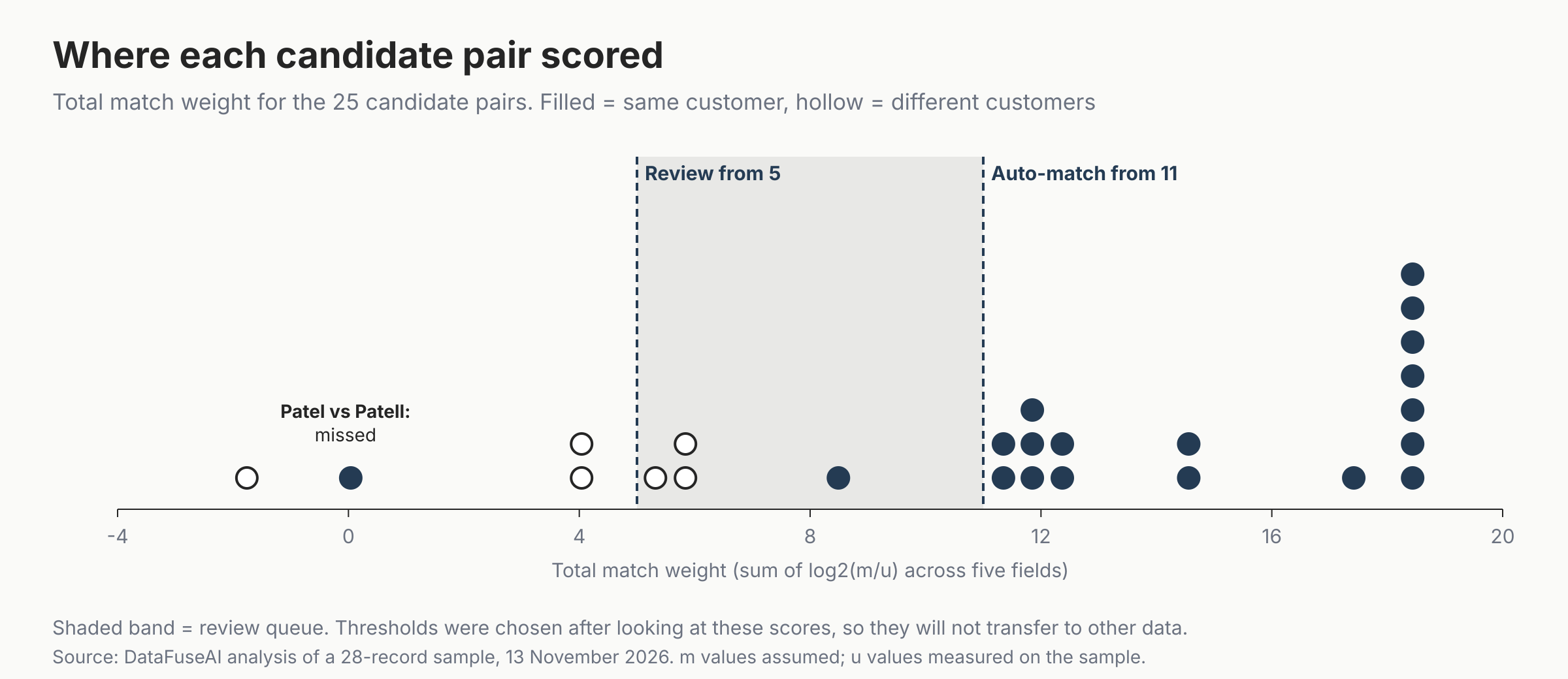
We set auto-match at 11 and review at 5. An auto-match at 11 needs a shared email or phone: without one, the highest a pair can score is 10.18, from full agreement on name and postcode. That gives a rule anyone can explain.
| Auto-match threshold | Auto-matched pairs | Pairs for review | Wrong merges | Pairwise recall | Customers before review |
|---|---|---|---|---|---|
| 5.5 | 20 | 1 | 2 | 94.7% | 14 |
| 8 | 18 | 3 | 0 | 94.7% | 15 |
| 11 (used) | 17 | 4 | 0 | 89.5% | 16 |
| 15 | 8 | 13 | 0 | 42.1% | 21 |
How the auto-match threshold trades review work against errors, with review fixed at 5. True answer: 14 customers. Source: DataFuseAI analysis, 13 November 2026.
The 5.5 row is the trap. It produced 14 customers, exactly the right number, yet it merged the two María Garcías. The missed Patel pair offset the wrong merge, so the total looked perfect. Check pairs, not just the customer count.
The 8 row also scored well here, but only because the one extra pair it auto-merged happened to be correct. That pair, David Brown in Boston, matched on name and postcode with different emails and no phone. Two different María Garcías matched the same way, apart from a disagreeing phone number. We kept that shape of evidence in review. How to set these thresholds on your own data is a topic of its own.
Step 5: Cluster matched pairs, then check for chains
Matching produces pairs, but a customer list needs groups. To turn one into the other, link every matched pair and treat each connected group of records as one customer. This is often called clustering or transitive closure. In our run, the six pairs among Robert Smith's four records became one cluster.
Don't add a rule that each customer has at most one record per system. Our CRM holds two records for James Johnson and two for Robert Smith. A one-per-source rule would have split both.
Chains are the risk. If A matches B and B matches C, A and C end up as one customer even if they were never compared. So after clustering, check every pair inside each cluster for hard contradictions. Our check flags any two records in one cluster whose email and phone are both present and both different. It catches direct wrong matches as well as chains. At the 11 threshold it flagged nothing. At the 5.5 threshold it flagged both wrong María García pairs.
After the four borderline pairs were reviewed, with David Brown accepted and the other three rejected, the result was 15 customers. We simulated that review with the answer key; the Methodology explains how.
Step 6: Build the golden record with survivorship rules
Survivorship decides which value is kept on the golden record when records disagree. Profisee describes it as the rules that choose which attribute value is saved to the golden record [6]. The common rule types are source priority, most recent value, most complete record, a data quality score and conditional rules [6].
Set the rule per field, not per record. We used three:
| Field | Rule | Why |
|---|---|---|
| Name | CRM first, then ERP, then support; the longest name wins within a source | The CRM keeps mixed case and accents. The ERP stores names in capitals |
| Most common standardised value across the cluster; ties go to the CRM | Two systems agreeing beats one | |
| Phone | CRM first, then ERP, then support | Illustrative: the team that updates phone numbers owns the value |
Survivorship rules in our run. They are illustrative; choose yours with the people who own each field.
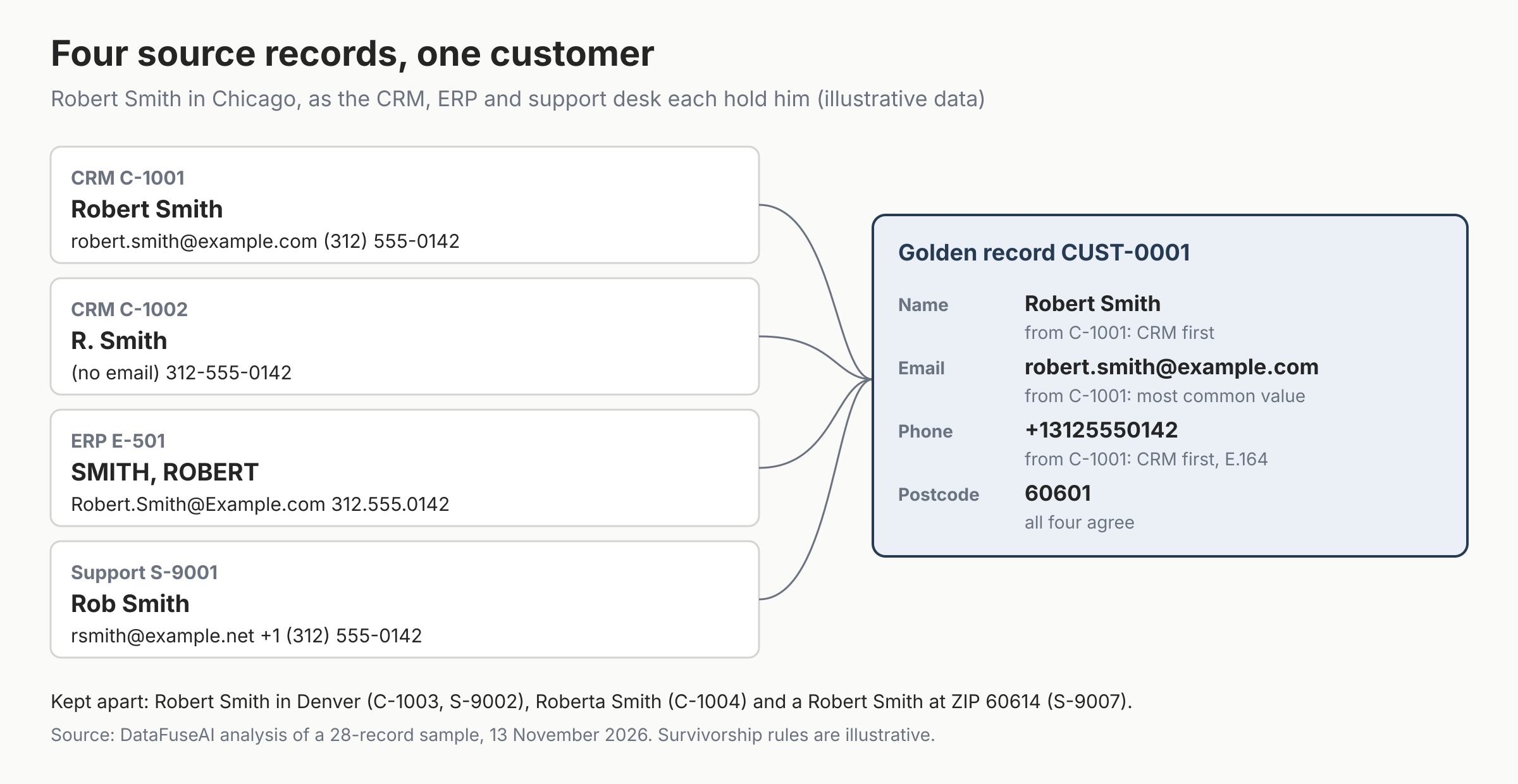
Keep the record ID that supplied each value, as the figure does. Without it, nobody can answer why a value is on the golden record. We had no last-updated dates in this sample, so we didn't use a most-recent rule. If you do, check the timestamps first. Profisee warns that recency rules need reliable timestamps across sources, and that nightly batch updates can skew them [6].
Step 7: Publish a crosswalk that every system can join through
A crosswalk is a table with one row per source record: customer_id, source_system and record_id. It is the part of the work other teams actually use. Ours has 28 rows for 15 customers. Once it exists, reports join through it instead of matching names again.
This PostgreSQL query finds support records that belong to a customer who also has an ERP record:
SELECT s.record_id AS support_record,
       e.record_id AS erp_record,
       s.customer_id
FROM crosswalk s
JOIN crosswalk e USING (customer_id)
WHERE s.source_system = 'Support'
  AND e.source_system = 'ERP';
On our sample it returns two rows: S-9001 with E-501 (Robert Smith) and S-9004 with E-506 (Sarah O'Neil). Keep customer IDs stable between runs. When a new run splits or merges a cluster, record the old and new IDs, so downstream joins don't break silently.
How accurate was it?
Because every record in the sample carries a hidden label, we could score the result exactly, using pairwise precision and recall. Precision is the share of matched pairs that are truly the same customer. Recall is the share of true pairs the run found.
| Stage | Pairs matched | Correct | Precision | Recall | Customers (true: 14) |
|---|---|---|---|---|---|
| Auto-match only | 17 | 17 | 100% | 89.5% | 16 |
| After review | 18 | 18 | 100% | 94.7% | 15 |
Pairwise accuracy on the 28-record sample. Small labelled samples give rough estimates, not production accuracy. Source: DataFuseAI analysis, 13 November 2026.
The one missed pair was Anika Patel in the ERP and Anika Patell in support. We count a surname as "close" when its Levenshtein similarity is at least 85%. We compute similarity as 1 minus the edit distance divided by the longer name's length. One extra letter on a six-letter name gives 83%, so the pair scored as a disagreement. Meanwhile "Robert" and "Roberta" score 86%, because the names are longer.
A single percentage cut-off is harsher on short names than long ones. Possible fixes are a lower cut-off for short strings, a different similarity measure, or a phonetic code. Test any of them against your labelled pairs before switching.
Which mistakes should you avoid?
Each of these shortcuts looks harmless on a small test file and fails quietly at scale. The first five showed up in our run or in the traps built into the sample; the last two follow from how the scoring and the crosswalk work:
- Joining on raw email. Case, trailing spaces and second addresses hide matches. Standardise first.
- Using one threshold. Everything near the line ends up wrong in one direction. Keep a review band.
- Trusting the customer count. A run can hit the right total with wrong merges inside it, as our 5.5 threshold did.
- Assuming one record per system. CRMs hold their own duplicates. Cluster first, then check.
- Surviving the match key. "Maria Garcia" is a key; "María García" is the customer's name.
- Weighting fields twice. City and postcode, or email and email domain, carry the same evidence.
- Re-matching in every report. Publish the crosswalk once, join through it, and check it on a schedule alongside your other data quality validation checks.
Where DataFuseAI fits (and where it doesn't)
DataFuseAI runs data reconciliation as steps in a data pipeline rather than as a separate product [7]. It has two matching transforms: Fuzzy Filter, which scores rows in one dataset against a target value or another row, and Fuzzy Join, which links rows across two tables without a shared key [7][8]. Both use Levenshtein distance converted to a percentage score [8].
You set the threshold yourself. DataFuseAI's reconciliation page suggests starting around 80 to 85 on a sample you can check by eye [7]. Its Individual Score mode requires every configured column pair to pass its own threshold. Its Combined Score mode combines the column scores into one overall score before the threshold applies [7][8]. Reconciliation runs keep history, and audit logs record changes with before-and-after detail [7]. Cleaning steps can run before the Fuzzy Join on the same canvas, using the 12 data quality and transformation transform types, such as Dedupe [7][9]. The whole pipeline can run on-premise with no internet dependency [10].
It is a weaker fit in four cases:
- Point-of-entry matching. It is not built to approve or reject a live transaction in milliseconds [7].
- Probabilistic weights. The pages we read describe string-similarity scores against a threshold you set [8], not Fellegi–Sunter m and u weights.
- Golden records and review queues. Its reconciliation page doesn't describe survivorship rules, golden records, crosswalks or a review approval workflow [7]. Matched rows keep their score as a column, so borderline matches stay visible for review [7].
- Nicknames. Edit distance won't link "Rob" and "Robert", and the product pages we read describe no built-in nickname list. Map nicknames to formal names before the Fuzzy Join, for example with a nickname table and the Join transform [9]. Check for extra rows, because one nickname can map to several names.
For a step-by-step build of the Fuzzy Filter and Fuzzy Join themselves, see our guide to fuzzy matching in ETL pipelines. To test matching on your own systems, DataFuseAI offers a 30-day proof of concept for one recurring workflow and two or three sources, with no POC fee [11]. Applications are reviewed first, and any external cloud or compute cost is yours.
Frequently Asked Questions
What is the difference between record matching and deduplication?
Deduplication usually means removing repeated records inside one table. Record matching, or record linkage, finds records that describe the same customer across tables or systems and gives them a shared ID. Matching often keeps every source record and links them through a crosswalk, rather than deleting any.
Can I match customer records without a shared ID?
Yes. Most cross-system matching works without a shared key. You standardise fields such as name, email, phone and postcode, compare them pair by pair, and combine the evidence into a score. In our sample, no two systems shared a customer ID, and the run still found 18 of 19 true pairs after review.
Should I use exact rules or fuzzy matching?
Use both. Exact rules on standardised email and phone are fast and easy to explain. Fuzzy comparison catches spelling and nickname differences that exact rules miss. In our run, only 7 of 19 true pairs agreed exactly on every compared field once cleaned. The other 12 had a nickname, an initial, a missing value or one disagreeing field.
How many records need manual review?
It depends on your thresholds and your data. In our sample, 4 of 25 candidate pairs, or 16%, fell in the review band. Raising the auto-match threshold to 15 pushed 13 pairs into review. Measure review load on a labelled sample, because it decides how many staff hours matching costs each run.
Methodology
Data. The sample is an illustrative 28-record file built by DataFuseAI: 12 CRM, 8 ERP and 8 support records, covering 14 people. Each record has a true_person label. The matching and scoring steps don't read it; it is used to measure the result and to simulate the review.
Code. The pipeline is a single Python 3 script using only the standard library, plus a PostgreSQL 16 script that standardises the three sources and runs the crosswalk query. Both were run between 16:50 and 16:55 UTC on 13 November 2026. The nickname list is names.csv from the carltonnorthern/nicknames repository on GitHub, Apache License 2.0, downloaded on 13 November 2026 [2].
Scoring. Five fields were compared: email, phone, first name, last name and postcode. u values were measured over all 378 record pairs, with add-one smoothing. m values were set by hand and are listed in the script. Weights are log2(m/u), and a partial agreement is capped at the weight of an exact agreement. Thresholds of 11 and 5 were chosen after looking at the score distribution, so they are not a recommendation for other data.
Review. The review step was simulated: a reviewer would see the four borderline pairs, and we accepted or rejected each using the label. A real review will make some mistakes this simulation does not.
Limits. A sample of 28 records gives rough accuracy figures, not production estimates. Phone standardisation assumes North American numbers. The sample has no timestamps, so most-recent survivorship was not tested.
References
- Fellegi, I. P. and Sunter, A. B. "A Theory for Record Linkage." Journal of the American Statistical Association 64(328): 1183-1210, December 1969. Accessed 13 November 2026. https://doi.org/10.2307/2286061
- Northern, C. and contributors. "nicknames" (names.csv, Apache License 2.0). GitHub. Accessed 13 November 2026. https://github.com/carltonnorthern/nicknames
- ITU-T. "E.164: The international public telecommunication numbering plan" (edition 02/2026, approved 13 February 2026). Accessed 13 November 2026. https://www.itu.int/rec/T-REC-E.164-202602-I
- Splink (UK Ministry of Justice analytical services). "The Fellegi-Sunter model." Accessed 13 November 2026. https://moj-analytical-services.github.io/splink/topic_guides/theory/fellegi_sunter.html
- Splink. "Specifying and estimating a linkage model." Accessed 13 November 2026. https://moj-analytical-services.github.io/splink/demos/tutorials/04_Estimating_model_parameters.html
- Profisee. "MDM Survivorship: How to Choose the Right Record." 23 October 2025. Accessed 13 November 2026. https://profisee.com/blog/mdm-survivorship/
- DataFuseAI. "Data Reconciliation: Fuzzy Matching Across Systems." Accessed 13 November 2026. https://www.datafuseai.com/solutions/data-reconciliation
- DataFuseAI (Masson Sherston). "Fuzzy Matching in ETL Pipelines: Algorithms & No-Code Implementation." 29 May 2026. Accessed 13 November 2026. https://www.datafuseai.com/blogs/fuzzy-matching-etl-pipelines
- DataFuseAI. "Data Transformation & Data Quality Profiling." Accessed 13 November 2026. https://www.datafuseai.com/solutions/data-quality-transformation
- DataFuseAI. "Deployment Options." Accessed 13 November 2026. https://www.datafuseai.com/platform/deployment-options
- DataFuseAI. "Free 30-Day Data Integration POC." Accessed 13 November 2026. https://www.datafuseai.com/free-poc
 Request a Demo