
MCP for data pipelines lets an AI assistant find sources, draft a pipeline, check it, run it and report back, through tools the pipeline vendor publishes [1]. That is a different job from asking an assistant questions of your data, which is what most talk about the Model Context Protocol covers. We read the tools defined in six data-pipeline vendors' published MCP server code. Of 294 tools, 11 work with business data directly.
The rest inspect metadata (140), define or change pipelines (37), validate or review changes (21), run them (17), delete things (21) or manage access (47). Only one of the six servers has merge-request tools for reviewing a change. That gap matters more once an assistant can change what runs every night.
Figures checked 17 November 2026. This guide is for data engineers and platform owners deciding what an MCP connection to their pipeline tooling should allow. For what a pipeline platform does in general, read DataFuseAI's guide to what a data integration platform is.
Key Takeaways
- Querying data is a small part. 11 of 294 tools in our census query, preview or write business data directly, or write SQL to do so.
- Pipeline objects are the main subject. 37 tools create or change pipeline definitions, and 17 run, stop or retry them.
- Review is rare. Keboola's server is the only one of six with merge-request tools, and approvals are optional by default.
- Confirmation is usually the client's job. Fivetran's README says its server marks write tools with advisory text but does not enforce confirmation.
- Defaults vary widely. Fivetran starts in read scope and Prefect's tools are read-only by design. Airbyte, Airflow, dbt and Keboola expose write tools unless you switch on a read-only mode or a tool filter.
What is MCP, and what does it add to a pipeline platform?
The Model Context Protocol is an open protocol that lets an AI application connect to external tools and data through servers that describe what they offer [2]. A server lists its tools with a name, a description and a JSON Schema for the inputs [1]. The model decides which tool to call, the client sends the request, and the server runs the tool.
For a pipeline platform, that means the assistant works with the same objects a data engineer works with. Sources, connections, transformations, jobs, schedules and run logs all become callable. The specification says tools are model-controlled and that there should always be a human able to deny a tool call [1].
The specification also says what a server must do itself. Servers must validate tool inputs, apply access controls and rate limits, and clean outputs [1]. Clients should ask for confirmation on sensitive operations, and must treat tool annotations as untrusted unless the server is trusted [1].
What do data-pipeline vendors' MCP servers actually expose?
They mostly expose pipeline objects, not data. We read the source code of six official MCP servers from data-pipeline vendors and gave each tool one primary job [3][4][5][6][7][8]. Inspecting metadata, status and logs was the largest group at 47.6%; working with business data directly was 3.7%.
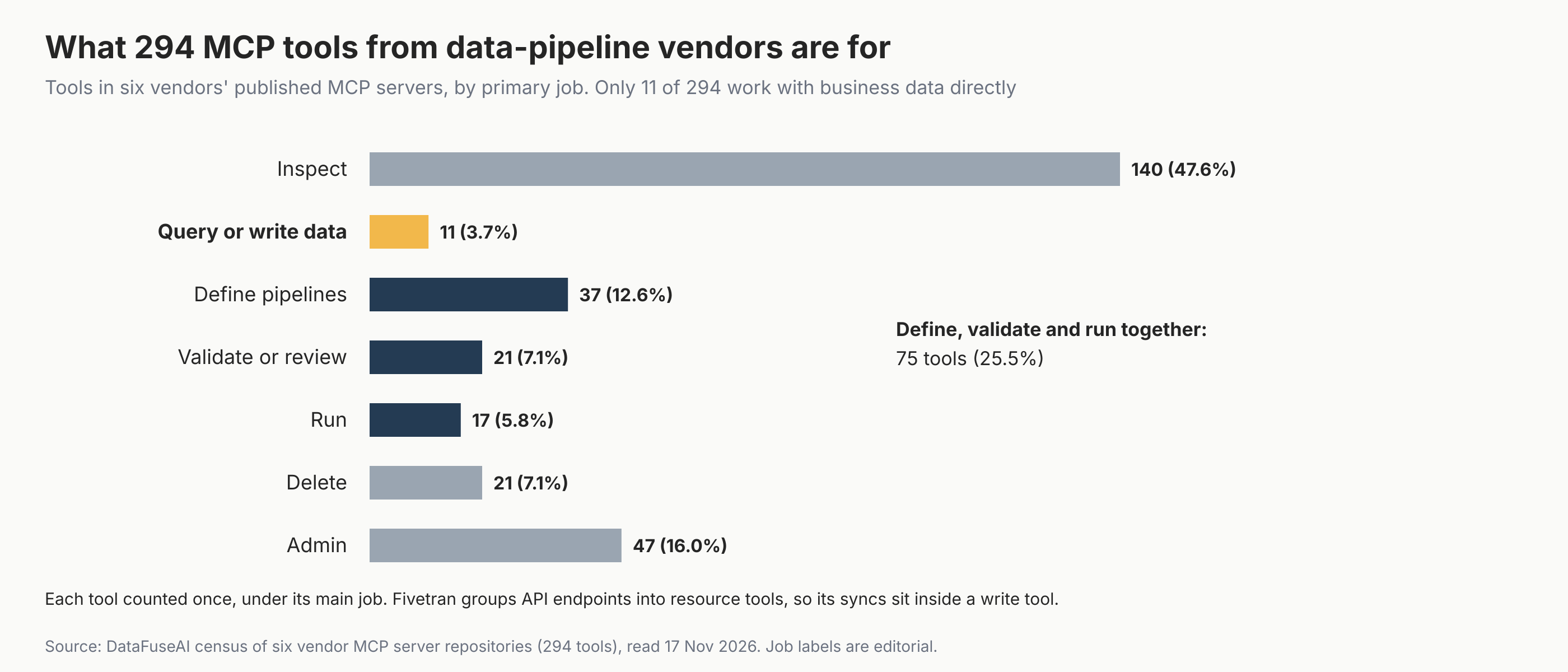
| Primary job | Tools | Share | Examples |
|---|---|---|---|
| Inspect metadata, status, logs or docs, or generate code text | 140 | 47.6% | get_lineage, list_dag_runs, generate_model_yaml |
| Query, preview or write business data directly, or write SQL to do so | 11 | 3.7% | query_data, run_sql_query, text_to_sql |
| Create or change pipeline definitions | 37 | 12.6% | create_flow, update_sql_transformation, create_connection_on_cloud |
| Validate, test, review or publish | 21 | 7.1% | validate_connector_config, approve_merge_request, test |
| Run, stop, retry or pause | 17 | 5.8% | run_job, trigger_dag, retry_job_run |
| Delete | 21 | 7.1% | permanently_delete_cloud_source, connections_delete |
| Admin, access and account settings | 47 | 16.0% | users_write, set_project_scope |
Source: DataFuseAI census of the airbytehq/PyAirbyte, astronomer/agents, dbt-labs/dbt-mcp, fivetran/fivetran-mcp, keboola/mcp-server and PrefectHQ/prefect-mcp-server repositories, read 17 November 2026.
The census counts tools defined in each repository, including tools that only appear with certain settings. Prefect's four execution-plan tools, for example, sit behind an experimental setting that is off by default [8]. Fivetran's server routes its API through resource tools, so starting a sync sits inside the connections write tool [6].
How do the six servers differ?
Each server reflects its product. The orchestrator servers are mostly for inspecting, and Airflow's can also run, while integration platforms expose more tools that build and change pipelines. No two make the same choice about review, defaults or deletion, so read a server's tool list before you connect it.
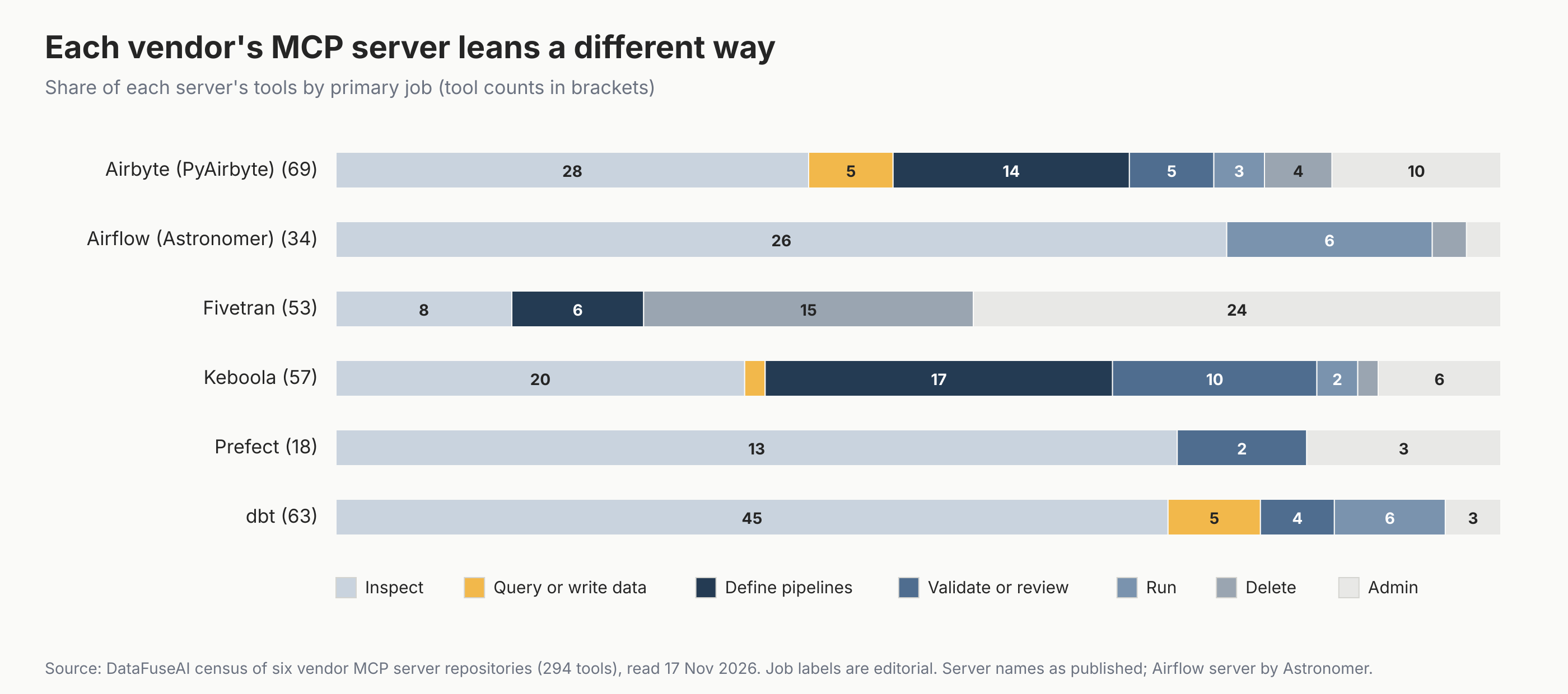
- Keboola has the broadest pipeline-building set, with 17 tools that create or change pipeline objects such as flows, transformations, configurations and data apps. It is also the only server with merge-request tools. Projects need no approvals by default, and when approval is required, its documentation says it is never available to the request's creator [7].
- Airbyte's PyAirbyte server can deploy sources and destinations, create connections and run syncs. 44 of its 69 tools carry a read-only annotation in the code [3].
- Fivetran's server covers its whole REST API. It starts in read scope, and write and delete tools appear only when you raise the scope [6].
- dbt's server is mostly inspection of models, lineage and jobs. It also runs dbt commands such as build and test, and its code-generation tools return YAML or SQL text without changing the project [5].
- Airflow (Astronomer) inspects DAGs and runs. It can also trigger and clear runs, pause DAGs and delete runs [4].
- Prefect's server is read-mostly, with an experimental surface to validate and publish execution-plan drafts [8].
What does each server allow before you change any setting?
Out of the box, two servers start read-only and four expose write tools. Each has its own switch to narrow that, and none of the switches is the same.
| Server | Out of the box | Read-only switch | Narrower controls | Delete tools |
|---|---|---|---|---|
| Airbyte (PyAirbyte) | Cloud writes allowed; safe mode on, so updates and deletes touch only objects created in the session | AIRBYTE_CLOUD_MCP_READONLY_MODE=1 (Cloud tools only) |
Safe mode, on by default | 4 |
| Airflow (Astronomer) | Writes allowed | AF_READ_ONLY=true, off by default |
ASTRO_MCP_ALLOWED_TOOLS allowlist |
1 |
| dbt | Toolsets on unless disabled, including command-line tools that run dbt; code generation off | None as one switch | DBT_MCP_ENABLE_TOOLS allowlist, DISABLE_TOOLS and per-toolset DISABLE_* settings |
0 |
| Fivetran | Read scope, which still reaches API-key endpoints until you deny them | Default (FIVETRAN_SCOPE=read) |
DISALLOWED_ACTIONS denylist |
15 |
| Keboola | No restriction when no filter headers are sent | X-Read-Only-Mode: true header |
X-Allowed-Tools and X-Disallowed-Tools headers |
1 |
| Prefect | Read-only by design; experimental execution-plan tools off | Not needed | The API key's workspace role | 0 |
Sources: each vendor's documentation or settings code at the commits in the references [6][9][10][11][12][13]. Delete counts are from our census.
Airbyte's settings apply to its Cloud tools, not local operations [9]. Read-only modes differ in scope too. Airbyte's still allows syncs on existing connectors, because it doesn't treat a sync as a change to the workspace [9]. Astronomer's README notes that its allowlist limits which tools a client can call but not the arguments of an allowed tool [10].
Five jobs MCP can do in pipeline creation
Building a pipeline through MCP involves five jobs, and querying data is not one of them. They are a DataFuseAI editorial framework, not part of the specification. Each job needs a different level of trust, so each deserves its own permission.
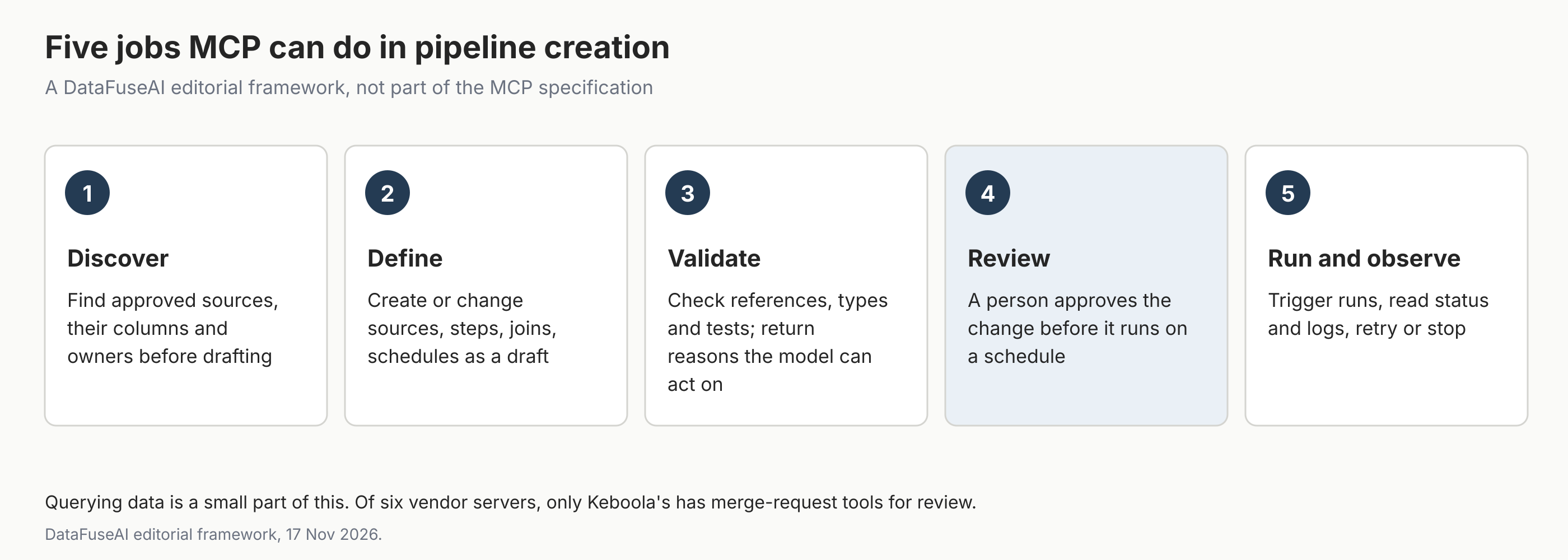
- Discover. Find approved sources, their columns and owners before drafting anything.
- Define. Create or change sources, steps, joins and schedules as a draft, not in production.
- Validate. Check references, types and tests, and return reasons the model can act on. DataFuseAI's guide to data quality validation in ETL pipelines covers the checks themselves.
- Review. A person approves the change before it runs on a schedule.
- Run and observe. Trigger runs, read status and logs, and retry or stop when needed. A run that succeeds can still deliver wrong numbers, as our post on silent data quality failures explains.
What should an MCP connection to your pipelines allow?
Start with less than the servers allow. Grant discovery and validation first, then drafting, and add running and deletion last, once reviewed pipelines exist. The table maps each job to a starting default; it is editorial advice, not a vendor's recommendation.
| Job | Risk if the model gets it wrong | Suggested starting default |
|---|---|---|
| Discover | Sees sources it shouldn't | On, scoped to the user's grants |
| Define | A wrong draft | On, drafts only, never production |
| Validate | A wrong pass or fail | On |
| Review | Self-approval | People only, never the drafting identity |
| Run | Costs, load on source systems | Off until a reviewed pipeline exists |
| Delete | Lost configuration or history | Off |
Two features of the protocol help here. A server's tool list can depend on the caller's authorization, so a read-only user need never see write tools [1]. Tool errors are returned to the model as results, so a refused draft comes back with a reason the model can fix [1].
Mistakes to avoid
- Treating MCP as a chat-with-data feature. In the vendors' own servers, most tools act on pipelines, not rows.
- Relying on the model to ask for confirmation. Advisory text in a tool description is not a control.
- Letting the drafting identity approve its own change. Keboola's documentation says approval is never available to the creator; check that your platform enforces the same, and requires approval at all. Our guide to audit-ready data operations covers the logs that make a review checkable later.
- Granting delete with write. Keep deletion a separate, rarer permission.
- Counting tools as capability. Many inspection tools don't make a server better for building than fewer tools that define and validate.
Where DataFuseAI fits (and where it doesn't)
DataFuseAI is a data integration vendor. Here we describe the MCP protocol and other vendors' servers, not a DataFuseAI feature, and make no promise about one. DataFuseAI isn't in the census, and nothing below is a DataFuseAI MCP tool.
What DataFuseAI does have are the controls an MCP connection would rely on. Its governance page describes permission groups set module by module and an audit log that records who changed what, with old and new values [14]. Its pipeline automation page describes pipelines built on a visual canvas and saved as scheduled jobs, with each run's duration, status and step log kept [15].
To test a pipeline workflow on your own data, DataFuseAI's free 30-day POC asks for one recurring workflow and two or three data sources [16]. Applications are reviewed for fit, there is no POC fee or obligation, and external cloud or compute costs, if any, stay with you [16].
Frequently Asked Questions
Is MCP only for querying data with an AI assistant?
No. MCP lets an assistant call any tool a server publishes, including tools that create, validate and run pipelines. In the six data-pipeline vendors' servers we read, only 11 of 294 tools work with business data directly. Most inspect pipeline metadata, change pipeline definitions or manage runs.
Can an AI assistant create a data pipeline through MCP?
Yes, if the platform's MCP server offers tools for it. Keboola's server can create flows and SQL transformations, and Airbyte's PyAirbyte server can deploy connectors and create connections. Whether the assistant may run or publish that pipeline should depend on review and permissions on the server.
Does MCP require a human to approve tool calls?
Not always from the server, but the host must get the user's consent. The specification's key principles say hosts must obtain explicit user consent before invoking any tool [2]. Its tools page adds that clients should prompt for confirmation on sensitive operations [1]. How consent works depends on the client. A server can add its own approval step; Keboola's merge requests allow one, though approvals are optional by default.
Which MCP version does this guide describe?
It describes the Model Context Protocol specification dated 2026-07-28, the version current on 17 November 2026 [2]. Vendor servers change often, so the census reflects each repository's latest commit on that date. Recheck both before relying on a specific tool or rule.
Methodology
Population. Official MCP servers from data-ingestion, transformation and orchestration vendors whose source code we could find in public repositories on 17 November 2026. Vendors with hosted servers but no public server code were left out. The six were Airbyte, Airflow by Astronomer, dbt, Fivetran, Keboola and Prefect. Airbyte's hosted MCP server has no public code, so we read PyAirbyte's airbyte/mcp module, which Airbyte publishes. Airflow's server is astro-airflow-mcp in astronomer/agents.
Dates. Repositories were cloned on 17 November 2026 between 04:53 and 04:54 UTC. The census was corrected and re-run by 07:11 UTC after an independent audit found five tools our first extraction missed. Commit hashes are in the references. The dataset is in the editorial pack.
Extraction. We read tool definitions statically, without running the servers, because the package index was unreachable from our workspace. Sources were decorators in code (Airbyte, Airflow), Prefect's named tool lists, Keboola's generated TOOLS.md, Fivetran's endpoints index, and dbt's committed contract snapshot plus its tool-name list.
Classification. Each tool got one primary job from tool names and descriptions, using written rules and named exceptions. This is editorial judgement. Tools that appear only under certain settings are counted, as are dbt tools marked deprecated or served by a remote proxy. Read-only counts come from each tool's annotations; six dbt tools have none in the repository. Prefect's docs proxy forwards to a separate documentation server, so its tools are not counted; dbt's remote-proxied tools are defined in its repository, so they are.
Defaults table. Each row comes from the vendor's README, security notes or settings code at the same commit, read on 17 November 2026. We did not run the servers to confirm the defaults.
Limits. Tool counts measure surface, not quality or usage. Servers without public code are out of scope.
References
- Model Context Protocol. "Tools" (specification version 2026-07-28). Accessed 17 November 2026. https://modelcontextprotocol.io/specification/2026-07-28/server/tools
- Model Context Protocol. "Specification" (version 2026-07-28). Accessed 17 November 2026. https://modelcontextprotocol.io/specification/2026-07-28
- Airbyte. "airbytehq/PyAirbyte: airbyte/mcp" (commit ca27f63, 6 November 2026). Accessed 17 November 2026. https://github.com/airbytehq/PyAirbyte/tree/ca27f634d45ad5de964412dc3100f6ea52e4b846/airbyte/mcp
- Astronomer. "astronomer/agents: astro-airflow-mcp" (commit 35b9610, 29 October 2026). Accessed 17 November 2026. https://github.com/astronomer/agents/tree/35b9610bb2710c37ca11326c4cbf7818b6725fec/astro-airflow-mcp
- dbt Labs. "dbt-labs/dbt-mcp" (commit e5b9147, 16 November 2026). Accessed 17 November 2026. https://github.com/dbt-labs/dbt-mcp/tree/e5b91476ca57f6ba60f3e80be9168feacd644260
- Fivetran. "fivetran/fivetran-mcp: README" (commit b6675b6, 3 November 2026). Accessed 17 November 2026. https://github.com/fivetran/fivetran-mcp/blob/b6675b66a114ea378d8a9b2d77b6fdef155310c4/README.md
- Keboola. "keboola/mcp-server: TOOLS.md" (commit 050d9b3, 16 November 2026). Accessed 17 November 2026. https://github.com/keboola/mcp-server/blob/050d9b360edc5cd018676fcf5a965f6b1131fb89/TOOLS.md
- Prefect. "PrefectHQ/prefect-mcp-server" (commit 48efd28, 23 September 2026). Accessed 17 November 2026. https://github.com/PrefectHQ/prefect-mcp-server/tree/48efd289bdb2b94a78e35b1331fbefc4fa3f6411
- Airbyte. "airbytehq/PyAirbyte: airbyte/mcp/__init__.py" (commit ca27f63, 6 November 2026). Accessed 17 November 2026. https://github.com/airbytehq/PyAirbyte/blob/ca27f634d45ad5de964412dc3100f6ea52e4b846/airbyte/mcp/__init__.py
- Astronomer. "astronomer/agents: astro-airflow-mcp/README.md" (commit 35b9610, 29 October 2026). Accessed 17 November 2026. https://github.com/astronomer/agents/blob/35b9610bb2710c37ca11326c4cbf7818b6725fec/astro-airflow-mcp/README.md
- dbt Labs. "dbt-labs/dbt-mcp: src/dbt_mcp/config/settings.py" (commit e5b9147, 16 November 2026). Accessed 17 November 2026. https://github.com/dbt-labs/dbt-mcp/blob/e5b91476ca57f6ba60f3e80be9168feacd644260/src/dbt_mcp/config/settings.py
- Keboola. "keboola/mcp-server: README" (commit 050d9b3, 16 November 2026). Accessed 17 November 2026. https://github.com/keboola/mcp-server/blob/050d9b360edc5cd018676fcf5a965f6b1131fb89/README.md
- Prefect. "PrefectHQ/prefect-mcp-server: SECURITY.md" (commit 48efd28, 23 September 2026). Accessed 17 November 2026. https://github.com/PrefectHQ/prefect-mcp-server/blob/48efd289bdb2b94a78e35b1331fbefc4fa3f6411/SECURITY.md
- DataFuseAI. "Data Governance & Compliance: RBAC, Audit Logs, Isolation." Accessed 17 November 2026. https://www.datafuseai.com/solutions/data-governance-compliance
- DataFuseAI. "Data Pipeline Automation, Scheduling & Monitoring." Accessed 17 November 2026. https://www.datafuseai.com/solutions/data-pipeline-automation
- DataFuseAI. "Free 30-Day Data Integration POC." Accessed 17 November 2026. https://www.datafuseai.com/free-poc
 Request a Demo