

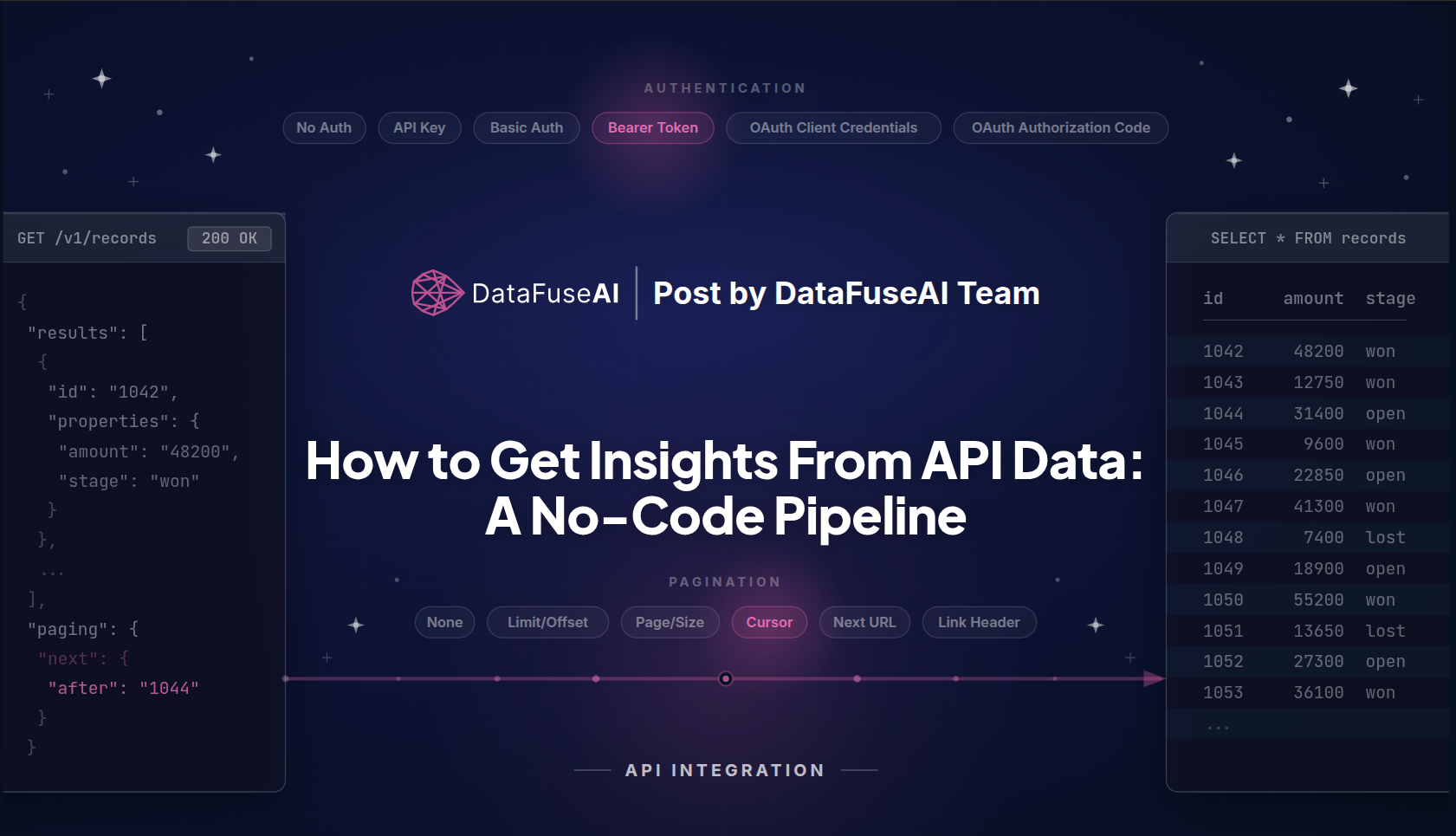
Getting insights from API data means turning what an endpoint returns into an answer someone can act on. The API hands you a JSON payload. The answer is a number, a trend, a ranked list. The distance from payload to insight is the work, and how much work it is depends entirely on the question you're asking.
A one-off lookup can be a single call and a careful read. A question you'll ask again every Monday needs the data pulled on a schedule, reshaped to fit the question, and landed somewhere you can query. That second case is a pipeline, whether you write it or build it.
Two decisions gate the data itself, and they're the same for every REST API: how it authenticates, and how it paginates. Settle those and what's left is shaping.
We built one such pipeline over a single HubSpot Service Key, with no scripts. It returned a risk-adjusted sales forecast of $364,100 weighted against $422,500 raw.
What getting insights from API data actually means
Getting insight from API data is the work of turning an endpoint's response into an answer to a specific question: get the data out, get it into a shape that fits the question, then ask. An API call on its own is not insight. It's a payload.
That definition is deliberately smaller than the one you'll usually be sold. Getting insight from API data does not mean running a six-step pipeline. Sometimes the payload is already the answer. A single endpoint returns exactly the rows you want, already flat, already typed, and you read them and you're done — no pipeline, no sink, no schedule. That case is real and common, and this guide isn't about it. Name it anyway, so you can recognize when you're in it and stop early.
The work shows up when one or more of these is true: the question needs data from more than one endpoint, the response is shaped for transport rather than analysis, the fields arrive as the wrong types, or the question will be asked again next week and nobody wants to re-run anything by hand.
That middle one is where APIs earn their reputation. JSON is a transport format. It exists to carry structure between two systems, and it lets that structure nest as deep as the sender feels like nesting it. Tables don't nest. So when a response nests, something has to unwrap it before a column exists to query, and a number that arrived as a quoted string has to be coerced before you can sum it. When a response doesn't nest, you skip that step entirely. The mismatch is conditional, not a law.
The standard that specifies JSON (RFC 8259) calls it "a lightweight, text-based, language-independent data interchange format."[1] Interchange is the word doing the work there. Nothing in the format was ever promising you a table.
The mismatch is common enough to plan for, though. In a 2020 survey of 2,360 respondents across more than 100 countries (data scientists, analysts, engineers, and others), Anaconda found they spent on average 45% of their time getting data ready (loading and cleansing) before they could use it to develop models and visualizations.[2] The figure is old and self-reported, and it's about data work generally rather than APIs specifically. The shape of the complaint is what survives: preparation is frequently the job.
When the question does recur, the work settles into a recognizable shape — extract, transform, sink, profile, schedule, query — and that shape is what this guide builds. It's the extract, transform, load sequence applied to a source that happens to speak HTTP, and it's the loop DataFuseAI's canvas implements. Treat it as one well-worn answer to "this question recurs," not as the definition of insight. Plenty of useful API work never gets past step one.
Here's the part that does generalize. Once an API is connected, it stops being special: it becomes one source among many, configured on the same screen as PostgreSQL or Snowflake or S3, feeding the same canvas as everything else. That's the argument for treating API ingestion as a data operations platform concern rather than a scripting one. Your REST APIs become just another table.
Which is why most of the difficulty per API concentrates in two questions: how do I authenticate, and how do I get past page one?
Match the authentication method to your API
Almost every REST API you'll connect to authenticates in one of six ways: No Auth, API Key, Basic Auth, Bearer Token, OAuth Client Credentials, or OAuth Authorization Code. The fields each one needs are short, fixed, and knowable before you write a line of config.
| Auth type | Fields it exposes | Typical use |
|---|---|---|
| No Auth | — | Public and open APIs |
| API Key | API Key, Key Name, Key Prefix, Location (Header or Query) | Most SaaS and developer APIs |
| Basic Auth | Username, Password | Legacy and internal services |
| Bearer Token | Bearer Token | Static tokens, service keys, personal access tokens |
| OAuth Client Credentials | Token URL, Client ID, Client Secret, Scope | Machine-to-machine services with no end user |
| OAuth Authorization Code | Client ID, Client Secret, Token URL, Authorization URL, Scope, plus a Connect via OAuth step (PKCE, auto-refresh) | User-delegated access, where a person grants an app permission to act for them |
The last two rows are the same standard wearing different clothes. Both are OAuth 2.0, which exists to let one application obtain limited access to another service. OAuth defines several ways to obtain that access, and two of them turn up in practice: Authorization Code when a person has to approve the access, Client Credentials when no person is involved and one service is just talking to another. If an API's docs tell you to register an app and collect a client ID and secret, you're in one of those two rows, and which one depends entirely on whether a human is being asked to approve anything. (Both grant types are specified in the OAuth 2.0 framework, RFC 6749.)[3]
The Bearer row deserves a closer read than it usually gets. A bearer token is exactly what the name says: anyone who bears it can use it. There's no signature, no proof of identity, and nothing tying the token to the caller. Possession is the entire authorization model.
That isn't a simplification made for a blog post — it's what the word means in the standard that defines the scheme, which describes a bearer token as one that "any party in possession of the token (a 'bearer') can use" (RFC 6750).[4] Which is why the scoping step later in this guide isn't optional hygiene: a bearer token carrying write scopes is a write-capable credential sitting in a config field, and the only thing limiting the damage is what you ticked when you created it.
Those six are what an API connection profile exposes, and they cover the APIs you're realistically going to meet. They aren't a law of the web. If an API's documentation describes a scheme that doesn't map onto any row above, that mismatch is the signal, and you want it resolved before you start building rather than after.
Mechanically, a connection profile is a Base URL plus one of those six auth blocks. Endpoints hang off the profile, each with a name, path, method, query params, path variables, request body, and pagination, all as free-form JSON. Secrets mask to ******** once saved.
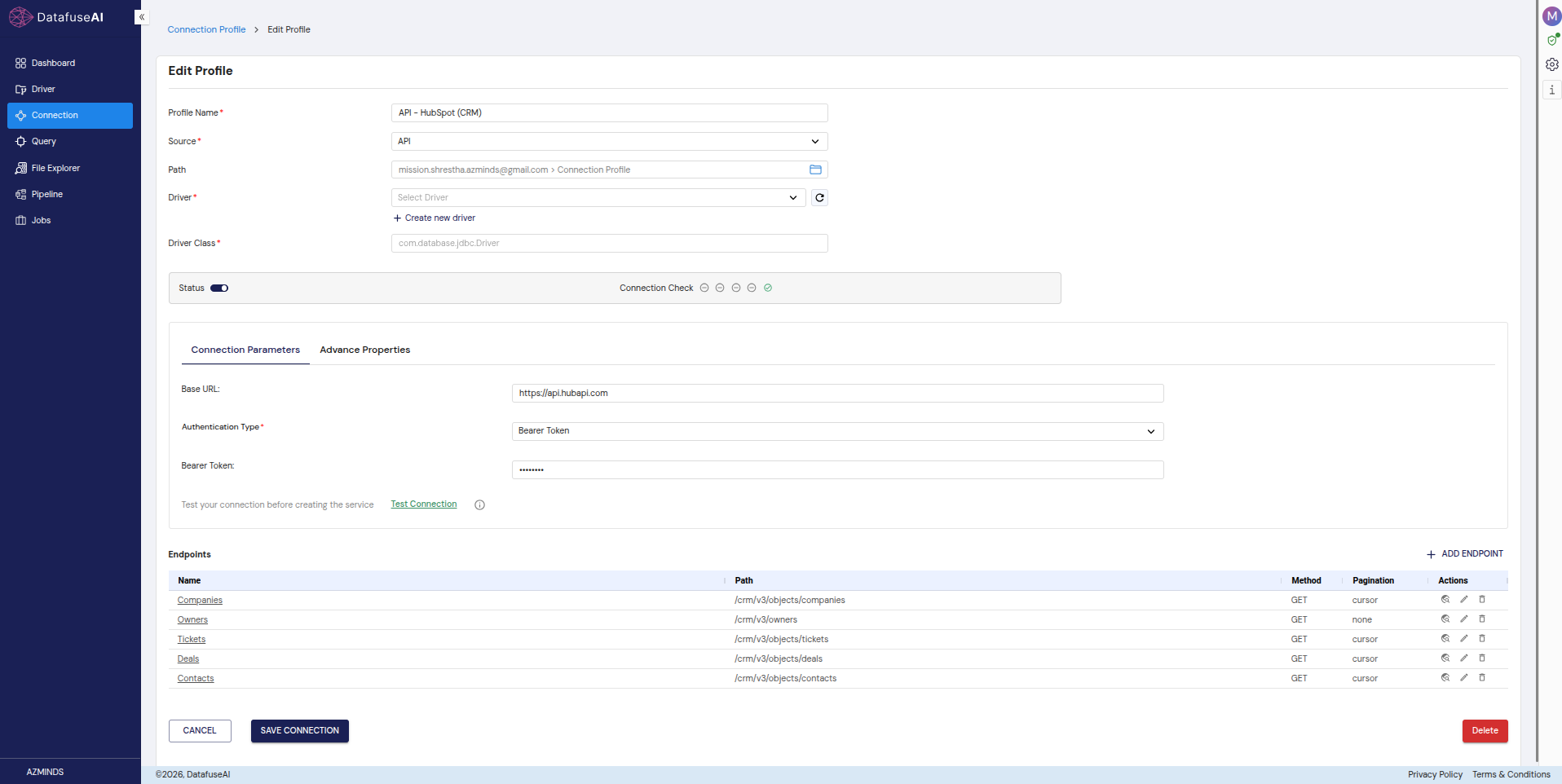
One last thing before you move on from the auth screen: Test Connection only probes the Base URL. It tells you the host resolves. It does not tell you the credential works. Discover Schema, which hits a real endpoint and infers the field list, is the actual credential check, a distinction that costs people an hour when they learn it the slow way.
Choose a pagination strategy — and what happens when you choose wrong
The error we encountered looks like this:
HTTP 429 Too Many Requests
It arrived after a first attempt to pull HubSpot deals. Not on request one, and not on the config-time preview, which had looked perfect. It arrived once the pipeline actually ran, in a storm, after thousands of duplicate requests had already gone out the door.
We had chosen Page/Size. HubSpot CRM v3 is cursor-only.
Here's the cause. A cursor-only API paginated with Page/Size loops, because the page parameter never advances the cursor: the API ignores the page number it wasn't designed to read, returns page one again, and the pipeline — seeing a full page of results — asks for the next one. Every request re-fetches the first page. The loop only terminates when the rate limiter answers, which it does with 429.
The fix was a strategy swap, not a code change: set Pagination Strategy to Cursor, point cursor_param at after and cursor_field at paging.next.after, and the runtime walks the collection properly.
What makes this trap worth a section of its own is when it hides. Discover Schema, the config-time preview, samples the first page only, so a wrong strategy produces a clean, green, correct-looking schema. On an actual pipeline run, the runtime auto-walks cursor, next-url, link-header, limit-offset, and page-size pagination up to a max_pages or max_records cap. The preview never exercises the thing that breaks. The scheduled run does, at 7 AM, unattended.
None of that is HubSpot being difficult, and none of it is our failure alone. 429 isn't a HubSpot error code. It's the HTTP status any server uses to tell a client it has sent too many requests in too short a window and needs to slow down — rate limiting, in one number. It has been part of the HTTP standard since 2012 (RFC 6585, §4),[5] which makes what we hit a standard response to a standard mistake, and makes 429 something every API you ever connect to is entitled to return.
HubSpot's own usage guidelines document the thresholds — burst limits of 100, 190, or 250 requests per 10 seconds depending on tier and add-on, and daily limits of 250,000, 625,000, or 1,000,000 — and state plainly that "any app or integration exceeding its rate limits will receive a 429 error response for all subsequent API calls."[6]
The same failure shows up on public APIs that have nothing to do with CRM. In a public GitHub discussion on the ercot/api-specs repository, a user running a production pipeline against the ERCOT Public Reports API reported that "the first page of results returns successfully, but subsequent pages fail with the same error even after retries." The error was HTTP 429, arriving after ERCOT introduced new bandwidth-based rate limits, with responses naming the quota directly: "You have exceeded the hourly bandwidth limit of 64 MB." Another affected consumer described their real-time LMP feed as non-functional, unable to retrieve even a single full day of data. ERCOT's own response named the cause: "approximately 10% of users were generating over 80% of total system load, which was degrading reliability for the broader user base."[7] That's a single documented thread rather than a survey, so treat it as what it is: evidence that this class of failure is real and recurring, not a measurement of how often it happens.
The lookup that prevents it is short. Six strategies cover the patterns you'll meet in practice, and the API's docs tell you which one you're in:
| Strategy | How it walks | Choose it when |
|---|---|---|
| None | One request, one page | The endpoint returns the full collection at once, or page one is genuinely all you want |
| Limit/Offset | Adds the page size to a numeric offset each round | The docs name an offset (or skip) parameter and the collection is stable during the pull; offsets drift if rows are inserted mid-walk |
| Page/Size | Increments a page number | The API counts in pages and the page number actually moves the result window. Verify this, don't assume it |
| Cursor | Sends an opaque token from the previous response into the next request | The response carries a next-token and no page numbers. This is the only strategy that works against a cursor-only API |
| Next URL | Follows a fully-formed URL the response hands back | The response body contains an absolute link to the next page, so there's nothing to construct |
| Link Header | Follows the rel="next" link in the HTTP Link header |
Paging lives in the headers rather than the body |
Those last two rows aren't conventions somebody invented. The HTTP Link header carries links in the response headers instead of the body, and relation names like next and previous mark where a resource sits in a navigation sequence, which is what lets a client walk an ordered collection without guessing at URLs. An API paginating this way is following the spec (RFC 8288).[8] Follow it back.
Read the pagination section of the docs before the auth section. It's the one that decides whether your run finishes.
Build the extract → transform → sink loop
Once the profile and the endpoints are configured, the API stops being an API. It becomes a Source node on a canvas, dragged from the same palette as every database, warehouse, and file source, and the rest of the build is the same no-code ETL work you'd do against Postgres. That's why the loop generalizes: only the first step knows or cares that HTTP was involved.
Not every pipeline needs every step below. Take the ones the question earns.
1. Extract. Add a Source (API) node, one per profile-and-endpoint pair, so a pipeline reading three APIs carries three source nodes. Alias the fields you'll want to name differently downstream while you're here (id → deal_id, for instance), because renaming later means chasing the old name through every node that referenced it. Why it's a separate step from transform: extraction is the only part with a rate limit and a network on the other side, so it's the only part where getting it wrong costs you a 429 rather than a wrong number. Failure mode: selecting the endpoint without setting its pagination, which extracts page one and looks fine.
2. Transform. This is where a response becomes a table, in as many nodes as the payload actually demands — sometimes zero.
Explode flattens structure, when there's structure to flatten. Object paths become one column each with no row multiplication; array paths produce one row per element. It flattens one level per node, so deeply nested payloads want chained Explode nodes rather than one clever configuration. Responses that arrive as a flat list of scalar fields don't need it at all, and adding it out of habit just gives you a node to maintain. Failure mode: assuming a single Explode reaches all the way down, then wondering why a column still holds a JSON blob.
Derived is where types get fixed and business logic gets computed: CAST a string to a number or a date, CASE a status field into a probability, concatenate a display name, flag a row. Why it matters: APIs are often generous with strings and stingy with types, and every arithmetic operation downstream depends on this node being right. If your API already returns properly typed numbers, you may only need Derived for the business logic, or not at all.
Join and Union combine endpoints. Join families cover Inner, Left, Right, Full, Cross, Left-Anti, Left-Semi, and Fuzzy; Union stacks rows by name or by position. Why the distinction is load-bearing: a Join needs a key that both sides genuinely share, and APIs frequently don't give you one. More on that below.
Aggregate rolls up (18 functions: sum, count, avg, min, max, stddev, and the rest), Route splits one stream into several by condition, Filter drops rows, Dedupe removes repeats, Unpivot reshapes wide to long.
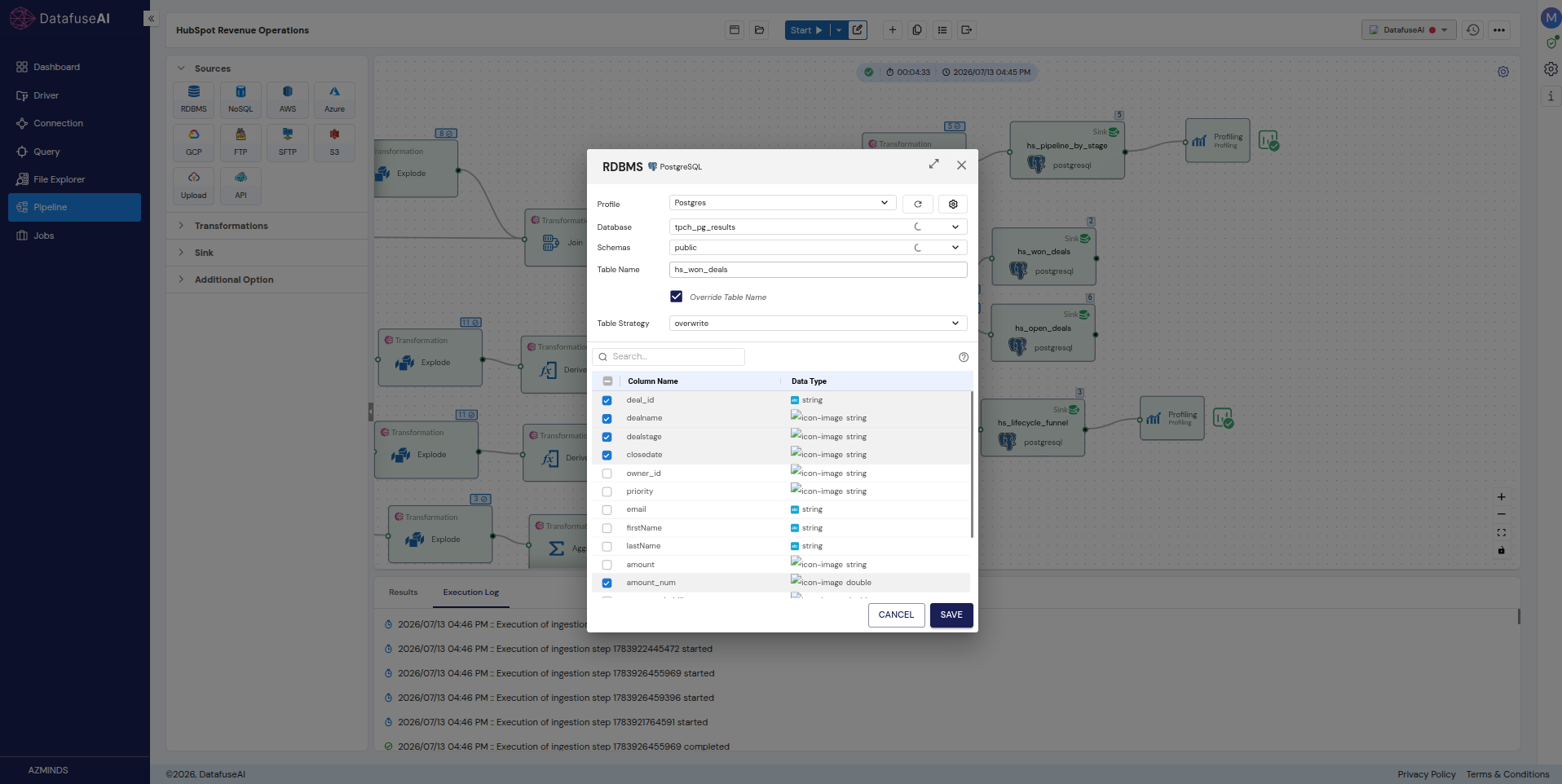
3. Sink. Point the result at a destination: RDBMS, S3, NoSQL, GCP, Azure. Each sink node carries a Table Strategy (overwrite, create, drop, or append), and one pipeline can write several sinks in a single run. Why the strategy is a decision and not a default: append on a full re-pull duplicates your entire dataset every morning, and overwrite on a partial pull silently deletes history.
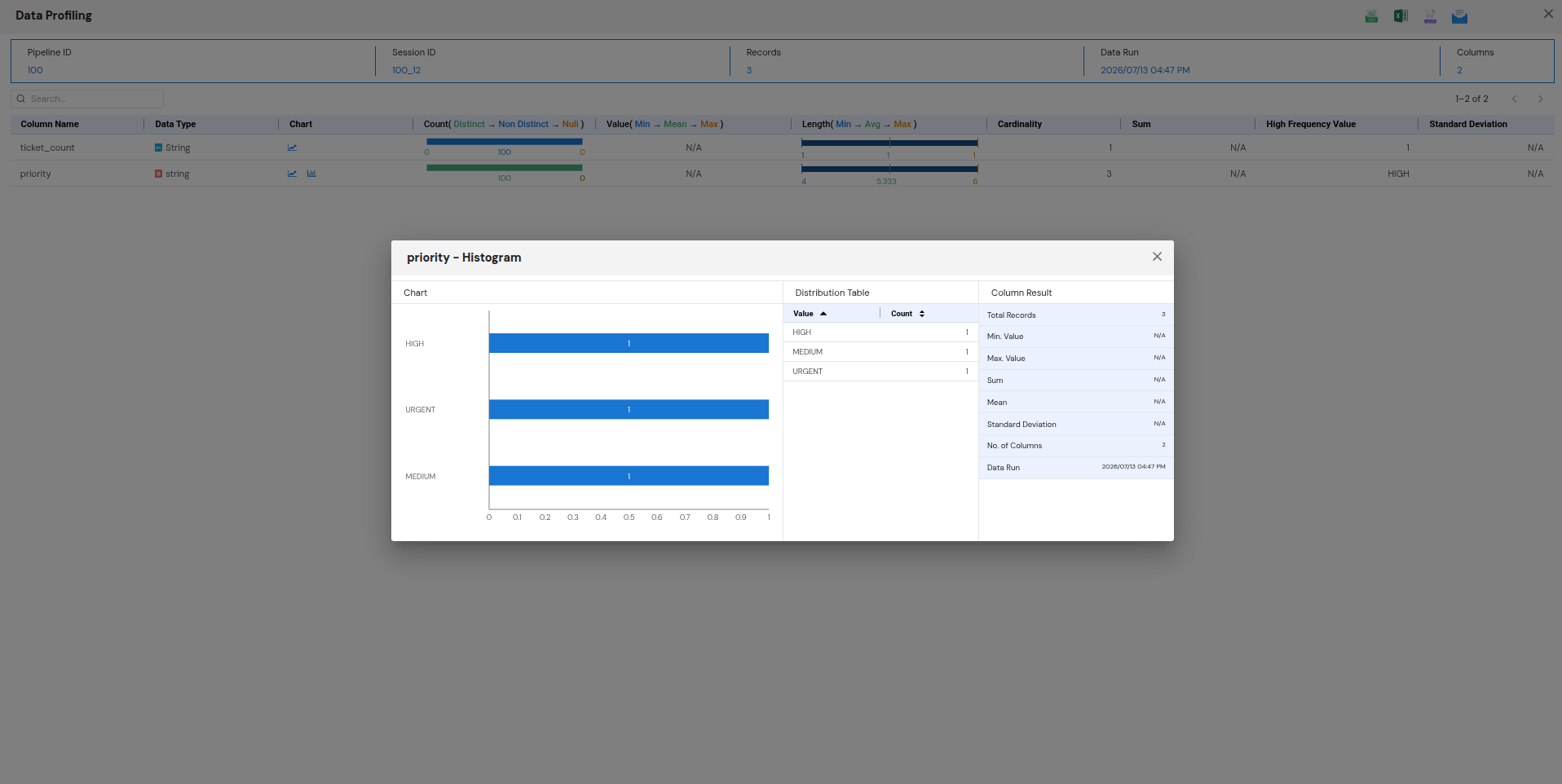
4. Profile. Wire a Profiling node after the sink and pick the columns worth watching. After a run, the Profiling Result dialog gives you, per column: data type, a distribution chart, distinct/non-distinct/null counts, min/mean/max, length stats, cardinality, sum, high-frequency value, and standard deviation. Why it earns its own step: a sum you can read against a number you already know is the cheapest data-quality check available, and it's the difference between publishing a figure and trusting one. Failure mode: profiling nothing, shipping a forecast, and discovering the null handling was wrong after someone in sales asks about it.
5. Schedule. Schedule → Create Job. Minute, Hourly, Daily, Weekly, and Monthly frequencies are available, and the scheduler writes the cron expression for you. The pipeline becomes a Job with run history, which means failures are visible rather than merely absent. Why it's a step and not an afterthought: a table nobody refreshes is a screenshot.
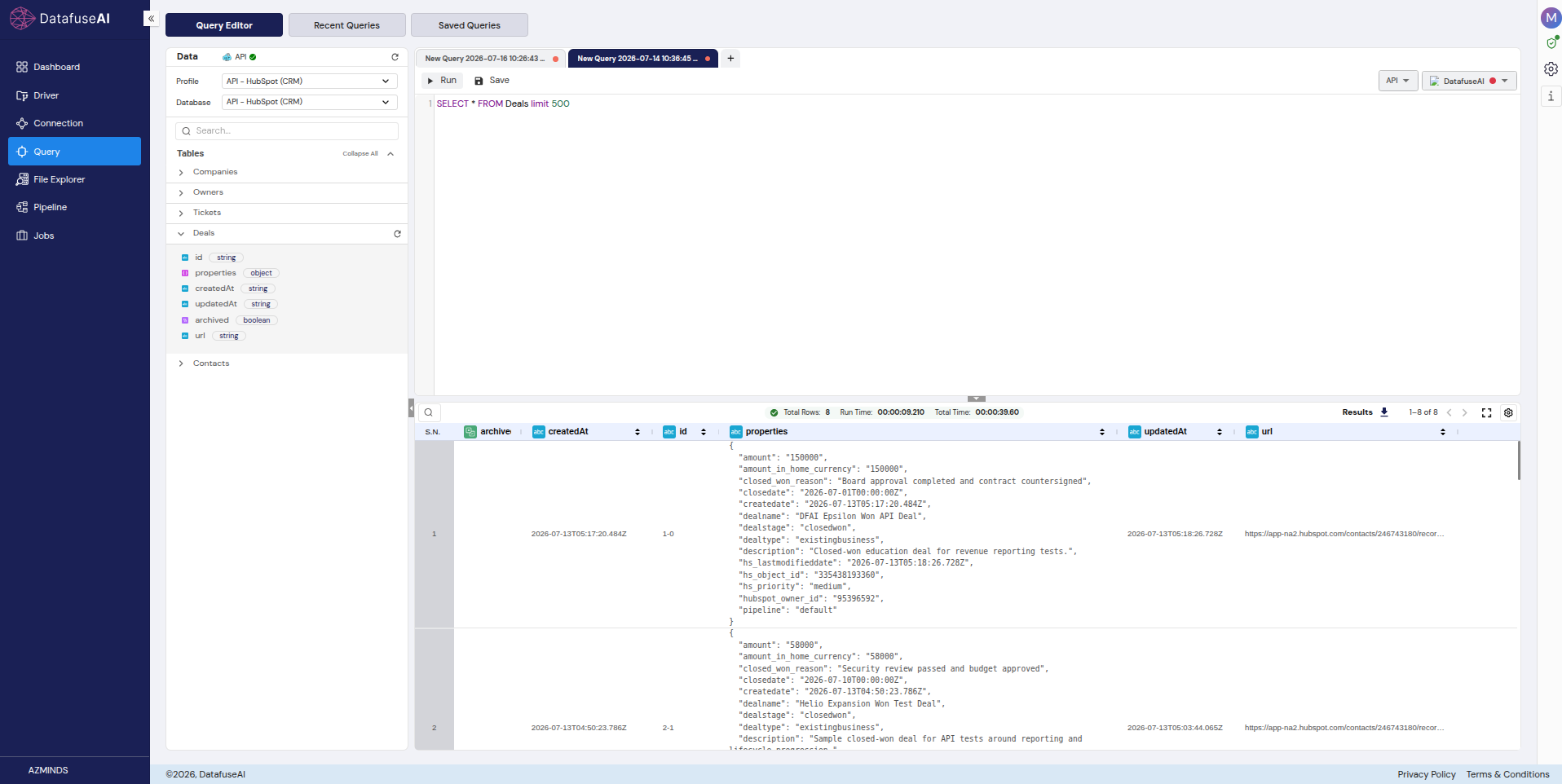
6. Query. Landed tables are queryable in the Query Editor, running SQL against the sink engine. The loop closes here: API → pipeline → sink → profiling → schedule → SQL.
The reusable part is narrower than the six boxes: the auth and the pagination are the only things you had to work out per API, and everything downstream of the Source node is the same work you'd do on any source at all. The worked example that follows is one instance of that.
A worked example: HubSpot CRM, end to end
On the data in this section. Every screenshot and figure below comes from a dedicated sample HubSpot account built specifically for this guide, modeled on realistic CRM scenarios: a multi-stage deal pipeline, companies across several countries, contacts at various lifecycle stages, and support tickets. No real customer data or PII appears anywhere in it, and every key is masked (pat-na1-…).
HubSpot CRM is a useful example precisely because it's an awkward one. It exercises the whole framework at once: Bearer auth, cursor-only pagination, a nested properties envelope, a number returned as a string, and associations too constrained to join. An easier API would prove less. Read the specifics below as one API's answers, not as what every API does — the envelope and the string-typed amount are HubSpot's choices, and yours will have different ones.
The goal: one pipeline, five endpoints, landing five tables that answer a morning's worth of RevOps questions.
Scope the key before you copy it
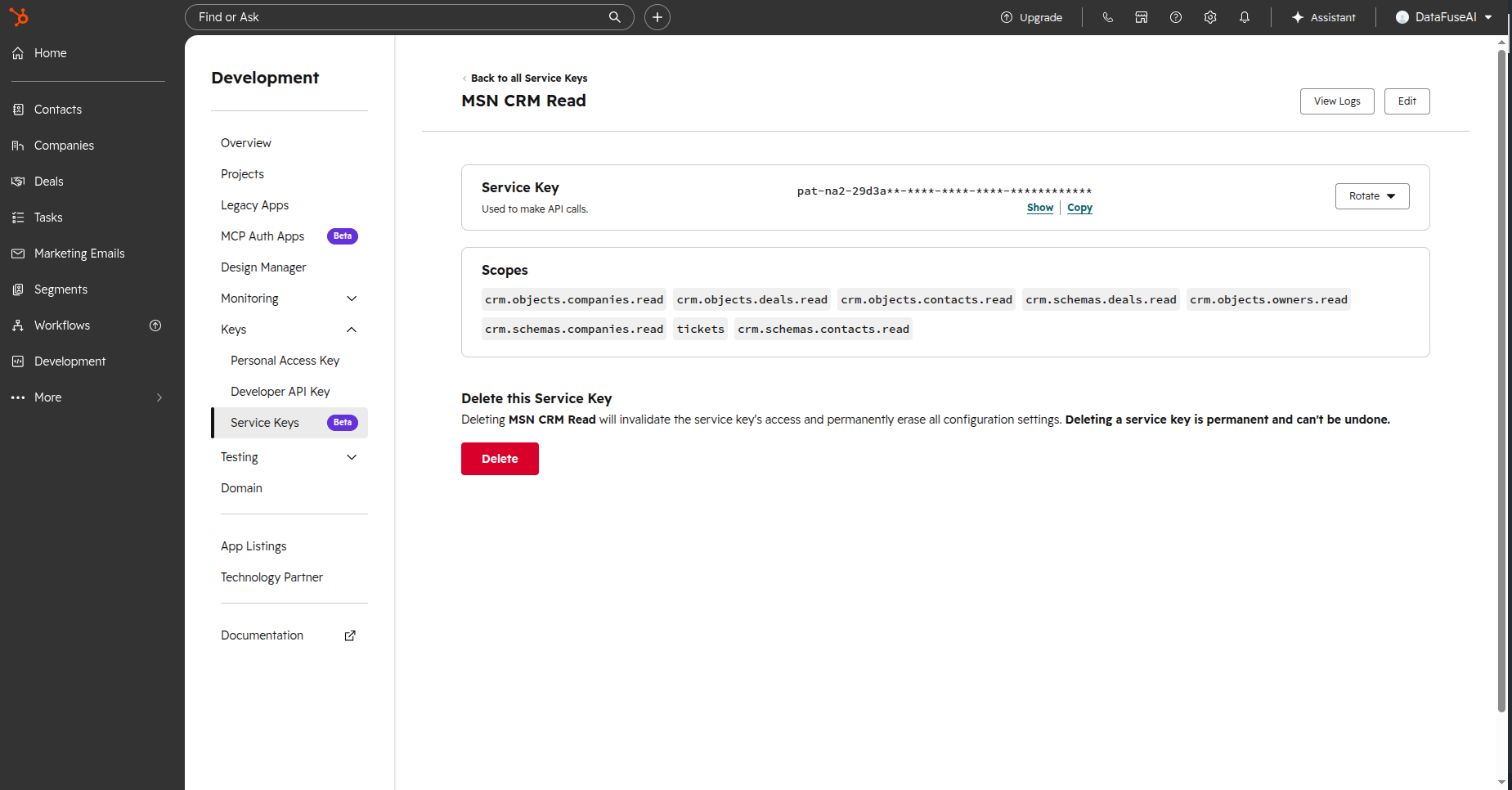
HubSpot offers several credential types, and only some fit "read CRM data from one account." The Service Key, currently in beta, is the easy default: object-scoped, rotatable, no app to manage, sent as a Bearer token. The legacy Private App token is the fallback. An OAuth app is the right answer only if you're building something public or multi-account. Personal Access Keys are CLI auth, and Developer API Keys configure apps rather than read data; neither is a REST bearer for CRM objects.
The path: Development → Keys → Service keys → Create service key. Name it something that says what it does, like DataFuseAI CRM Read. Then tick the read scopes, and only the read scopes:
crm.objects.contacts.read
crm.objects.companies.read
crm.objects.deals.read
crm.objects.owners.read      (if listed)
crm.objects.tickets.read
No .write. No export. No import. Nothing marked sensitive. Start minimal and add later if a pipeline genuinely needs more. This is the step that cashes out the bearer-token problem from earlier: possession is the whole authorization model, so the ticked boxes are the only thing standing between a leaked config field and a writable CRM. Create the key, then Show → Copy it (pat-na1-xxxx…). Afterwards you can rotate it with a 7-day grace window, view its logs, and edit its scopes without rebuilding anything.
The OAuth alternative, briefly, for the case where you're building a shareable app rather than reading one account: it maps to OAuth Authorization Code, with access tokens that expire after 30 minutes and refresh from there.
The connection profile
Four fields, verbatim:
Profile Name:        API - HubSpot (CRM)
Source:              API
Base URL:            https://api.hubapi.com
Authentication Type: Bearer Token
  Bearer Token:      <your Service Key, pat-na1-…>
Save, then Test Connection, then Discover Schema on each endpoint. That order matters for the reason given earlier and worth repeating with a concrete stake: Test Connection probes https://api.hubapi.com and confirms HubSpot's host is up, which it always is. Discover Schema sends a real authenticated request to a real endpoint and comes back with the field list, which is the first moment you learn whether your scopes were right.
The endpoints
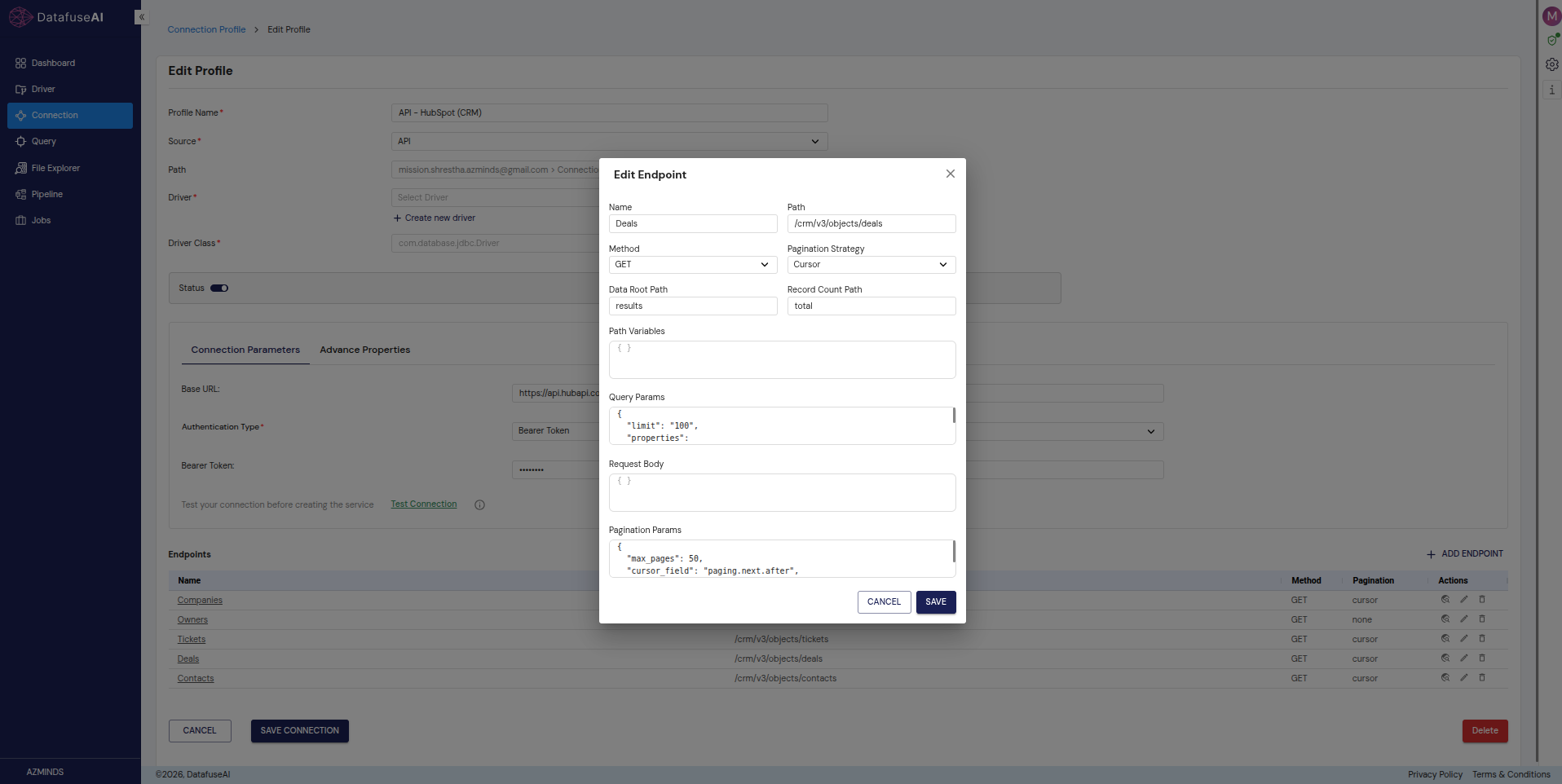
Five endpoints, all cursor-paginated, all with Data Root Path: results. The config block that matters:
Pagination Strategy: Cursor
Query Params:        {…properties…, "limit": "100"}
Pagination Params:   {"cursor_param":"after", "cursor_field":"paging.next.after", "max_pages":50}
cursor_field is the annotation to read twice: paging.next.after is a path into the response body, telling the runtime where HubSpot hides the token for the next page. HubSpot's object-API docs confirm the shape — the response returns "paging": { "next": { "after": "…" } }, and "the after value is the id of the next listing that would've been returned." The "limit": "100" isn't arbitrary either: 100 is the largest page these endpoints will return, and limit is how you ask for less than that ("To retrieve a specific number of records under 100, add a value to the limit parameter").[9] Asking for fewer just means more round trips against the rate limit that produced our 429.
| Endpoint | Path | Key properties requested |
|---|---|---|
| Deals | /crm/v3/objects/deals |
dealname, amount, dealstage, pipeline, closedate, hubspot_owner_id, … |
| Companies | /crm/v3/objects/companies |
name, domain, industry, city, country, lifecyclestage, hubspot_owner_id |
| Contacts | /crm/v3/objects/contacts |
email, firstname, lastname, lifecyclestage, hubspot_owner_id, company, jobtitle |
| Owners | /crm/v3/owners |
id, email, firstName, lastName (top-level, no properties envelope) |
| Tickets | /crm/v3/objects/tickets |
subject, hs_pipeline_stage, hs_ticket_priority, hubspot_owner_id |
Those v3 paths are the ones this run used and they remain documented, but HubSpot now also publishes a date-versioned path for the same objects (/crm/objects/2026-03/{objectTypeId}). If you're building this today, check which one the docs put in front of you.
Every CRM object endpoint needs that explicit properties list. HubSpot's documentation describes the parameter as "a comma separated list of the properties to be returned in the response,"[9] and the operative word is returned — omit it and you get a thin default that won't contain amount, dealstage, or anything else you came for. This is the single most common reason a HubSpot pull looks empty when it isn't. It's also a good example of a per-API quirk you have to read the docs for: no framework predicts it.
Owners is the odd one out: its fields arrive top-level, with no properties envelope to unwrap, so configuring it like the others fails. With a single owner in this account it never needed a second page either. Even inside one vendor's API, the rules aren't uniform.
The CAST that the forecast depends on
Here's the structural fact that decides whether any of this produces a number. HubSpot CRM wraps business fields in a properties object with only id at the top level, and returns amount as a string, so a single CAST(amount AS DOUBLE) in a Derived node is the coercion the entire forecast depends on.
Unpack that in order. The Source node returns rows shaped { id, properties: { dealname, amount, dealstage, … } }. An Explode of properties.* unwraps the envelope and gives you dealname, amount, and dealstage as real columns. That part is mechanical.
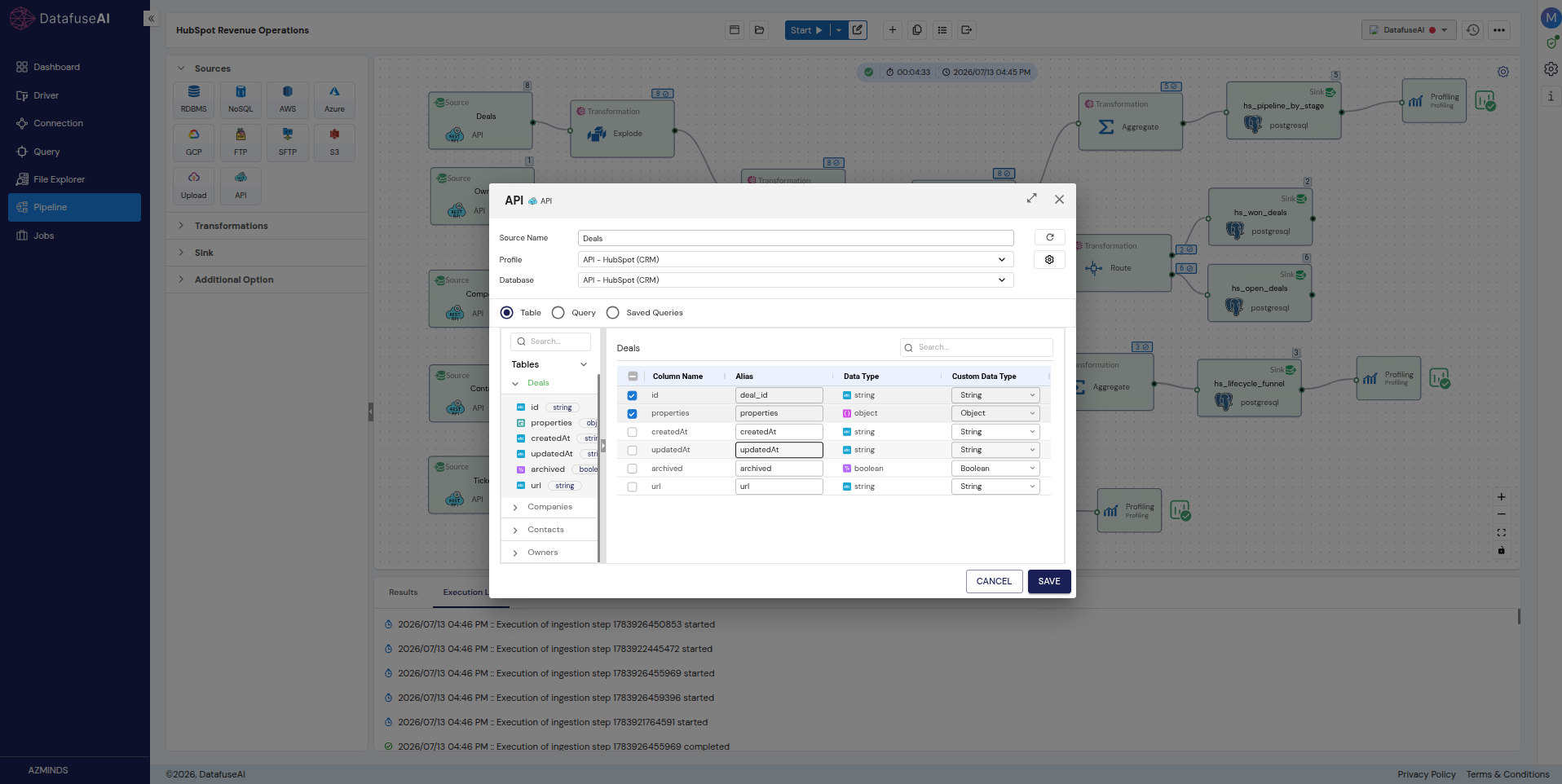
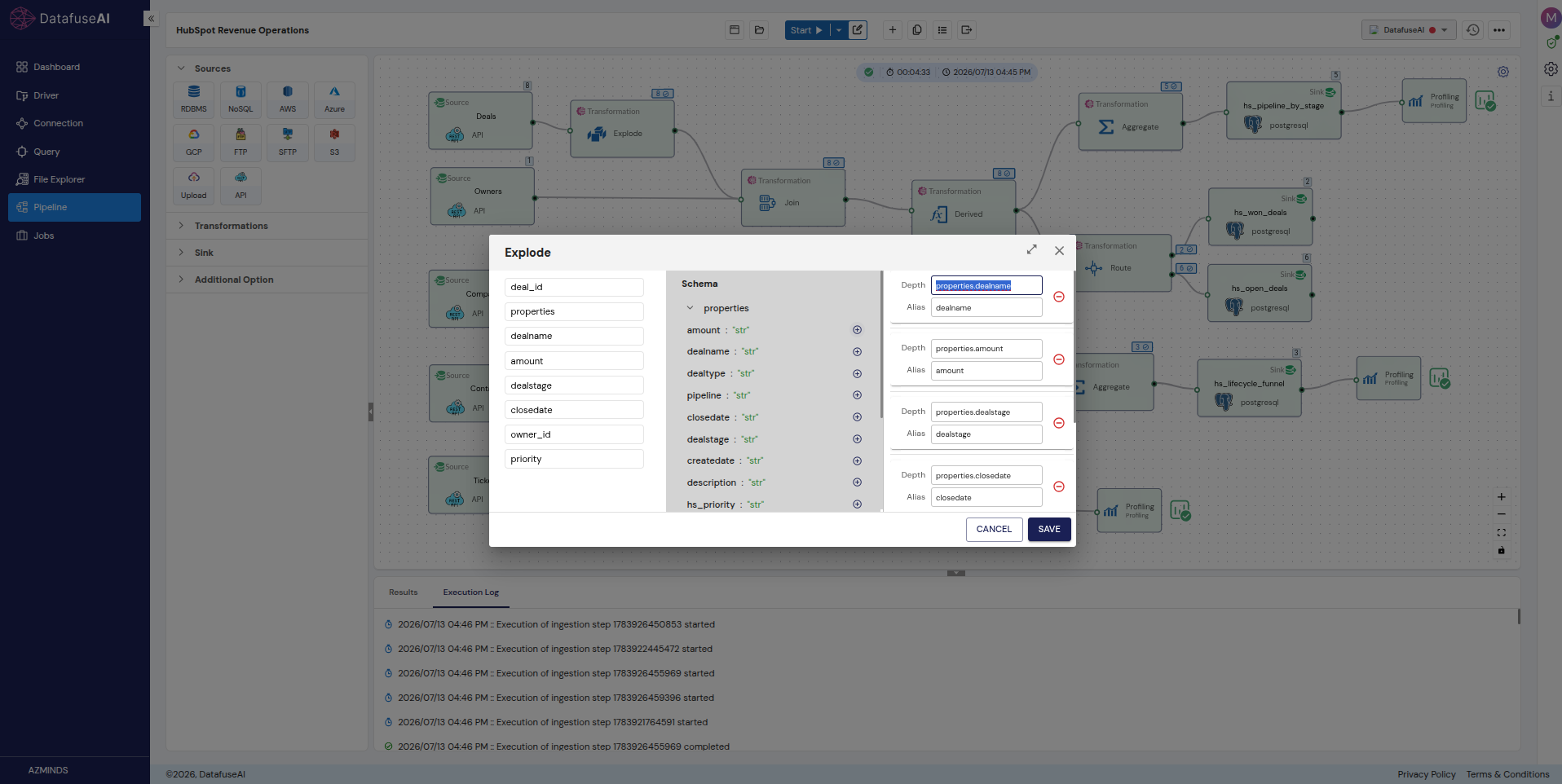
What Explode cannot do is type them. amount arrives as "91000", a quoted string, and it stays a string through the Explode because Explode's job is structure, not types. It isn't a source column you can override at Discover Schema time either, because at Discover Schema time it doesn't exist yet: it's still inside the envelope. So the coercion has exactly one correct home:
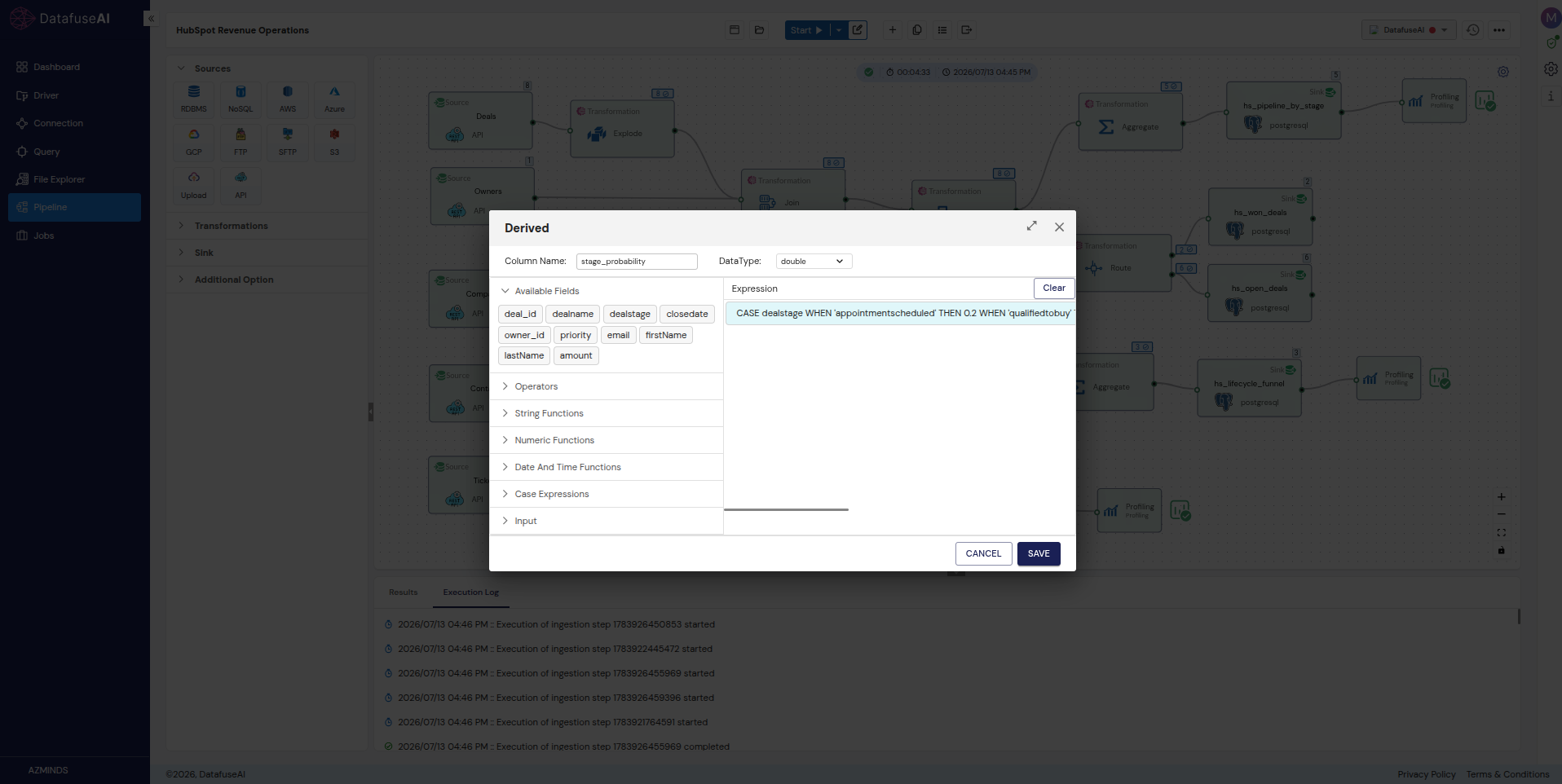
amount_num = CAST(amount AS DOUBLE)
One expression, in one Derived node, after the Explode and before any arithmetic. Skip it and SUM(amount) either errors or concatenates, and the forecast never gets computed.
This is HubSpot's quirk, not a universal one — plenty of APIs return amount as a JSON number and you'd cast nothing. The transferable habit isn't "always CAST." It's to look at what Discover Schema inferred for the fields you plan to do arithmetic on, before you build anything on top of them.
The gotcha: type Derived expressions by hand. Pasting from rendered markdown or HTML can inject invisible zero-width characters into the expression, which Spark rejects with an error that points nowhere useful. This one costs an afternoon if you don't know it and thirty seconds if you do.
Union, not join
The obvious way to build a company-plus-contact funnel is to join companies to contacts. In this account, that's the wrong move, and the reason generalizes well beyond HubSpot: the associations are constrained, so there's no foreign key to join on that the data will actually honor.
A join with a key that isn't reliably populated doesn't fail loudly. It drops rows, or duplicates them, and hands you a funnel that's confidently wrong. So Companies and Contacts each get normalized independently — Explode, then a Derived node mapping each object's fields onto a shared shape of entity_type, entity_name, lifecyclestage — and then a Union by name stacks them. No key required, because no relationship is being asserted. Both objects have a lifecycle stage, the union counts them together, and the funnel is correct because it never claimed a link that wasn't there.
The contrast case is Owners, which is the one safe join here. Deals carry hubspot_owner_id, Owners carry id, and the relationship is real and populated. So Branch 1 uses a Left Join on hubspot_owner_id == id to attach owner names to deals, and nothing about it is a workaround.
The rule underneath: join when the API gives you a key it actually maintains, union when it gives you rows that share a shape. Reaching for a join because joins feel more sophisticated is how a pipeline produces a number nobody can reconcile.
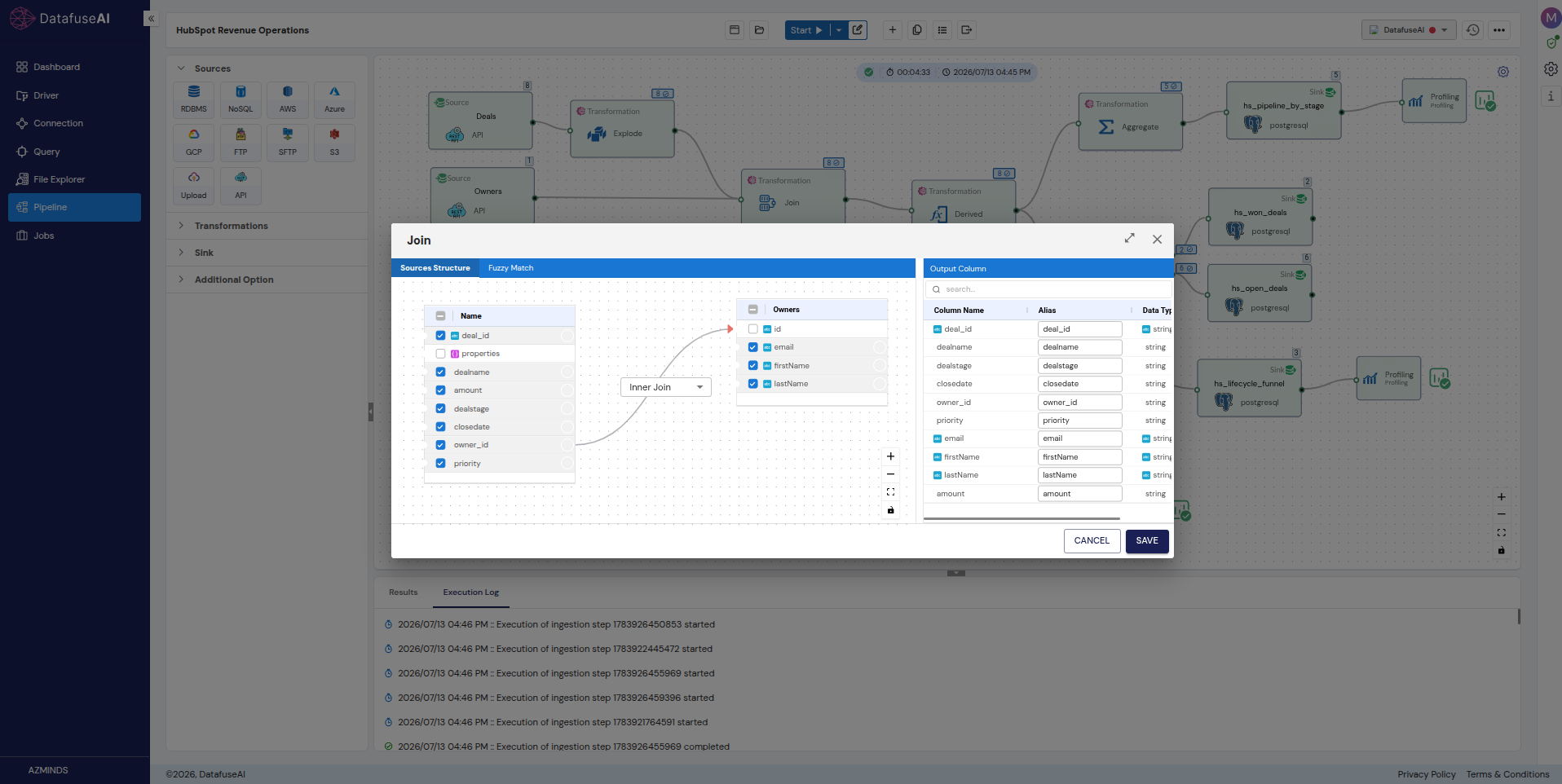
The three branches
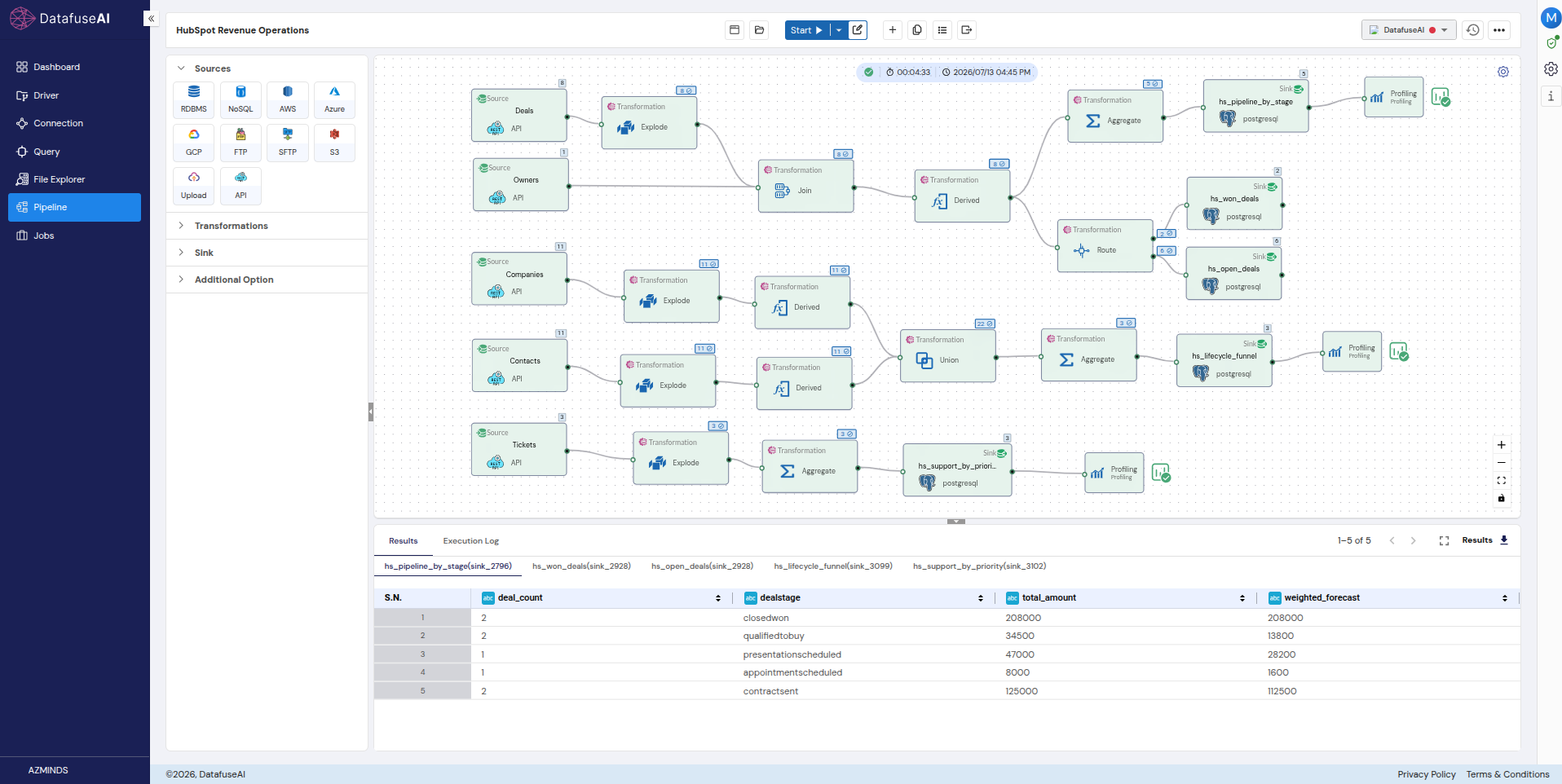
The finished pipeline, hs-revops-360, is one canvas: 5 API sources → 6 transform types → 5 PostgreSQL sinks → 3 profiling gates. It runs as three branches.
Branch 1, deal forecast and segmentation. Deals → Explode(properties.*) → Join(+Owners on hubspot_owner_id) → Derived, where the Derived node computes amount_num = CAST(amount AS DOUBLE), stage_probability as a CASE on dealstage, weighted_amount, is_won, is_open, and owner_name. Then it forks. Branch 1a runs Aggregate by dealstage into the hs_pipeline_by_stage sink, with Profiling behind it. Branch 1b runs a Route node (all-matches, disjoint) into two sinks: hs_won_deals and hs_open_deals.
Branch 2, the unified lifecycle funnel. Companies and Contacts each run Explode → Derived (normalize to entity_type / entity_name / lifecyclestage), then Union (by name) → Aggregate by lifecyclestage → the hs_lifecycle_funnel sink → Profiling.
Branch 3, support health. Tickets → Explode → Aggregate by priority → the hs_support_by_priority sink → Profiling.
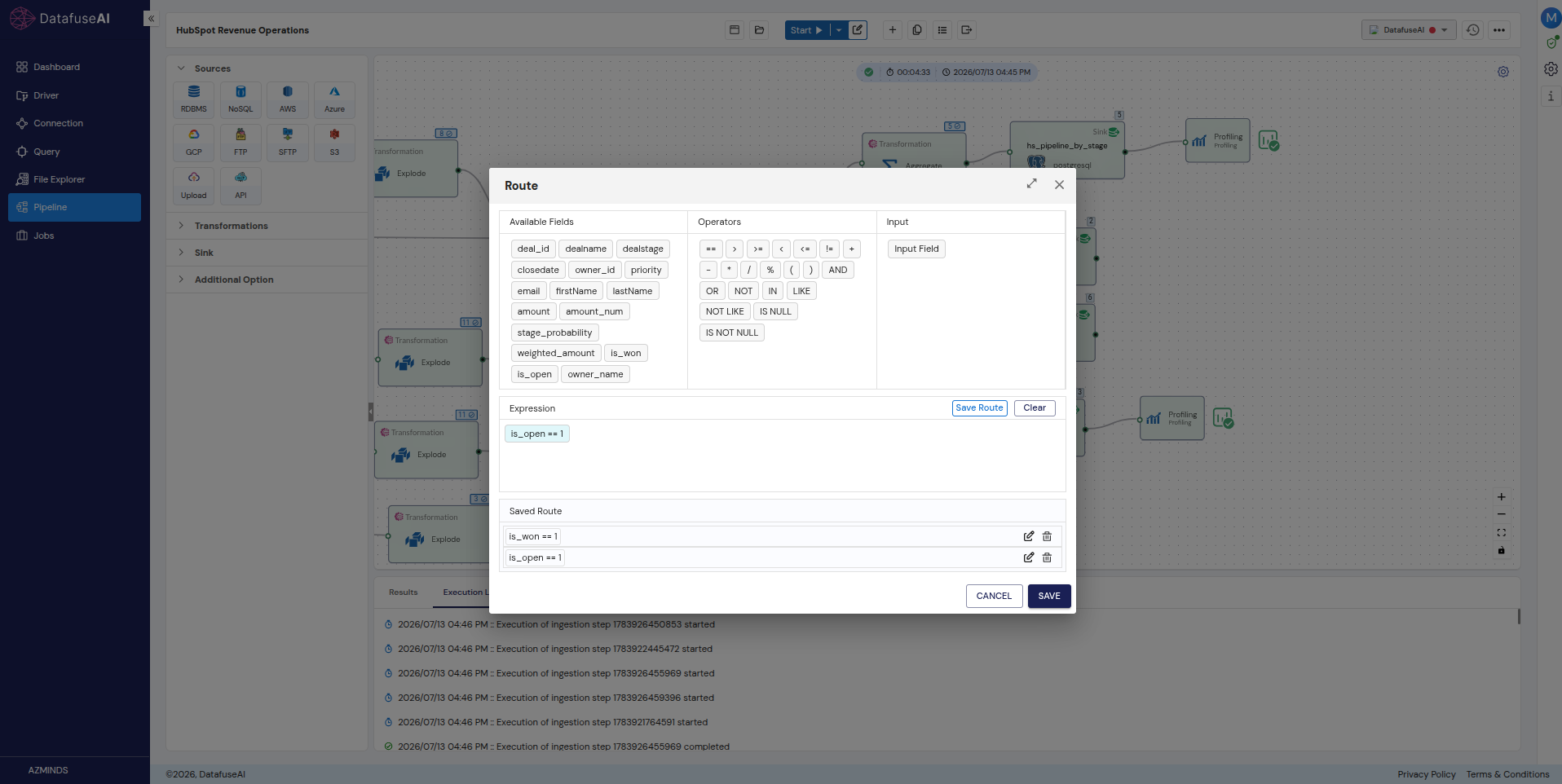
Three branches, one run, one credential. The branch shapes are what travel to your next API. The properties Explode, the CAST, and the Union-instead-of-join are answers to HubSpot's particular awkwardness — a different API asks different questions and you'd wire different nodes.
The results: what one pipeline answered
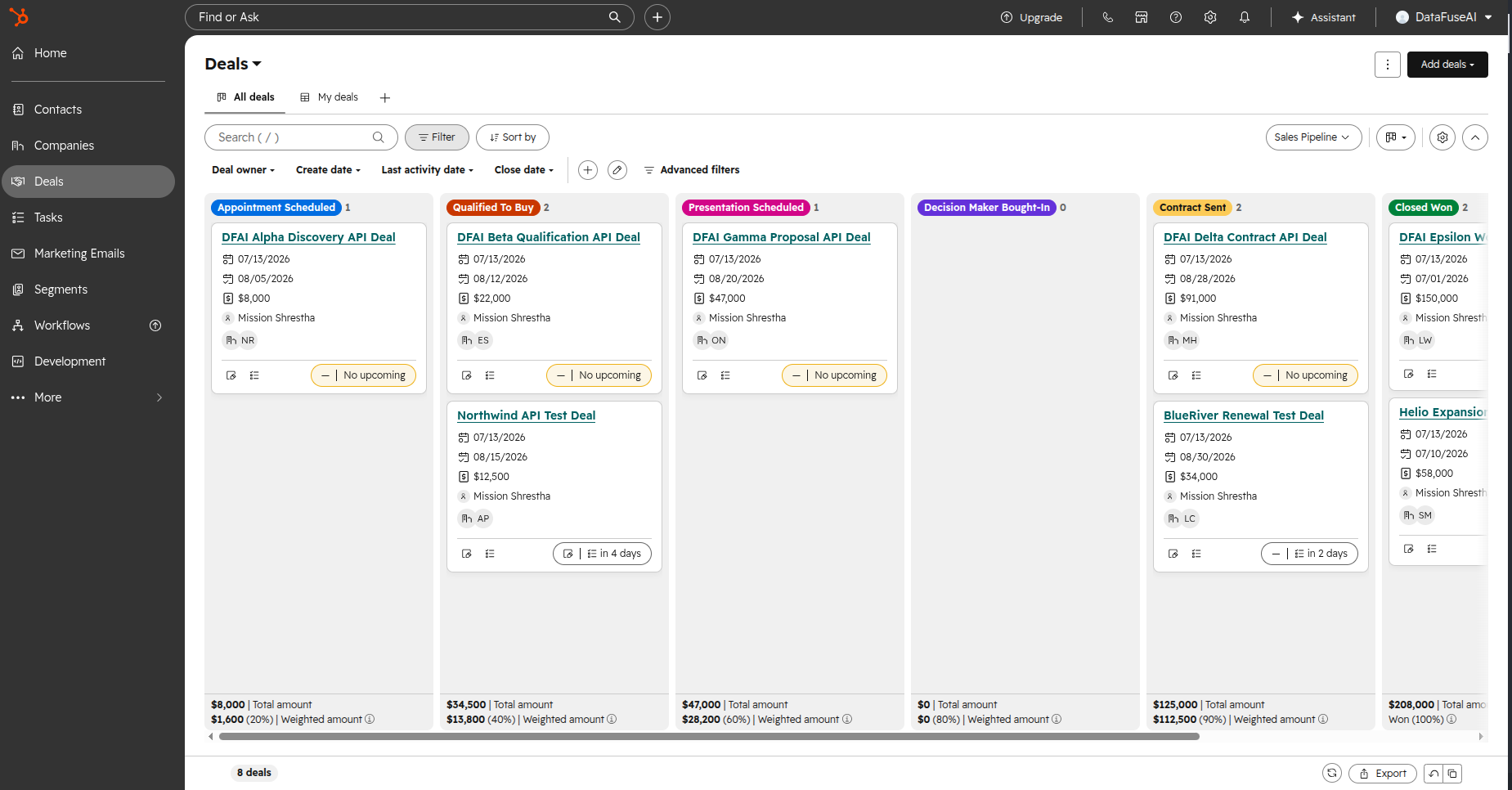
Weighting each deal by its stage probability turned a raw $422,500 pipeline into a $364,100 risk-adjusted forecast, with $156,100 of that still open. The raw number is what the CRM already showed anyone who looked. The weighted number is the insight, and it didn't exist anywhere before the pipeline computed it.
Here's the arithmetic, so you can audit it rather than take it:
| Deal | Amount | Dealstage | Win prob. | Weighted |
|---|---|---|---|---|
| DFAI Alpha Discovery | 8,000 | appointmentscheduled | 0.20 | 1,600 |
| Northwind API Test | 12,500 | qualifiedtobuy | 0.40 | 5,000 |
| DFAI Beta Qualification | 22,000 | qualifiedtobuy | 0.40 | 8,800 |
| DFAI Gamma Proposal | 47,000 | presentationscheduled | 0.60 | 28,200 |
| BlueRiver Renewal | 34,000 | contractsent | 0.90 | 30,600 |
| DFAI Delta Contract | 91,000 | contractsent | 0.90 | 81,900 |
| Helio Expansion Won | 58,000 | closedwon | 1.00 | 58,000 |
| DFAI Epsilon Won | 150,000 | closedwon | 1.00 | 150,000 |
| Total | 422,500 | 364,100 |
Eight deals, 11 contacts, 11 companies, and three tickets. A small fixture, deliberately: the point is the mechanism, and small numbers are checkable by hand.
The run landed five tables:
| Table | Grain | Rows | Powers |
|---|---|---|---|
hs_pipeline_by_stage |
Deal stage | 5 | Weighted forecast funnel |
hs_won_deals |
Won deal | 2 / $208,000 | Closed-won revenue |
hs_open_deals |
Open deal | 6 / $214,500 | Open-pipeline drill-down |
hs_lifecycle_funnel |
Lifecycle stage | 3 (22 entities) | Company + contact funnel |
hs_support_by_priority |
Ticket priority | 3 | Support triage |
That lifecycle funnel is the Union paying off: 22 entities across companies and contacts, split opportunity 12, lead 6, customer 4. It's a cross-object view HubSpot's native reports can't produce in this account, built without asserting a single association the data couldn't back.
Then the profiling gates, the step that earns the right to publish any of these numbers. weighted_forecast Sum = 364,100. total_amount Sum = 422,500. Funnel entity count = 22. Tickets = 3. Each of those is a number we already knew from the source, read back off the landed table, which is the entire point. If the sums had disagreed, the CAST or the Union would have been wrong, and we'd have found out here rather than in a meeting.
With the tables landed, the questions become SQL:
-- Risk-adjusted forecast vs raw pipeline
SELECT SUM(total_amount) AS raw, SUM(weighted_forecast) AS weighted
FROM hs_pipeline_by_stage;              -- → 422,500 | 364,100

-- Weighted OPEN pipeline (exclude closed-won)
SELECT SUM(weighted_forecast) FROM hs_pipeline_by_stage
WHERE dealstage <> 'closedwon';         -- → 156,100

-- Anything urgent on support?
SELECT priority, ticket_count FROM hs_support_by_priority;
That third query is the one that changes the character of the exercise. It returns HIGH ×1, MEDIUM ×1, and URGENT ×1, a "waiting on us" performance issue, from the same run, the same credential, and the same pipeline that produced the forecast. Revenue risk and support risk side by side, because both objects came through the same door. Landed tables are also just tables, which means the same five sinks feed a dashboard directly when you want analytics-ready data for BI rather than an ad-hoc query.
Three caveats, kept rather than smoothed, because a worked example that admits nothing is worth less than one that does.
The fixture has a single owner (95396592), so the owner rollup is single-valued. The join mechanism is correct and the data is degenerate: the query works, the chart would be a single bar. closedlost is absent from this account, which means we report won and open and don't compute a win rate; a win rate without losses would be actively misleading, so it isn't here. And two of the eleven companies have a null country, which we left in deliberately. Null handling is a real property of real API data, and a fixture with no nulls teaches you nothing about what happens when you meet one.
Scheduling is what turns all of the above from an answer into a habit. Schedule → Create Job → Daily at 7 AM, and the pipeline becomes a Job with run history, refreshing the tables before the first standup of the day.
Where this approach stops (and when to just write the script)
Practitioners on developer forums argue, repeatedly and with receipts, that no-code tools hit a complexity ceiling. The case runs like this: visual builders are strong for the simple 80%, but once the logic gets genuinely non-trivial, a canvas becomes harder to reason about than code, and there's no hatch to drop through to a lower level. The people making this argument have usually shipped on these tools, which is what makes it worth taking seriously rather than rebutting.
It's correct, and the honest response is to scope the claim rather than deny it.
This guide is about data ingestion and transformation, which has a comparatively finite decision surface: a handful of auth types, a handful of pagination strategies, and a handful of transforms. A CAST in a Derived node and a Union by name are inside the ceiling, comfortably. Arbitrary application logic with deep conditional branching is above it, and if that's what you're building, build it in code.
The second objection I'll concede outright, because it's true and there's no counter-move: version control and reproducibility are weaker on a canvas than in a repository. You cannot diff a visual pipeline the way you diff a script, and on a team where every change goes through review, that's a real cost. What exists here is narrower than Git and shouldn't be dressed up as equivalent: profiling gates that catch a wrong number, Jobs with run history that make a failure visible, scheduled refreshes that don't depend on anyone remembering. Useful, verifiable, and not the same thing as git log.
The third objection is the most common one, and the most quoted: just write the script. requests plus a pagination loop is about thirty lines, you own it outright, and there's no vendor in the picture.
For a one-off pull by someone who already writes Python, yes. Write the script. It'll be done before you finish reading a comparison table, and this guide has nothing to sell you.
The calculus changes at the maintenance surface, not at the first pull. The script is thirty lines until it needs auth refresh, then full-pagination auto-walk with a page cap, then type coercion, then a second endpoint and the join logic between them, then scheduling, then run history so you know when the 3 AM run failed, then profiling so you know the numbers are right before someone acts on them. Each addition is reasonable in isolation. Collectively they're a mini-platform, and you're now maintaining it in addition to your actual job. Code can obviously do this. The question is whether you want the thing you maintain to be the pipeline or the pipeline's infrastructure.
Where the argument recurs, if you want to read it in the original: I'm skeptical of low-code[10] · Ask HN: Honest thoughts on no-code or low-code solutions?[11] · A second look at "no code" tools (2019)[12].
Frequently asked questions
Check whether you need to first. Plenty of API responses come back flat enough to load as-is, and flattening those is work you invented for yourself. When a response does nest, use an Explode transform, one node per level: object paths become one column each without changing the row count, and array paths produce one row per element. JSON can nest without limit and a table cannot, so something has to do the unwrapping. One caveat worth carrying: flattening fixes structure, not types. A number that arrived as a string still needs a CAST afterwards.
Configure a connection profile with the API's Base URL and its auth type; add an endpoint with its path, its field selection, and the correct pagination strategy; extract with a Source node; reshape it if the payload needs reshaping; then write to a sink with an explicit table strategy. Schedule it if the question recurs. The two steps that decide whether it works at all are auth and pagination, and they're the two you have to answer freshly for every new API.
Schedule the pipeline as a Job. Minute, Hourly, Daily, Weekly, and Monthly frequencies are available, and the scheduler generates the underlying cron expression, so a daily 7 AM refresh is a few clicks rather than a crontab entry on someone's laptop. Scheduled runs carry run history, which matters more than the scheduling itself: an unattended pipeline that fails silently is worse than no pipeline.
Yes. Use a Union rather than a Join. A Join needs a foreign key both sides genuinely maintain, and when an API's associations are constrained, that key either isn't populated or isn't trustworthy, so the join silently drops or duplicates rows. Normalize each endpoint's output to a shared column shape in a Derived node, then Union by name: you get one table across both objects without asserting a relationship the data can't back. Our 22-entity company-plus-contact funnel is exactly this, and it's a view HubSpot's own reports can't produce in that account.
The API you have to connect this week
The per-API work is smaller and more predictable than it feels from the outside. That's the useful thing to carry out of here, not the HubSpot config and not the six boxes on the canvas. Read how it authenticates, read how it paginates, and you've done the part that doesn't transfer. Everything downstream is the same shaping you'd do to any source, and how much of it you need depends on the question, not on the protocol.
So the next time someone hands you an API you've never seen, the first two questions are already written. The answers tell you within ten minutes whether you're looking at an afternoon or a week.
And if it turns out to be a single call, a flat response, and a question you'll only ask once — read the JSON and go home. Knowing which case you're in is most of the skill.
References
- [1] Bray, T. (Ed.). The JavaScript Object Notation (JSON) Data Interchange Format. RFC 8259, IETF, December 2017. rfc-editor.org/rfc/rfc8259
- [2] Anaconda. The State of Data Science 2020: Moving From Hype Toward Maturity. 2020. anaconda.com/resources/whitepaper/state-of-data-science-2020
- [3] Hardt, D. (Ed.). The OAuth 2.0 Authorization Framework. RFC 6749, IETF, October 2012. rfc-editor.org/rfc/rfc6749
- [4] Jones, M. & Hardt, D. The OAuth 2.0 Authorization Framework: Bearer Token Usage. RFC 6750, IETF, October 2012. rfc-editor.org/rfc/rfc6750
- [5] Nottingham, M. & Fielding, R. Additional HTTP Status Codes. RFC 6585, IETF, April 2012. (§4 defines 429 Too Many Requests.) rfc-editor.org/rfc/rfc6585
- [6] HubSpot. Usage Guidelines — API Rate Limits. Developer documentation. developers.hubspot.com/docs/developer-tooling/platform/usage-guidelines
- [7] ERCOT. Public API rate limiting — GitHub discussion #132,
ercot/api-specs. github.com/ercot/api-specs/discussions/132 - [8] Nottingham, M. Web Linking. RFC 8288, IETF, October 2017. rfc-editor.org/rfc/rfc8288
- [9] HubSpot. Using object APIs — CRM guides. Developer documentation. developers.hubspot.com/docs/guides/api/crm/using-object-apis
- [10] Hacker News discussion. I'm skeptical of low-code. 427 points. news.ycombinator.com/item?id=38816135
- [11] Hacker News discussion. Ask HN: Honest thoughts on no-code or low-code solutions?. 30 points. news.ycombinator.com/item?id=31508130
- [12] Hacker News discussion. A second look at "no code" tools (2019). 139 points. news.ycombinator.com/item?id=26136334

 Request a Demo