
Sales reports $121,000 closed won for the quarter. The billing report says $93,500. Both numbers come straight from their systems, and the meeting turns into an argument about which system is broken.
When CRM and billing numbers don't match, neither system has to be broken. They count different things: a Salesforce opportunity Amount is "the estimated total sale amount" [1], while a billing report adds up invoices issued in a period. To investigate, match the records behind both totals. Then sort every difference into one of six buckets until nothing is left unexplained. This guide works through that on illustrative sample data.
Who this is for: revenue operations, finance analysts and data engineers asked to explain a gap between two revenue reports. If the question is which definition should win, start with our guide to why systems disagree, which covers root causes and how to agree a shared definition [8].
Key takeaways
- A CRM total and a billing total answer different questions. Expect a gap, and aim to explain every dollar of it.
- Compare records, not report totals. Put amounts, currencies and timestamps into one form before you compare anything.
- Match on a stored ID first, then on customer plus amount. Never match on customer alone.
- Sort each difference into one of six buckets in a fixed order: duplicates, status and credits, scope, timing, schedule, currency. Stop when the residual is zero.
- In our illustrative example, a $27,500 net gap hid $95,300 of individual differences. $30,000 of them were data errors.
Product documentation checked 6 November 2026.
Why don't CRM and billing numbers match?
CRM and billing numbers don't match because each system records a different event. The CRM records a deal's expected value on the date it closes. The billing system records invoices, each with a status, a creation time and later corrections. A report on either system then applies its own filters for period, status and currency. Finance teams often call the two numbers bookings and billings. Two correct reports can still disagree by a large amount.
The table compares what Salesforce and Stripe record for the same deal. Other CRMs and billing systems use different field names, but the same questions apply.
| What you compare | CRM (Salesforce opportunity) | Billing (Stripe invoice) | Why the totals drift |
|---|---|---|---|
| Amount | "The estimated total sale amount"; with products, the sum of the products [1] | Integer amounts in the smallest currency unit, such as cents [5] | Contract value against what has been invoiced so far |
| Date | Close Date, a date; marking a deal won before that date sets it to the current UTC date [1] | created in seconds since the Unix epoch; an effective_at date can differ [5] |
Period cutoff and time zone |
| Status | A Closed/Won stage marks the deal won [1] | Draft, open, paid, void or uncollectible [3] | Void invoices count as zero for reporting [3], so an export that sums every status overstates |
| Corrections | Edits to the opportunity | Credit notes reduce a finalized invoice without voiding it [3] | A report may or may not subtract credits |
| Currency | With advanced currency management, converted at the dated rate for the Close Date [2] | Invoice currency as a lowercase ISO code [5] | Two conversion rates for one amount |
| Link between systems | Opportunity ID | Optional metadata you attach [6] | No shared key unless you store one |
Source: Salesforce and Stripe documentation as cited, checked 6 November 2026. The "Why the totals drift" column is DataFuseAI's editorial summary.
What is a six-bucket reconciliation bridge?
A reconciliation bridge starts at one reported total and ends at the other. Every step between them is a named amount. The six-bucket bridge is a DataFuseAI editorial framework, not an industry standard. Apply the buckets in this order, so each difference is counted once.
| # | Bucket | What lands in it | Usually | First check |
|---|---|---|---|---|
| 1 | Duplicates | The same deal or invoice recorded twice | Data error | Group deals by account, amount and close date |
| 2 | Status and credits | Void or draft invoices in the report; credit notes | Error if void is counted; credits are definition | Filter by status, then subtract credit notes [3] [4] |
| 3 | Scope | Records with no counterpart by design, such as self-serve or usage invoices | Definition | List unmatched records on both sides |
| 4 | Timing | The counterpart exists, in another period | Timing | Widen the window by one period on each side |
| 5 | Schedule | Contract value billed in instalments | Definition | Compare the deal Amount with invoices to date |
| 6 | Currency | One deal-currency amount, two conversion rates | Definition | Recompute in the deal currency [2] |
Source: DataFuseAI editorial framework; status and currency checks follow the vendor documentation cited.
Three common differences need a home too. Discounts and proration change what is invoiced, so they belong in schedule; a Stripe invoice's lines include prorations [5]. Refunds and credits on paid invoices belong in status and credits [3]. Tax is handled in step 2, before any bucket.
Duplicates go first because they inflate every later bucket. Status goes before scope, so a void invoice is not mistaken for billing with no deal. Timing goes before schedule, because a deal billed next month is a cutoff difference, not an instalment.
How to investigate a CRM and billing gap, step by step
The investigation has six steps, and it works the same in a spreadsheet, SQL or a pipeline tool. The first three steps make the two datasets comparable. The last three explain the difference and stop it coming back. Keep the record-level files from every step, because the bridge is only as trustworthy as the rows behind it.
Step 1: Write down the filters behind each number
Before touching data, write down exactly what each report includes. For the CRM, note the stage filter, the date field, the period and the currency setting. For billing, note which statuses count and whether credit notes are subtracted. Note which date defines the period, such as the created or effective date [5], and in which time zone.
Most gaps start here. A billing report that sums every status counts void invoices, and one that ignores credit notes counts credits as billing.
Step 2: Pull record-level extracts and put them in one form
Export the deals and the billing documents, not the report totals. Then normalise five things:
- Units. Stripe invoice amounts are integers in the smallest currency unit, so 900000 means $9,000.00 [5].
- Currency codes. Stripe writes ISO codes in lowercase, such as
usd[5]. Use one case on both sides. - Tax. A Stripe invoice
totalis the total after discounts and taxes, whiletotal_excluding_taxincludes discounts but excludes tax [5]. Compare the figure that matches how your CRM Amount is entered. - Timestamps. Convert Stripe's Unix timestamps [5] to the time zone your reporting period uses, and record which one that is.
- Deal currency. Keep each amount in its original currency next to the converted figure, so step 4 can separate currency from everything else.
Step 3: Match the records, then count what didn't match
Match each invoice to a deal on a stored ID first. Stripe lists storing internal IDs "to match Stripe objects to objects in your own systems" as a use of metadata [7]. Metadata doesn't copy to related objects automatically, with a few exceptions. When a subscription creates an invoice, Stripe copies its metadata to the invoice's parent.subscription_details.metadata as a one-time snapshot, not to the invoice's own metadata [6].
Where no ID exists, match on customer plus amount within the period, and mark those matches as weaker. Never match on customer alone. A usage invoice for an existing customer would attach to the wrong deal. When customer names differ between systems, use fuzzy matching with a threshold you choose; our fuzzy matching guide covers the algorithms [12].
Join at one row per deal. A row-level join of deals to invoices multiplies amounts; our five-check join test shows how to catch it.
Step 4: Sort every difference into one bucket, in order
Work through the buckets in order: duplicates, status and credits, scope, timing, schedule, currency. Give each record one bucket, one signed amount and a one-line reason, such as "void invoice included in the export". A record that seems to fit two buckets goes in the earlier one. The reason line is what lets someone else check the bridge without asking you.
Step 5: Close the bridge to zero
Add the bucket totals to the CRM figure. The result must equal the billing figure exactly. If it doesn't, the residual is a seventh bucket called "unexplained". Investigate that before you present anything. A bridge with a large unexplained line hasn't explained the gap.
Add up the absolute values of the differences as well. A small net gap can hide large differences that cancel each other out.
Step 6: Fix the errors, label the definitions, schedule the check
Data errors get fixed at the source: merge the duplicate deal, and change the report filter that counts void invoices. Definition and timing differences stay, because they are correct, but each needs a written label so the next reader expects them. Then run the same comparison every period as a scheduled check. Our guide to pipeline validation checks covers where count and cardinality checks belong in a pipeline [13].
Illustrative worked example: what explains a $27,500 gap?
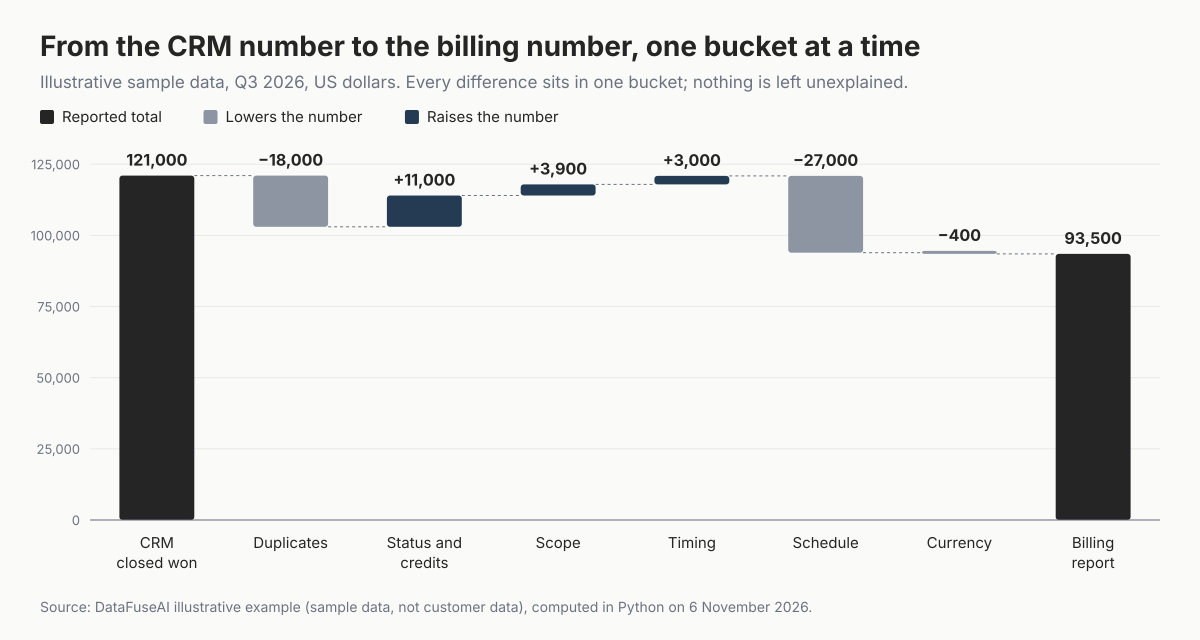
The sample data is invented for this illustration: 8 CRM opportunities and 11 Stripe-style billing documents for one illustrative quarter, Q3 2026. CRM closed won for the quarter is $121,000. The billing report is $93,500, so the net gap is $27,500.
| Bucket | Records behind it | Amount (USD) | Type |
|---|---|---|---|
| CRM closed won, Q3 | 6 opportunities closed won in the quarter | 121,000 | Starting total |
| Duplicates | One Delta deal entered twice | −18,000 | Data error |
| Status and credits | A void invoice in the export (+12,000); a credit note (−1,000) | +11,000 | Error, then definition |
| Scope | A self-serve invoice (+2,400) and a usage invoice (+1,500), with no deal | +3,900 | Definition |
| Timing | Deal closed at the cutoff (+8,000); Q2 deal billed in July (+10,000); Q3 deal first billed 1 October (−15,000) | +3,000 | Timing |
| Schedule | Acme's $36,000 annual deal, billed quarterly, so $27,000 not yet invoiced | −27,000 | Definition |
| Currency | A €20,000 deal at 1.10 in the CRM, 1.08 in the billing report | −400 | Definition |
| Billing report, Q3 | 10 documents created in the quarter | 93,500 | Ending total; residual 0 |
Source: illustrative sample data computed with Python on 6 November 2026; exchange rates are illustrative, not market data. Not customer data.
Two findings matter more than the bridge itself.
The net gap understated the work. The individual differences add up to $95,300 in absolute terms, against a net gap of $27,500. The duplicate deal (−$18,000) and the void invoice (+$12,000) partly cancel. Together they move the net gap by only $6,000, yet they are $30,000 of errors.
The cutoff came from the time zone. The Ember deal was marked closed won at 17:00 Pacific on 30 September. Its Close Date had been in the future, so it became the current UTC date, 1 October [1]. The invoice was created ten minutes later, at 00:10 UTC on 1 October. A billing report run in Pacific time put it on 30 September. One deal, two quarters, both systems working as documented.
Matching worked as step 3 predicts. Of 8 live invoices in the quarter, 5 matched on the opportunity ID stored in metadata and 1 on customer plus amount. The 2 left unmatched became the scope bucket. A customer-only match would have attached Acme's $1,500 usage invoice to Acme's annual deal, and the schedule bucket would have been wrong by the same amount.
Mistakes to avoid
- Comparing report totals instead of records. Two totals can't tell you which records differ, so every explanation stays a guess.
- Summing every invoice status. Void invoices count as zero for reporting, so leave them out of the billing total [3].
- Mixing currency units. Stripe amounts are in the smallest currency unit, so for a two-decimal currency such as USD a missed division by 100 makes billing look 100 times too high [5].
- Reading Close Date in your own time zone. A deal closed won early gets the current UTC date, and Salesforce notes that UTC can differ by one day from your time zone [1].
- Matching on customer alone. Usage and one-off invoices attach to the wrong deal and hide the scope bucket.
- Calling a small net gap close enough. Offsetting errors cancel in the net; check the absolute total too.
Where DataFuseAI fits (and where it doesn't)
DataFuseAI, the publisher of this guide, runs matching and reconciliation as steps in a scheduled pipeline. Its reconciliation page describes weighted, multi-column fuzzy joins for sources "that were never given a shared key", with a threshold you set [9]. Each reconciliation run keeps its history, including when it ran, the rows matched and the threshold [9].
Fits:
- Matching deals to invoices when the systems share no ID, using a Fuzzy Join on names and other columns [9].
- Repeating the comparison every period as a scheduled job with run history [9].
- Teams that want flagged pairs reviewed rather than merged. The finance page says flagged pairs are "output for review, not merged automatically" [10].
May not fit:
- Pulling straight from Salesforce or Stripe with a pre-built connector. The connectors page lists databases, warehouses, files and a generic REST API connector, and no SaaS app connectors [11].
- Checks at the moment of entry. The reconciliation page says it is not built to sit in front of a live transaction and approve or reject it in milliseconds [9].
- Revenue recognition. The bridge explains billing against the CRM; recognising revenue stays with your finance system and policy.
DataFuseAI's data reconciliation page walks through a Fuzzy Join on two sources with no shared key [9]. For a finance-specific example, see the CRM and ERP walkthrough for finance teams [10].
Frequently Asked Questions
Should CRM revenue ever equal billing revenue?
Only when both reports use the same definition. That means deals billed in full when they close, invoices in the same period and time zone, one exchange rate, and no credits or void invoices counted. A business that bills any contract in instalments, or bills usage separately, will see a gap. The goal is a bridge that explains every dollar of it.
How often should we reconcile CRM and billing data?
At least once per reporting period, before the numbers go to a board, a forecast or an audit. If the numbers feed a weekly dashboard, reconcile weekly, because a gap found at quarter end has had weeks to grow. DataFuseAI's reconciliation page says reconciliation runs are usually daily or weekly, matched to how fast the systems drift [9].
How big a gap between CRM and billing is acceptable?
There is no universal number. Set the rule on the unexplained residual, not on the net gap: it should be zero, because every difference has a named bucket. Fix data errors whatever their size. Definition and timing differences can stay at any size, as long as each one is labelled and the people who read both reports expect it.
Is reconciling CRM and billing the same as revenue recognition?
No. Billing totals, cash collected and recognised revenue are three different numbers. Even inside Stripe, unpaid invoices left open count as revenue in the Revenue Recognition report but are missing from the Balance summary report [14]. This guide stops at explaining billing against the CRM. Tying billing to the ledger is a separate reconciliation that finance owns.
Methodology
What we read. We read Salesforce documentation for opportunity fields and currency conversion, and Stripe documentation for invoice statuses, credit notes, the invoice object, metadata and revenue recognition reports. We also read DataFuseAI's own posts and product pages. All of it was read on 6 November 2026 between about 08:54 and 09:05 UTC.
The worked example. The sample data was invented for the illustration: 8 CRM opportunities and 11 billing documents, using Salesforce and Stripe field names. The script generates them, applies the bucket rules in order and asserts that the bridge closes to zero. Every figure in the example comes from that run. It is illustrative, not measured on customer data.
Limits. The example uses one CRM and one billing system, with one company time zone and illustrative exchange rates. Your systems may name fields differently, and your finance team may define the buckets differently. The bucket order is a DataFuseAI editorial choice.
References
- Salesforce Help, "Opportunity Fields", read 6 Nov 2026. https://help.salesforce.com/apex/HTViewHelpDoc?id=opp_fields.htm
- Salesforce Developers, "convertCurrency()" (SOQL and SOSL Reference), read 6 Nov 2026. https://developer.salesforce.com/docs/atlas.en-us.soql_sosl.meta/soql_sosl/sforce_api_calls_soql_querying_currency_fields.htm
- Stripe Docs, "How invoicing works", read 6 Nov 2026. https://docs.stripe.com/invoicing/overview
- Stripe Docs, "Issue credit notes", read 6 Nov 2026. https://docs.stripe.com/invoicing/dashboard/credit-notes
- Stripe API Reference, "The Invoice object" (API version 2026-04-22.dahlia), read 6 Nov 2026. https://docs.stripe.com/api/invoices/object?api-version=2026-04-22.dahlia
- Stripe Docs, "Metadata", read 6 Nov 2026. https://docs.stripe.com/metadata
- Stripe Docs, "Create custom columns using metadata", read 6 Nov 2026. https://docs.stripe.com/reports/metadata
- DataFuseAI, "Multi-Source Data Conflicts: What To Do When Systems Disagree", 30 Apr 2026. https://www.datafuseai.com/blogs/multi-source-data-conflicts
- DataFuseAI, "Data Reconciliation" (solution page), read 6 Nov 2026. https://www.datafuseai.com/solutions/data-reconciliation
- DataFuseAI, "Integrate and Reconcile Finance Data Before Your Reporting Deadline" (industry page), read 6 Nov 2026. https://www.datafuseai.com/industries/finance
- DataFuseAI, "Data connectors", read 6 Nov 2026. https://www.datafuseai.com/platform/data-connectors
- DataFuseAI, "Fuzzy Matching in ETL Pipelines: Algorithms & No-Code Implementation", 29 May 2026. https://www.datafuseai.com/blogs/fuzzy-matching-etl-pipelines
- DataFuseAI, "Data Quality Validation in ETL Pipelines: 5 Checks", 6 Feb 2026. https://www.datafuseai.com/blogs/data-quality-validation-etl-pipeline
- Stripe Docs, "Reconcile your Stripe balance with Revenue Recognition", read 6 Nov 2026. https://docs.stripe.com/revenue-recognition/data-reconciliation
 Request a Demo