
Picture a nightly orders script that has run cleanly for a year. Someone reruns it by hand after a network blip, and the Monday revenue report doubles. Python ETL scripts rarely fail on a good day. They fail when something goes wrong, often quietly, reporting success while loading the wrong data [1]. Switch to an orchestrator or a managed pipeline when several scripts need the same safety code, or one person can no longer keep them safe. In our test, that safety code took a 16-line script to 61 lines.
This guide shows that test, the code it needed, what an orchestrator or managed pipeline takes off your hands, and a short test you can run on your own scripts. Figures checked 16 November 2026, when the scripts were run.
Who this is for: data engineers and analysts who own a few Python jobs on cron and need to decide whether to harden them, wrap them in an orchestrator or replace them. For the wider question of whether you need a platform at all, start with our guide to what a data integration platform is.
Key Takeaways
- The first script failed all five tests. A rerun, a stalled run and a rerun after an outage all loaded duplicate rows. A renamed source field loaded 200 rows with no amount and still exited with success.
- Nobody was told. None of the five failures sent an alert. In three of them every run exited with code 0, so nothing looked wrong.
- The fixes are known and small, but they add up. A timeout, retries, a run lock, a schema check, an all-or-nothing upsert and a run log took the script from 16 lines to 61.
- An orchestrator schedules and retries, but your writes still have to be safe to repeat. Airflow's own guidance says to replace INSERT with UPSERT for that reason.
- A managed tool can still change what a report sees. In Fivetran's file connectors, a renamed column header leaves the old column filling with nulls in later syncs.
What is the difference between a Python ETL script and a managed data pipeline?
A Python ETL script is code you write and schedule yourself, often with cron, that pulls data from a source, reshapes it and loads it somewhere. A managed data pipeline is a product that runs the same extract, transform and load steps for you, with the scheduling and run history provided by the product. Between the two sits an orchestrator, which runs your own Python on a schedule.
| Option | Who writes the load logic | What comes built in | What you still own |
|---|---|---|---|
| Python script on cron | You | A schedule. Cron can mail command output to the crontab owner or a MAILTO address [2] | Timeouts, retries, duplicate protection, schema checks, alerts, run history |
| Script inside an orchestrator (Airflow, Prefect) | You | Scheduling and retries; Airflow can retry a failed task [3] | Making each task safe to rerun, which Airflow's guidance leaves to your code [3] |
| Managed data pipeline | The product, configured by you | Scheduling and run history, for example DataFuseAI's Jobs [4]; loading by primary key on products that MERGE, such as Fivetran [5] | Data tests on what was loaded, and the product's limits |
Options compared by who owns each job. Source: the documentation cited in each row, checked 16 November 2026. Products differ; check yours.
The build vs buy question is a cost and staffing decision, which our build vs buy analysis argues rests on the yearly cost of maintaining what you build [6]. This guide covers the earlier, more practical question: is the script you already have safe to leave running?
What happens when a simple script meets five common failures?
We wrote a short first version of an orders load, the shortest code that works on a good day, then put it through five failures that scheduled jobs can meet. Each failure was simulated against a local test API serving 200 orders over five pages. The correct result every time is 200 orders, each loaded once.
The first script is 16 lines of standard-library Python. It calls the API with no timeout, appends each page to an orders table and commits page by page. It reads fields with get(), so a missing field becomes a blank rather than an error. Here is the whole script:
import json, sqlite3, sys, urllib.request

api, db = sys.argv[1], sys.argv[2]
con = sqlite3.connect(db)
con.execute("""CREATE TABLE IF NOT EXISTS orders (
    order_id INTEGER, customer_id TEXT, amount REAL, updated_at TEXT)""")

page, pages = 1, 1
while page <= pages:
    with urllib.request.urlopen(f"{api}/orders?page={page}") as r:
        data = json.load(r)
    pages = data["pages"]
    for o in data["orders"]:
        con.execute("INSERT INTO orders VALUES (?, ?, ?, ?)",
                    (o.get("order_id"), o.get("customer_id"), o.get("amount"), o.get("updated_at")))
    con.commit()
    page += 1

print(f"loaded {pages} pages")
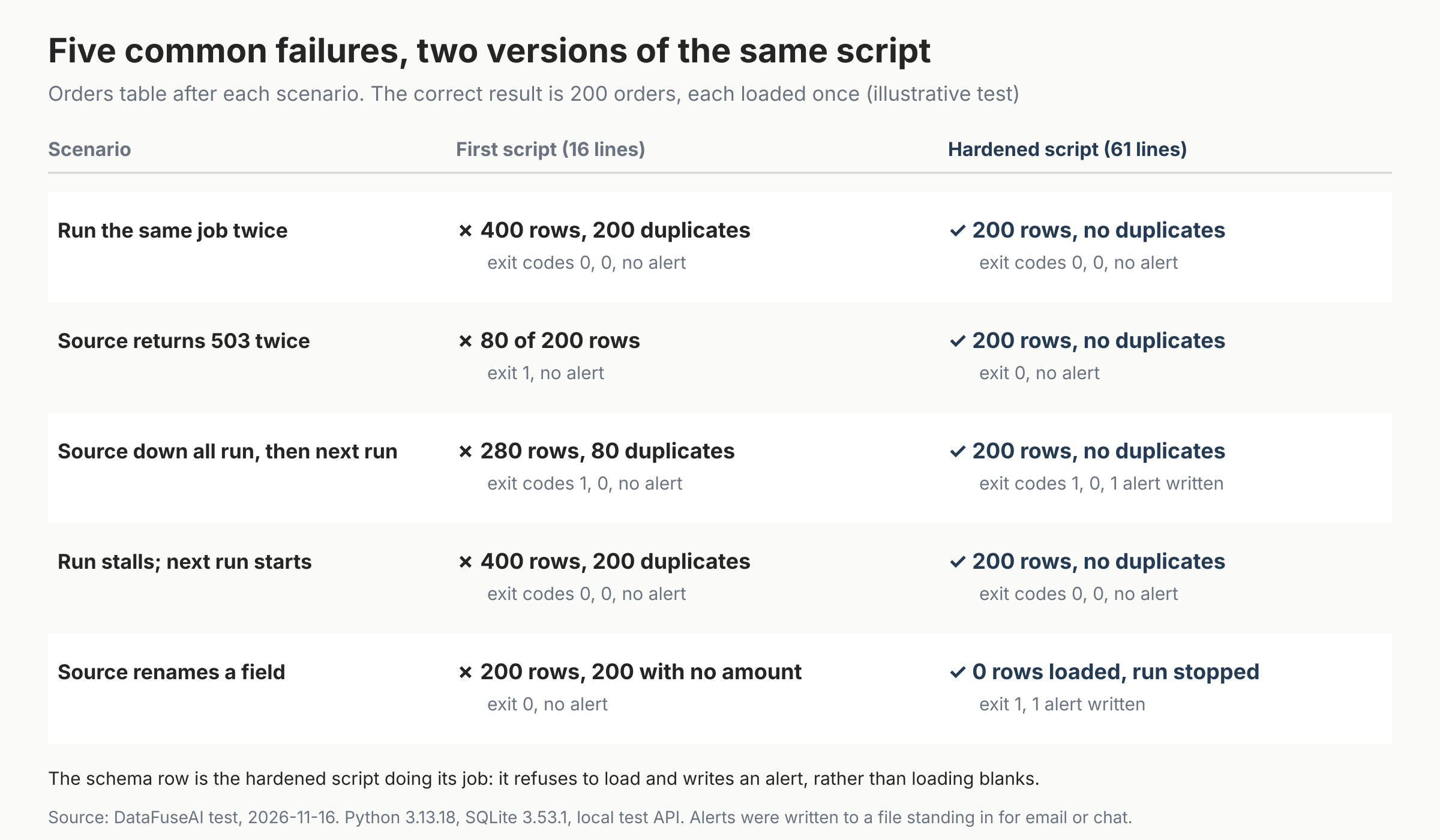
| Failure | First script result | Exit codes |
|---|---|---|
| Same job run twice | 400 rows, 200 duplicates | 0, 0 |
| Source returns 503 twice on page 3 | 80 of 200 rows, run crashed | 1 |
| Page 3 is down for a whole run, then the next run starts after it recovers | 280 rows, 80 duplicates | 1, 0 |
| Page 3 stalls for 45 seconds and cron starts the next run | 400 rows, 200 duplicates; the stalled run took 45.1 s | 0, 0 |
Source renames amount to total |
200 rows, all with no amount | 0 |
First-script results from our run on 16 November 2026. Source: DataFuseAI test.
Three things went wrong underneath:
- No timeout. Python's
urlopen()uses the global default socket timeout when you pass none, and that default isNone, meaning no timeout [7][8]. The popular requests library behaves the same way: with no timeout set, the program will never time out, as Pylint's documentation puts it [9]. A stalled source therefore holds the run open until the next one starts. - Writes that are not safe to repeat. Appending rows means every rerun, overlap or retry after a partial load adds copies.
- Silent success. Cron can mail a job's output to the crontab owner or the MAILTO address [2]. Our first script prints "loaded 5 pages" even when it has just loaded duplicates or blanks, so that mail looks the same on a bad night as a good one.
What does it take to make a Python ETL script safe?
We then hardened the same script, keeping it to the standard library. It passed all five tests: 200 orders each time, or, for the renamed field, no load at all and an alert. When page 3 stayed down, the run gave up after 7.1 seconds, wrote no orders and wrote an alert; the next run loaded all 200 orders. The code grew from 16 lines to 61.
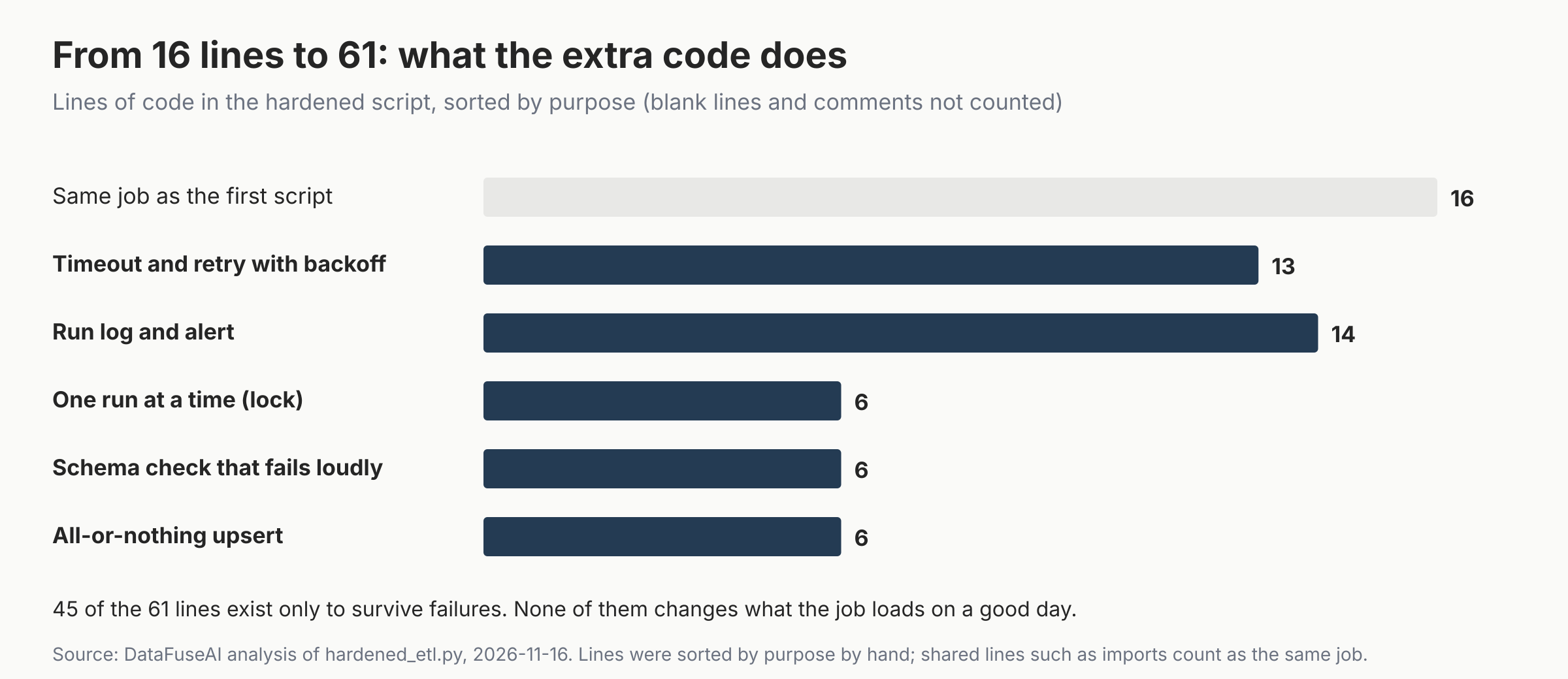
Each protection maps to one failure:
1. A timeout and retries with backoff (13 lines). Every request now has a 10-second timeout and up to four attempts, waiting 1, 2 and 4 seconds between them. The run with two 503 errors took 3.1 seconds and loaded all 200 rows.
def fetch(page):
    for attempt in range(1, MAX_TRIES + 1):
        try:
            with urllib.request.urlopen(f"{api}/orders?page={page}", timeout=TIMEOUT_S) as r:
                return json.load(r)
        except urllib.error.HTTPError as e:
            if e.code < 500 or attempt == MAX_TRIES:
                raise
        except (urllib.error.URLError, TimeoutError):
            if attempt == MAX_TRIES:
                raise
        time.sleep(2 ** (attempt - 1))  # 1s, 2s, 4s
2. One run at a time (6 lines). A file lock makes a second copy exit straight away. In the stall test, the second run exited immediately, and the first finished in 11.1 s after its timeout and retry.
3. An all-or-nothing upsert (6 lines). Rows are collected first, then written in one transaction with INSERT … ON CONFLICT DO UPDATE on the order ID. SQLite's UPSERT follows the syntax PostgreSQL established [10], and PostgreSQL guarantees an atomic insert-or-update outcome [11]. Running the job twice now changes nothing the second time.
with con:  # one transaction: all rows or none
    con.executemany("""INSERT INTO orders VALUES (?, ?, ?, ?)
        ON CONFLICT(order_id) DO UPDATE SET customer_id = excluded.customer_id,
        amount = excluded.amount, updated_at = excluded.updated_at""", rows)
4. A schema check that fails loudly (6 lines). Each record must carry the four agreed fields with the right types. When amount became total, the run stopped before writing anything.
5. A run log and an alert (14 lines). Every run that gets the lock writes its start, end, status, row count and error to a table, and a failure writes an alert a person will see. In our test the alert went to a file standing in for email or chat.
None of this is new. Airflow's best-practice guide says to treat tasks like database transactions, never to produce incomplete results, and to replace INSERT with UPSERT because a rerun can duplicate rows [3]. The point is that a plain script gets none of it for free, and each protection is one more thing someone has to test and maintain.
What does an orchestrator or managed pipeline take off your hands?
An orchestrator removes the scheduling and task-retry code, but not the duty to make each load safe to repeat. A managed pipeline takes over the loading code too, though no tool removes the need to check what was loaded. Here is how the five protections divide up, from the documentation we read.
| Protection | Script on cron | Script in an orchestrator | Managed data pipeline |
|---|---|---|---|
| Timeout and retry | You write it | Task retries built in [3]; request timeouts still in your code | Check the docs |
| One run at a time | You write it | Check the docs | Check the docs |
| Writes safe to repeat | You write it | Still your code [3] | Loading by key on products that MERGE, such as Fivetran [5] |
| Schema change | You write a check | Still your code | Fivetran file connectors add a new column and fill the old one with nulls [12]; check yours |
| Run history and alerts | You write it | Check the docs | Run history and notifications on DataFuseAI [4]; check others |
Who writes each protection. Cells marked "check the docs" vary by product; we did not test orchestrators or managed products here. Source: the cited documentation, checked 16 November 2026.
The schema row deserves a closer look. Fivetran's documentation for file connectors says that when a column header changes, it creates a new column, copies the existing data into it, and keeps the old column, adding null values to it in later syncs [12]. A report still reading the old column now sees blanks for new rows, the same symptom our first script produced. Handling a schema change is not the same as checking what the data means, so you still need a test on the data itself. Our post on data observability explains why a successful run isn't proof of correct output [1].
There is also a middle path. Tools such as Prefect and Airflow run your existing Python with scheduling and retries, and dlt handles loading from Python code. Our comparison of open source data integration platforms covers them [13].
The five-failure test: run it on your own scripts
The five-failure test is a DataFuseAI editorial checklist, not an industry standard. Run it against a test copy of the destination table, never the real one. A script passes a check only when the table ends up correct and someone is told about anything that went wrong.
| Check | How to run it | Pass when |
|---|---|---|
| 1. Rerun | Run the job twice in a row | The row count and totals match a single run |
| 2. Transient error | Make one source call fail once (a wrong port, a mock that returns 503) | The run retries and loads everything, or fails without writing a partial load |
| 3. Failure, then next run | Let a run fail partway, then run it again | No duplicates and no gaps |
| 4. Stall and overlap | Make one call hang, then start a second run | Only one run writes, and the hung one gives up |
| 5. Changed field | Rename or drop a field the job reads | The run stops or flags it before writing blanks |
The five-failure test. Source: DataFuseAI editorial checklist; pass criteria are judgement, based on the results above.
When should you switch from Python scripts?
Stay with scripts while they pass the five-failure test and one person can keep them that way. Our pillar guide puts the condition simply: a few stable sources, one owner, and failures noticed the same day [14]. Once a script fails the test, you have three options: harden it, move it into an orchestrator, or replace it with a managed pipeline.
| Signal | What it usually points to |
|---|---|
| A script fails one or two checks, and you have few jobs | Harden it; the fixes above are small |
| Several scripts need the same retry, lock and alert code | An orchestrator, so that code lives in one place |
| Your sources are standard databases, files or SaaS APIs | A managed pipeline, so connectors and loading are someone else's code |
| Logic only Python can express, or a source no product supports | Keep Python, inside an orchestrator |
| A second team depends on the numbers, or someone must prove where a figure came from | A platform with run history and audit trails [14], or an orchestrator that provides them |
| Only one person can fix the scripts | Any option that doesn't depend on one person's memory |
Switching signals. Source: DataFuseAI editorial judgement, not measured thresholds.
Mistakes to avoid
- Calling a script reliable because it hasn't failed. Our first script passed the clean run perfectly. It only broke under the five tests.
- Leaving out the timeout. Python's standard library and requests both wait without limit by default.
- Retrying an append. Retries on a job that appends rows turn one failure into duplicates. Make the write safe to repeat first.
- Trusting exit code 0. In three of our five failures, including the blank amounts, every run exited with success.
- Moving to a tool and dropping your checks. Orchestrators still expect safe-to-repeat writes, and a managed tool can leave a renamed column's old name filling with nulls.
- Rewriting everything at once. Move the scripts that fail the test first, one at a time.
Where DataFuseAI fits (and where it doesn't)
DataFuseAI replaces the script with a pipeline built on a visual canvas, saved as a Job with a cron schedule [4]. Each run's duration, status and step-by-step log is kept, notifications can be switched on per Job, and a failed run is recorded rather than failing silently [4].
You can open the log, fix the failing step and rerun the Job, and the next scheduled run still starts on time [4]. Transformations are visual nodes, with a Query Editor for SQL in the same workspace [15].
It is a weaker fit in these cases:
- Logic that needs Python. The product pages describe visual transform nodes and SQL, not running Python inside a pipeline [15]. Keep that logic in Python with an orchestrator.
- Automatic retries. The automation page describes failed runs, logs and manual reruns, not automatic retries [4].
- Backfilling past periods. The automation page doesn't describe backfilling missed or historical periods [4].
- Repeat-safe loads. The pages we read don't say whether a sink upserts on a key or rolls back a failed run's partial writes [4][15]. Check both during a trial, using the five-failure test.
DataFuseAI offers a 30-day proof of concept for one recurring workflow and two or three sources, with no POC fee [16]. Applications are reviewed first, and any external cloud or compute cost is yours. A script that fails the five-failure test is a reasonable workflow to try it on.
Frequently Asked Questions
Is Python good for ETL?
Yes, for many jobs. With a few stable sources, scheduled scripts are often the cheapest reliable option, as our pillar guide notes [14]. The risk is not the language but the missing protections around it: timeouts, retries, safe reruns, schema checks and alerts. In our test, adding them took a 16-line script to 61 lines. Orchestrators such as Airflow and Prefect let you keep Python and share that code.
What is the difference between ETL scripts and a data pipeline tool?
A script is code you write, schedule and protect yourself. A data pipeline tool takes over scheduling and run history, and usually the connectors, so you configure the job rather than write every step. DataFuseAI's Jobs, for example, keep each run's status and log [4]. An orchestrator sits between them: it runs your code with scheduling and retries, but each task must still be written to be safe to rerun.
How do I make a Python ETL script safe to rerun?
Write with an upsert keyed on a unique ID, or delete and reload the period inside one transaction, so a second run changes nothing. Collect rows before writing, so a crash leaves no partial load. Add a lock so two runs never overlap. In our test these steps stopped all three duplicate cases: the rerun, the rerun after an outage and the overlapping run.
When is cron enough for scheduling ETL jobs?
Cron is enough when the job is safe to rerun, has a timeout, and someone reads its output. Cron can mail a job's output to the crontab owner or a MAILTO address [2]. But our first script printed the same success line after loading duplicates or blanks, so the mail alone would not have shown the problem. Once you need run history or shared alerts, use an orchestrator or platform.
Methodology
What we tested. Two Python scripts that load paginated orders from an API into a database table. The first is 16 lines, the shortest version we could write that works on a good day; it is shown in full above. The second adds a timeout, retries, a lock, a schema check, an all-or-nothing upsert and a run log, for 61 lines. Line counts exclude blank lines, comments and docstrings. Lines were sorted by purpose by hand. Shared lines, such as imports used only by a protection, count as the same job, so the map slightly undercounts the extra code.
Environment. Python 3.13.18 and SQLite 3.53.1, standard library only. The source was a local test API serving 200 orders over five pages. It had four switchable faults. Page 3 answered 503 twice, or for a whole run before the source recovered. The first request for page 3 stalled for 45 seconds. A release renamed amount to total. Alerts were written to a file standing in for email or chat. In the overlap test, the second run started 3 seconds after the first. SQLite stood in for the warehouse. The failures come from how the scripts read and write, not from the database, but we did not repeat the runs on PostgreSQL. The runs took place between 09:28 and 09:30 UTC on 16 November 2026.
What counts as a pass. The orders table holds exactly 200 distinct orders, each once, with no missing amounts, or the run stops without writing and records an alert.
Limits. This is an illustrative test of two scripts we wrote, not a survey of real scripts or of how often each failure happens. We did not test orchestrators or managed products; their rows in this guide come from their documentation.
References
- DataFuseAI. "Data Observability: What It Means Beyond the Dashboard." 14 February 2026. Accessed 16 November 2026. https://www.datafuseai.com/blogs/data-observability-pipeline
- Debian. "crontab(5): files used to schedule the execution of programs" (cronie, trixie). Accessed 16 November 2026. https://manpages.debian.org/trixie/cronie/crontab.5.en.html
- Apache Airflow. "Best Practices" (Airflow 3.3.2 documentation). Accessed 16 November 2026. https://airflow.apache.org/docs/apache-airflow/3.3.2/best-practices.html
- DataFuseAI. "Data Pipeline Automation, Scheduling & Monitoring." Accessed 16 November 2026. https://www.datafuseai.com/solutions/data-pipeline-automation
- Fivetran. "How to Handle Duplicate Records in Snowflake Destination." Accessed 16 November 2026. https://fivetran.com/docs/destinations/snowflake/troubleshooting/handle-duplicates
- DataFuseAI. "Build vs Buy Data Pipeline: The Calculation Vendors Skip." 6 April 2026. Accessed 16 November 2026. https://www.datafuseai.com/blogs/build-vs-buy-data-pipeline
- Python Software Foundation. "urllib.request: Extensible library for opening URLs." Python 3 documentation. Accessed 16 November 2026. https://docs.python.org/3/library/urllib.request
- Python Software Foundation. "socket: Low-level networking interface." Python 3 documentation. Accessed 16 November 2026. https://docs.python.org/3/library/socket.html
- Pylint. "missing-timeout / W3101." Pylint documentation. Accessed 16 November 2026. https://pylint.readthedocs.io/en/latest/user_guide/messages/warning/missing-timeout.html
- SQLite. "UPSERT." Accessed 16 November 2026. https://sqlite.org/lang_upsert.html
- PostgreSQL Global Development Group. "INSERT" (PostgreSQL 18 documentation). Accessed 16 November 2026. https://postgresql.org/docs/18/sql-insert.html
- Fivetran. "How Does Fivetran Handle Column Header Updates?" Accessed 16 November 2026. https://fivetran.com/docs/connectors/files/troubleshooting/updating-column-headers
- DataFuseAI. "16 Open Source Data Integration Platforms for 2027." 9 November 2026. Accessed 16 November 2026. https://www.datafuseai.com/blogs/open-source-data-integration-platforms
- DataFuseAI. "What Is a Data Integration Platform? How It Works and Costs." 9 November 2026. Accessed 16 November 2026. https://www.datafuseai.com/blogs/what-is-a-data-integration-platform
- DataFuseAI. "Data Transformation & Data Quality Profiling." Accessed 16 November 2026. https://www.datafuseai.com/solutions/data-quality-transformation
- DataFuseAI. "Free 30-Day Data Integration POC." Accessed 13 November 2026. https://www.datafuseai.com/free-poc
 Request a Demo