
The demo went well. The connectors worked, the pipeline ran, the dashboard refreshed. Then security review sent one question back: when this runs, where does our customer data go, and what leaves the network?
An enterprise data integration platform is software that connects, moves, transforms, validates and schedules data across many systems, with the controls a large organisation needs around it. Those controls include where pipelines run, who can change them, what is logged, and what happens when something fails. Most products move data well. They differ on the questions security, procurement and operations ask next. This guide sets out those requirements, the architecture behind them, and how 12 vendors document each one.
Who this is for: data architects, heads of data and platform engineers building a shortlist for a regulated or multi-team environment. New to the category? Start with our guide to what a data integration platform is.
Disclosure: DataFuseAI publishes this guide and is one of the 12 vendors in it. We don't rank vendors or score them. Every row in the comparison comes from that vendor's own documentation, pricing page or official training content, and the vendors appear in alphabetical order.
Key takeaways
- "Enterprise" is mostly about control, not connectors. Ask where the control plane and the data plane run, and what crosses between them.
- A hybrid agent is not the same as on-premise. In several products the agent keeps data local but still depends on the vendor's cloud to schedule and monitor work.
- Pricing meters vary widely: rows, credits, compute hours, messages, data moved, processing units. The meter decides which workloads get expensive.
- Shortlist on deployment first. It is a pass-or-fail filter, and it removes vendors faster than any feature list.
Vendor documentation and pricing checked 4 November 2026; Fivetran's pricing and DataFuseAI's architecture and governance pages re-checked 5 November 2026.
What makes a data integration platform "enterprise"?
An enterprise data integration platform does the same core jobs as any integration tool, plus the controls that let many teams use it safely. The core jobs are connecting to sources, moving data, transforming and validating it, and loading it on a schedule. Our introductory guide breaks those jobs into a six-layer model.
The enterprise layer is what security, audit and operations teams check:
- Deployment control. Where pipelines run, where credentials live, and which network paths must be opened.
- Identity and access. Single sign-on, role-based permissions and separate environments for development and production.
- Evidence. Audit logs of who changed what, run history, and exportable records for auditors.
- Operating limits. How the platform scales, what support it comes with, and how it behaves when a component fails.
- Commercial fit. A pricing meter that stays predictable at your volumes.
None of these is exotic. They are hard to compare because vendors document them in different places, under different names, and often by plan tier.
How is an enterprise data integration platform built? Control plane and data plane
An enterprise data integration platform has two parts that can run in different places. The control plane defines, schedules, permissions and monitors pipelines. The data plane does the work: it reads from sources, transforms records and writes to destinations. Our article on the control plane versus the compute plane explains the split in more depth; it calls the data plane the compute plane.
Where each part runs decides what your security team has to approve. Vendors combine them in four broad patterns.
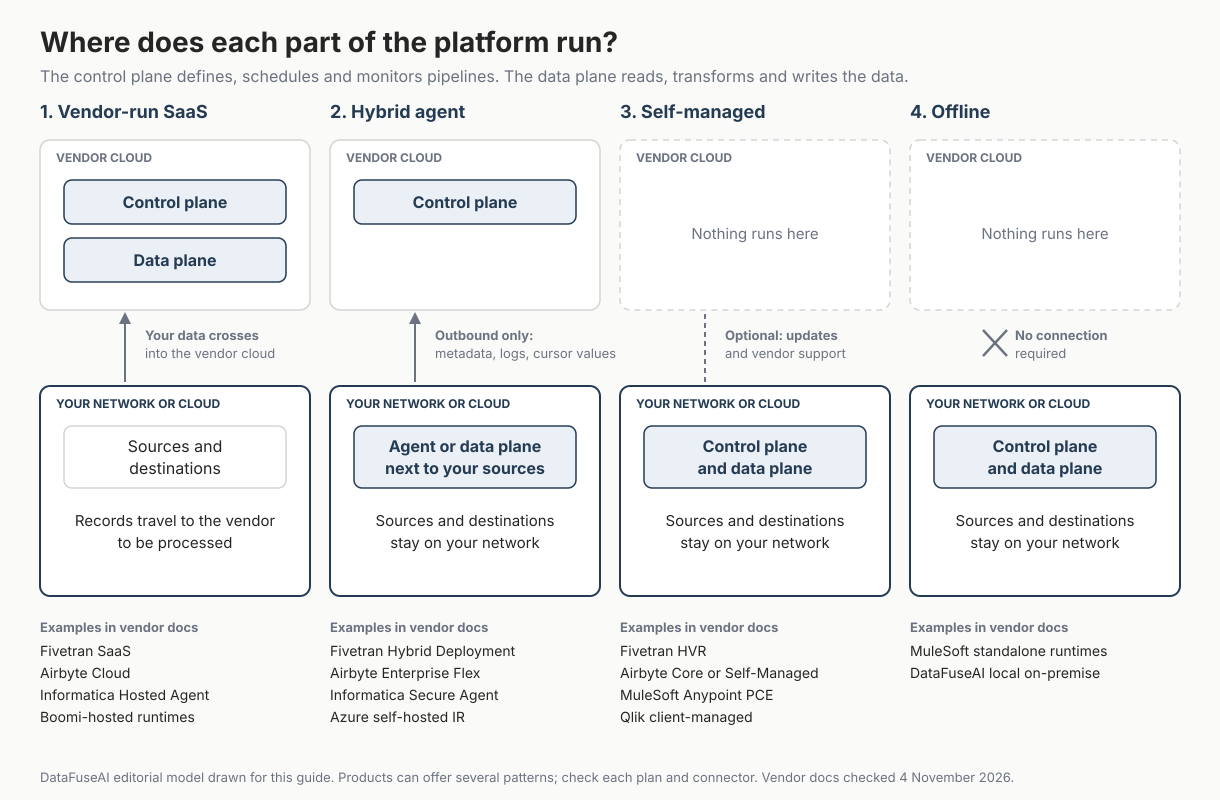
- Vendor-run SaaS. The vendor runs both planes, so records pass through its cloud. Fivetran's SaaS model, for example, handles data processing within Fivetran's cloud [1].
- Hybrid agent. The vendor runs the control plane, and an agent or data plane in your network moves the data. Fivetran describes its control plane in this model as "a fully managed, cloud-based component" [1].
- Self-managed. You install and run both planes, and may still take updates and support from the vendor. Fivetran describes HVR as a self-hosted version of Fivetran for database and file replication [1].
- Offline. Both planes run in your network with no dependency on the vendor. MuleSoft's standalone runtimes need no connection to its control plane [10], and DataFuseAI's local on-premise option has no internet dependency [12].
Cloud providers' own services sit slightly apart. AWS Glue jobs run in AWS and reach private databases through network interfaces created in your account [6]. Google Cloud Data Fusion keeps the instance in a Google-managed tenant project and runs pipelines on Spark clusters in your own project [7]. Who pays for and operates that compute is a separate decision, covered in who should own data pipeline compute.
What leaves your network in a hybrid deployment?
In a hybrid deployment, pipeline data stays in your network, but some metadata still goes to the vendor's control plane, and the agent depends on reaching it. That trade-off is the most useful thing to test before you sign. The table shows what five vendors document, and where they don't say.
| Vendor and option | What the vendor says goes to its cloud | Network direction | Worth testing |
|---|---|---|---|
| Fivetran Hybrid Deployment | "Only metadata (including MAR information) and logs" [1] | Fivetran never initiates inbound connections [1] | Needs an Enterprise or Business Critical plan, and covers a subset of connectors [1] |
| Airbyte Enterprise Flex | Cursor and primary key values stay in the control plane wherever the data plane runs [2] | Data planes only send requests outward [2] | Don't use sensitive fields as cursors or primary keys [2] |
| Informatica Secure Agent | The agent fetches task information from Informatica's cloud, then connects directly to sources and targets; the page doesn't say what run metadata it returns [3] | Outbound HTTPS; no inbound firewall rules [3] | If the agent can't reconnect to IDMC, the task fails [3] |
| Qlik Data Movement Gateway | Installed behind your firewall to move data from sources Qlik Cloud can't reach directly [4] | "Strictly outbound, encrypted and mutually authenticated" [4] | What run metadata the gateway reports to Qlik Cloud |
| Azure Data Factory self-hosted integration runtime | Instance metadata is stored only in the Data Factory's chosen region; the page doesn't say what run metadata the self-hosted runtime sends [5] | Outbound HTTP-based connections only [5] | Runs on Windows only [5] |
"Data never leaves" usually means record data. Cursor values, logs and run metadata may still leave, so check whether any of them are sensitive. And in Informatica's and Airbyte's documentation, the agent or data plane must reach the control plane to keep working [2][3]. If pipelines must keep running during an internet outage, look at the self-managed or offline patterns instead.
Source: each vendor's own documentation, checked 4 November 2026.
Enterprise data integration platform requirements checklist
Use this checklist in order. The early items are pass-or-fail filters that cost little to check. The later ones need a test environment. The fourth column shows how vendor documentation answers each question, so you know what a specific answer looks like.
| # | Requirement | What to ask or test | What a documented answer looks like |
|---|---|---|---|
| 1 | Deployment pattern | Which of the four patterns do you need for each data class? Is it on the plan you will buy? | Matillion lists hybrid cloud deployment among its Scale edition features, not Developer or Teams [9] |
| 2 | Network paths | Which ports open, in which direction? What must reach the internet? | AWS Glue needs internet access through a NAT gateway for services without VPC endpoints [6] |
| 3 | Metadata and residency | What leaves your network, and in which region is it stored? | Airbyte keeps cursor and primary key data in its control plane [2] |
| 4 | Control-plane dependency | What happens to scheduled runs if the vendor's cloud is unreachable? | Informatica: the task fails if the agent can't reconnect [3] |
| 5 | Identity and access | SSO, role-based access, separate environments, user limits | Data Fusion generally supports up to 50 users per instance, or 25 with RBAC; the Developer edition allows 2 concurrent users [7] |
| 6 | Audit evidence | Who changed what, with before-and-after values, exportable after the contract ends | Ask for a sample audit-log export during the trial |
| 7 | Latency and CDC | Do you need log-based change data capture, and on which plan? | Matillion lists streaming change data capture on its Scale edition [9] |
| 8 | Agent capacity and operations | How big is each agent, how many run per host, and who patches them? | Each Fivetran Hybrid agent needs at least 2 vCPUs and 2 GB of RAM, and Docker or Podman hosts run one agent each [1] |
| 9 | Pricing meter | Which unit is billed, and what makes it spike? | See the pricing section below |
| 10 | Exit | Can you export pipeline definitions, mappings and logs in a usable format? | Ask for a sample export during the trial |
Source: DataFuseAI editorial checklist; examples from the cited vendor documentation, checked 4 November 2026.
Items 1 to 4 decide whether a vendor stays on the list at all. Items 5 to 8 decide whether it survives a proof of concept. Items 9 and 10 decide whether you can live with it in year three.
12 enterprise data integration platform vendors compared
The table compares 12 vendors on where pipelines can run, who runs the control plane, and how each charges. Each one publishes its deployment model and pricing basis on its own site; the Methodology section explains how we chose them. It is a starting list, not a full market map and not a ranking.
Three groups are mixed here on purpose: data movement and ELT products, integration platforms (iPaaS) built around applications and APIs, and cloud providers' own services. That grouping is ours, not the vendors'.
| Vendor | Where pipelines can run (vendor docs) | Who runs the control plane | Pricing basis (public) |
|---|---|---|---|
| Airbyte [2] | Airbyte Cloud; Enterprise Flex with self-managed data planes; Core (open source) or Self-Managed Enterprise in your infrastructure | Airbyte for Cloud and Flex; you when self-managed | Credits on Standard and Plus; Data Workers capacity on Pro; Flex by quote |
| AWS Glue [6] | Jobs run in AWS and reach VPC and on-premises databases through network interfaces in your account, over VPN or Direct Connect | AWS | $0.44 per DPU-hour, billed by the second; varies by Region |
| Azure Data Factory [5] | Azure integration runtime (managed, serverless); self-hosted runtime on a Windows machine in your network; Azure-SSIS runtime | Microsoft (Azure) | Orchestration per activity run, plus execution by integration runtime hours |
| Boomi [11] | Boomi-hosted runtime clouds; local runtimes you install in a public cloud or on your own servers | Boomi (Boomi Enterprise Platform) | Pay-As-You-Go at $0.05 per Boomi Message, billed monthly; other editions priced by edition, connectors and add-ons |
| DataFuseAI [12] | Managed by DataFuseAI; private-hosted on your servers or cloud; local on-premise with no internet dependency | DataFuseAI for managed; your environment for on-premise | No paid pricing published; free scoped 30-day POC |
| Fivetran [1] | Fivetran cloud (SaaS); Hybrid Deployment agent in your network; self-hosted HVR | Fivetran for SaaS and Hybrid; you with HVR | Monthly Active Rows per connection, plus a $5 monthly base charge per connection using 1 to 1M MAR (Free plan exempt) |
| Google Cloud Data Fusion [7] | Spark clusters created in your Google Cloud project; on-premises sources need VPN or Interconnect, permissions and firewall rules | Google (tenant project) | Per instance-hour by edition, plus the Spark clusters that run pipelines |
| IBM DataStage [8] | IBM Cloud; DataStage Anywhere remote engines on-premises or in any cloud or data center | IBM (DataStage as a Service) | Standard plan: capacity unit-hours (job duration × vCPUs); check the plan for DataStage Anywhere |
| Informatica IDMC [3] | Informatica-managed Hosted Agent; Secure Agents and agent groups you install | Informatica | Consumption-based Informatica Processing Units, by quote |
| Matillion [9] | Hosted SaaS; hybrid SaaS deployment (Scale edition); inside Snowflake | Matillion (hosted platform) | Matillion Credits consumed by task hours; no per-credit price published |
| MuleSoft Anypoint [10] | CloudHub 2.0; Runtime Fabric in your data center or cloud; hybrid standalone runtimes; standalone runtimes with no control-plane connection | MuleSoft's cloud control planes, or you with Anypoint Platform PCE | For some US control-plane customers, packages of Mule flows, messages and data throughput |
| Qlik Talend Cloud [4] | Qlik Cloud; Data Movement Gateway behind your firewall; client-managed products | Qlik, or you with client-managed products | Capacity subscription metered by data moved, job executions and duration |
Source: each vendor's own documentation and pricing pages, checked 4 November 2026. Alphabetical order; not a ranking.
A few notes help read the table:
- Deployment options are plan- and connector-specific. Hybrid options often sit on higher plans, as the Fivetran and Matillion rows show, and may cover only some connectors. Ask for the list for your sources.
- The control plane column matters for outages and audits. Where it is the vendor, scheduling and monitoring depend on that vendor's service being reachable.
- Our data integration tools decision framework compares DataFuseAI, Domo, Skyvia and Zapier on deployment, architecture, governance and pricing transparency. This guide widens the shortlist to 12 enterprise vendors.
How do enterprise data integration platforms charge?
The 12 enterprise data integration platforms in this guide charge by one of six meters: changed rows, credits, compute time, messages or flows, data moved, or processing units. Several vendors, including Informatica, Matillion, Qlik and DataFuseAI, publish no list prices, so public pages often show the meter rather than the price.
| Meter | Vendors in this guide | What makes the bill grow |
|---|---|---|
| Changed rows | Fivetran (Monthly Active Rows) [1] | Many distinct rows changed each month (outside history mode, repeat updates to one row count once; deletes count too), re-syncs outside Fivetran's free scenarios, many connections |
| Credits or capacity | Airbyte (credits on Standard and Plus; Data Workers on Pro and Flex) [2], Matillion (credits by task hours) [9] | Data volume synced or capacity bought (Airbyte); task hours and extra developer users (Matillion) |
| Compute time | AWS Glue (DPU-hours) [6], IBM DataStage (capacity unit-hours, Standard plan) [8], Data Fusion (instance-hours plus Spark) [7] | Larger clusters, longer jobs, instances left running |
| Messages or flows | Boomi (Boomi Messages) [11], MuleSoft (flows, messages, throughput) [10] | Number of documents or events, number of deployed flows |
| Data moved | Qlik Talend Cloud [4] | Volume, job executions and job duration |
| Processing units | Informatica (IPUs, consumption-based, by quote) [3] | How many services and scalers you consume |
Source: vendor pricing pages and documentation, checked 4 November 2026.
Three published examples show how differently the meters behave.
- AWS Glue charges for run time. AWS's own example bills a 15-minute Spark job on 6 DPUs at $0.66 [6].
- Data Fusion charges while the instance exists. Usage is measured from instance creation to deletion [7]. At the published $4.20 an hour [7], an Enterprise instance left running for a 30-day month comes to $3,024 before any pipeline runs. That is our arithmetic on Google's list price, not a quote.
- Boomi Pay-As-You-Go charges per document. Each Boomi Message is one document flowing through the platform, at $0.05 each [11]. 100,000 messages a month would be $5,000 at that rate, again our arithmetic. How your process groups records into documents therefore shapes the bill.
Licence is only part of the cost. Glue and Data Fusion charges arrive on your cloud provider's bill, and every option needs engineering time to build and run pipelines.
How to shortlist and test an enterprise data integration platform
Shortlist an enterprise data integration platform on constraints first, then test it on your own data. Deployment and network rules remove more vendors than feature lists do, and they cost almost nothing to check. Here is an order that removes vendors cheaply before you spend weeks on a proof of concept.
- Classify your data. Decide which datasets may pass through a vendor cloud, which may only leave as metadata, and which must stay inside your network.
- Apply the deployment filter. Drop any vendor that doesn't document the pattern you need on a plan you would buy.
- Send the network, metadata and control-plane questions in writing. Written answers become part of the security review.
- Run one pipeline at production volume. Use your real sources, real credentials and a validation rule that should fail. Our five-phase ETL proof of concept framework sets out the phases and the evidence to collect.
- Break the connection on purpose. In a hybrid setup, block the agent's route to the vendor during a scheduled run and record what happens.
- Price your own workload. Ask each vendor to price the POC workload at full volume on its own meter, in writing.
Where DataFuseAI fits (and where it doesn't)
DataFuseAI is a data integration and preparation platform for scheduled batch pipelines, deployable as managed SaaS, private-hosted or fully on-premise. It suits teams whose data must stay inside their own network and who run recurring, monitored workflows. The details below come from DataFuseAI's product pages, checked 4 November 2026.
It is likely a fit if you need:
- An offline option. The local on-premise model runs entirely inside your internal network, with no external hosting and no internet dependency [12].
- The same product in each deployment. DataFuseAI says features, multi-tenant structure, role-based access and monitoring behave the same across managed, private-hosted and on-premise [12].
- A choice of execution engine. Execution is set separately from deployment, through an engine profile: the native engine, an existing Databricks workspace, or Spark through Apache Livy [12].
- Role-based access and audit logs. Permissions are assigned to groups at the action level, and user actions and system operations are logged with context [13]. The governance page shows who, when, what and the IP address for each action, with old and new values. It covers system and configuration activity, not row-level data access [15].
- Database, warehouse, file and API sources together. The solutions page lists pre-built connectors across 10 source categories, each checked by a multi-step Connection Check before use [14].
Other options are likely better if you need:
- Streaming or CDC-first pipelines. DataFuseAI does not support streaming sources such as Kafka, Kinesis or Pub/Sub [16], and its architecture is optimised for scheduled batch workflows rather than continuous event processing [13].
- Mature ELT today. DataFuseAI describes its ELT capability as in beta [16].
- Application-to-application integration and API management. MuleSoft runs Mule applications and API gateways [10], and Boomi's platform bundles integration, API management, workflow and EDI [11]. DataFuseAI is built for data pipelines instead.
- A certification on file. The governance page says compliance is your programme, not a product feature, and claims no certification [15]. Ask for the evidence your auditors need, and confirm SSO requirements directly.
If you have a recurring batch workflow that must stay inside your network, the next step is to test it. DataFuseAI's free 30-day POC asks for one recurring workflow, two or three data sources and a technical contact [17]. Applications are reviewed before scoping, not every applicant is accepted, there is no POC fee or obligation, and any external infrastructure cost stays with you [17]. You can also review the deployment options and the data integration platform pages first.
Frequently Asked Questions
What is the difference between an enterprise data integration platform and an ETL tool?
An ETL tool extracts, transforms and loads data. An enterprise data integration platform includes those jobs plus scheduling, monitoring, access control, audit logs and a choice of deployment pattern. Many products sold as an enterprise ETL platform now include most of these, so compare the controls rather than the label.
Is a hybrid deployment the same as on-premise?
No. Hybrid keeps record data on your network, but the vendor's cloud still schedules and monitors the work, so you depend on reaching it. On-premise means both planes run on your infrastructure. Offline goes one step further: no connection to the vendor at all, so confirm how licensing and updates work.
Which enterprise data integration platforms can run without a connection to the vendor?
Among the 12 vendors here, MuleSoft documents standalone runtimes that need no connection to its control plane [10], and DataFuseAI documents a local on-premise mode with no internet dependency [12]. Self-managed products such as Fivetran HVR [1], Airbyte Core [2] and Qlik's client-managed offerings [4] also run on your own infrastructure. Confirm offline licensing and update terms with each vendor.
Should we use our cloud provider's integration service instead?
It can be the simplest choice when your sources and destinations already live there. AWS Glue, Azure Data Factory and Google Cloud Data Fusion fit that provider's identity and networking, and their charges arrive on your cloud bill [5] [6] [7]. The work is in reaching sources in your own network: a VPN or dedicated link for Glue and Data Fusion [6] [7], or a self-hosted runtime for Azure [5].
Do we need change data capture?
Only if the business needs changes within minutes, or a source is too large to reload on a schedule. Scheduled batch or incremental loads cover most reporting and many AI data preparation jobs. CDC adds agents, log access and monitoring to run. Our guide to batch, CDC and streaming sets out the decision.
Methodology
How vendors were chosen: products marketed for enterprise data integration that publish their deployment model and pricing basis on their own sites, across three groups (data movement and ELT, iPaaS, and cloud-provider services), plus DataFuseAI as publisher. We capped the list at 12 to keep the table readable. Products we left out, such as Oracle GoldenGate, SAP Datasphere, SnapLogic and Denodo, were left out for space, not for anything we found about them. References group each vendor's pages into one numbered entry.
We read each vendor's own documentation, product and pricing pages on 4 November 2026, between about 13:20 and 14:05 UTC, and re-checked the Fivetran pricing and Azure runtime pages for corrections at about 14:40 UTC. On 5 November 2026 we re-read Fivetran's 2026 pricing update page (about 10:30 UTC) and DataFuseAI's architecture and governance pages. Rows describe what the vendor documents. Limits: we did not install or test the products, and features change by plan, region and release. Where a vendor's page gave no price, the table says so rather than using third-party estimates. Worked cost figures use the vendor's published rates and our own arithmetic, and are labelled as such. DataFuseAI facts come from DataFuseAI's public product pages, not internal information.
References
- Fivetran documentation: "Deployment Models"; "Hybrid Deployment" (plan requirement, metadata sent, agent sizing, connector subset); "HVR 6 Documentation"; "Usage-Based Pricing" ($5 base charge, row counting); "2026 Pricing Updates" (deletes and history mode). Accessed 4 and 5 November 2026. https://fivetran.com/docs/deployment-models, https://fivetran.com/docs/deployment-models/hybrid-deployment, https://fivetran.com/docs/local-data-processing, https://www.fivetran.com/docs/usage-based-pricing, https://fivetran.com/docs/usage-based-pricing/pricing-updates/2026-pricing-updates
- Airbyte documentation: "Airbyte platform" plan descriptions; "Get started with Enterprise Flex" (limitations); and Airbyte "Pricing" page. Accessed 4 November 2026. https://docs.airbyte.com/platform/next, https://docs.airbyte.com/platform/next/enterprise-flex/getting-started, https://www.airbyte.com/pricing
- Informatica: "Secure Agents" (IDMC Administrator documentation); Salesforce Trailhead, "Deploy the Secure Agent" (training module on Informatica IDMC); Informatica "Pricing" page. Accessed 4 November 2026. https://onlinehelp.informatica.com/IICS/dev/admin/en/gg-iics-rte/Secure_Agents.html, https://trailhead.salesforce.com/content/learn/modules/informatica-data-management-cloud-ecosystem-navigation/deploy-the-secure-agent, https://www.informatica.com/pricing
- Qlik: "Data gateways" and "Qlik Cloud capacity-based subscriptions" (Qlik Cloud Help); "Qlik Talend Cloud Plans and Pricing". Accessed 4 November 2026. https://help.qlik.com/en-US/cloud-services/Subsystems/Hub/Content/Sense_Hub/Gateways/setting-up-gateways.htm, https://help.qlik.com/en-US/cloud-services/Subsystems/Hub/Content/Sense_Hub/Admin/subscription-options-qlik-cloud.htm, https://www.qlik.com/us/di/pricing
- Microsoft: "Integration runtime in Azure Data Factory" (Microsoft Learn); "Azure Data Factory pricing". Accessed 4 November 2026. https://learn.microsoft.com/azure/data-factory/concepts-integration-runtime, https://azure.microsoft.com/en-ca/pricing/details/data-factory/
- Amazon Web Services: "Connecting to a JDBC data store in a VPC" (AWS Glue Developer Guide); "How to access and analyze on-premises data stores using AWS Glue" (AWS Big Data Blog, reviewed May 2022); "AWS Glue pricing". Accessed 4 November 2026. https://docs.aws.amazon.com/glue/latest/dg/connection-JDBC-VPC.html, https://aws.amazon.com/blogs/big-data/how-to-access-and-analyze-on-premises-data-stores-using-aws-glue/, https://aws.amazon.com/glue/pricing/
- Google Cloud: "Networking" concepts and "Cloud Data Fusion pricing". Accessed 4 November 2026. https://docs.cloud.google.com/data-fusion/docs/concepts/networking, https://cloud.google.com/data-fusion/pricing
- IBM: "DataStage Anywhere" and "DataStage offering plans" (IBM Cloud Pak for Data as a Service documentation); "IBM DataStage" product page. Accessed 4 November 2026. https://dataplatform.cloud.ibm.com/docs/content/dstage/dsnav/topics/remote-engine.html, https://www.ibm.com/docs/en/DSXDOC/dstage/dsnav/topics/ds-plans.html, https://www.ibm.com/products/datastage
- Matillion: "Data Productivity Cloud" and "Pricing" pages. Accessed 4 November 2026. https://www.matillion.com/data-productivity-cloud, https://matillion.com/pricing
- MuleSoft documentation: "Mule Runtime Engine Overview" (deployment options); "Usage and Pricing Metrics Reference". Accessed 4 November 2026. https://docs.mulesoft.com/mule-runtime/, https://docs.mulesoft.com/general/pricing-metrics
- Boomi documentation: "Integration runtimes" (Boomi-hosted and customer-hosted); "Boomi Pay-As-You-Go". Accessed 4 November 2026. https://help.boomi.com/docs/Atomsphere/Integration/Getting%20started/int-Atoms_Molecules_and_Atom_Clouds_d8fe8ad8-3ba5-4eb1-967d-cd0fc9ffb062, https://help.boomi.com/bundle/atomsphere_platform/page/atm-Atomsphere_Go.html
- DataFuseAI. "Deployment Options" product page. Accessed 4 November 2026. https://www.datafuseai.com/platform/deployment-options
- DataFuseAI. "Platform Architecture" product page. Accessed 4 November 2026. https://www.datafuseai.com/platform/architecture
- DataFuseAI. "Data Integration for Modern Data Teams" solution page. Accessed 4 November 2026. https://www.datafuseai.com/solutions/data-integration-platform
- DataFuseAI. "Data Governance & Compliance" solution page. Accessed 4 November 2026. https://www.datafuseai.com/solutions/data-governance-compliance
- DataFuseAI. "Batch vs CDC vs Streaming: A Leadership Decision Framework." 24 August 2026. https://www.datafuseai.com/blogs/batch-vs-cdc-vs-streaming
- DataFuseAI. "Free 30-Day Data Pipeline POC" page. Accessed 4 November 2026. https://www.datafuseai.com/free-poc
 Request a Demo