
The marketing operations lead connects the CRM and the billing system in ten minutes. Then finance asks for revenue by campaign, which means joining the two, and the tool asks for SQL.
A no-code data integration platform is software that connects to your systems through visual interfaces [1], moves their data on a schedule and lets you clean and combine it without writing code. This guide compares 10 of them: Airbyte, Azure Data Factory, Coupler.io, DataFuseAI, Fivetran, Hevo Data, Informatica, Integrate.io, Matillion and Skyvia. For each, it shows where the vendor's own documentation moves you to SQL, Python or dbt.
Who this is for: operations, finance, marketing and analytics teams without a dedicated data engineer, and the person choosing a tool for them. Data teams weighing deployment models, governance and audit logs should read our decision framework for no-code ETL tools instead.
Disclosure: DataFuseAI publishes this guide and is one of the 10 platforms in it. Platforms appear in alphabetical order. We don't rank them, and every vendor fact comes from that vendor's own pages.
DataFuseAI's data integration platform offers a free trial that starts with connecting your first source, with no credit card [8].
Key takeaways
- "No-code" usually covers connecting a listed source and simple field changes. Joins and unlisted sources are where the 10 differ: some keep them visual, others switch to SQL, dbt or Python. Check those two before you buy.
- Free entry points differ. Fivetran, Coupler.io, Skyvia and Informatica publish free plans with usage limits. Airbyte, Hevo Data and Integrate.io list 14-day trials, and Airbyte Core is free to self-host.
- Pricing meters differ too: rows changed, records written, events, credits, connected accounts, activity runs or a flat fee. The meter decides what makes the bill grow.
- Test one real report end to end, including a join and a failure, before you commit.
Figures checked 5 November 2026.
What is a no-code data integration platform?
A no-code data integration platform lets someone who doesn't write code connect sources, pick the data they want, and deliver it to a spreadsheet, BI tool, database or warehouse on a schedule. Fivetran's guide describes the approach as connecting systems through visual interfaces, and notes that some no-code tools are built for app-to-app workflow automation while others are built for loading data into warehouses [1].
This guide covers the second group: tools whose main job is moving data for reporting and analysis. Workflow automation products, which react to an event in one app by doing something in another, solve a different problem.
"No-code" and "low-code" overlap. Most platforms here start with forms and visual steps, then offer SQL, Python or dbt for anything the visual steps can't express. Our introductory guide to what a data integration platform is covers the layers every platform needs, whether or not it is no-code.
The 10 no-code data integration platforms compared
The 10 platforms differ most in who they are built for, what you can try for free, and what the bill counts. The table quotes each vendor's own description and its public pricing page or documentation, checked on 5 November 2026 unless the reference says otherwise.
| Platform | Built for, in the vendor's words | Free plan or trial | Pricing basis and entry list price |
|---|---|---|---|
| Airbyte | An "open-source data integration platform" [2] | 14-day trial with 400 credits, no card; Airbyte Core free to self-host [3] | Credits; Standard from $20 a month with 5 credits [3] |
| Azure Data Factory | "Azure's cloud ETL service" with a "code-free UI" [4] | No free tier mentioned on the pricing page [5] | Activity runs and integration runtime hours; data flows per vCore-hour, 8 vCores minimum [5] |
| Coupler.io | "The Fivetran alternative for business teams"; no warehouse or data engineer needed [6] | Free plan: 1 account, manual refresh, 100 rows per run; 7-day trial [7] | Plans set by accounts, destinations and refresh frequency; Starter $32 a month, or $24 billed annually [7] |
| DataFuseAI | "Built for BI, analytics, and growing data teams" [8] | Free trial with no credit card; scoped 30-day POC [8] [9] | No prices published |
| Fivetran | A managed ELT platform "built specifically for analytics" [1] | Free plan up to 500,000 monthly active rows (MAR); 14-day trial [10] | MAR per connection, plus a $5 base charge on standard connections with 1 to 1M MAR; no per-million rate published [10] |
| Hevo Data | One platform for "extraction, loading, and dbt-based modeling" into a warehouse [39] | 14-day trial, no card [11] | Events (each record inserted, updated or deleted in the destination); Starter listed at $299 a month, and "Starts at $265/m" with the 12% annual discount [11] |
| Informatica | Cloud Data Integration-Free, aimed at data practitioners and non-technical users in marketing, sales and revenue operations [40] | Free tier up to 20M rows or 10 compute hours a month [12] | Informatica Processing Units, by quote [13] |
| Integrate.io | A "low-code data pipeline platform" [14] | 14-day trial, no card [15] | Flat fee; Core $1,999 a month with unlimited data, pipelines and connectors [15] |
| Matillion | "Coders and non-coders alike" [16] | "Try free" registration; no trial length stated [17] | Credits consumed by task hours; no dollar price published [17] |
| Skyvia | Tools that "require no coding knowledge and can be configured visually" [41] | Free plan: 10,000 records a month, daily runs; 14-day trial [18] [19] | Records per month; Basic $99 a month, or $79 billed annually [18] |
Source: each vendor's own pricing page, documentation or blog, as cited. Alphabetical; not a ranking. Prices change, so confirm on the day you buy.
The meters don't compare directly. Coupler.io plans step up with connected accounts, destinations and refresh frequency [7], a Skyvia bill grows with records [18], a Fivetran bill with rows changed per connection [10], and an Integrate.io bill stays flat within the Core plan [15]. Price your own workload on each meter rather than comparing entry prices.
Where does no-code stop? A four-checkpoint test
Many no-code platforms stay no-code for the first two tasks and change at the third or fourth. We use four checkpoints to find where, each a task that most cross-system reports need sooner or later. The checkpoints are a DataFuseAI editorial framework, not an industry standard.
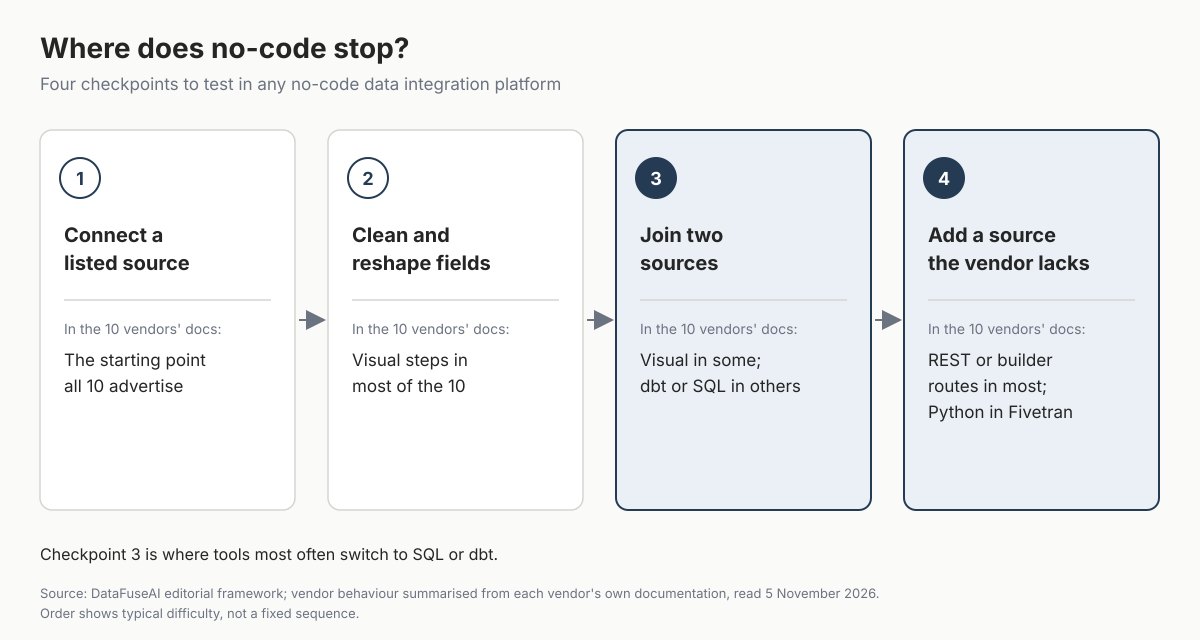
- Connect a listed source. This is the starting point all 10 platforms advertise.
- Clean and reshape fields. Rename, filter, change types, hash or mask.
- Join two sources. Combine the CRM and billing tables on a shared key, which is where most cross-system reports start.
- Add a source the vendor doesn't list. An internal API or a niche SaaS tool.
The table records what each vendor's own pages say at checkpoints 2 to 4. "Not stated" means the pages we read didn't say, not that the feature is missing.
| Platform | 2. Clean and reshape | 3. Join two sources | 4. Add an unlisted source |
|---|---|---|---|
| Airbyte | Mappings hash, encrypt and rename fields and filter rows, on Plus, Pro and Enterprise Flex [20] | Post-sync transformations through dbt in Airbyte Cloud [21] | Connector Builder, a "no-code tool" for source connectors, built on a low-code YAML format [22] |
| Azure Data Factory | Mapping data flows: "an entirely visual experience with no coding required," run on Spark [4] | The join transformation combines two sources or streams in a mapping data flow [23] | A generic REST connector, set up as a linked service in the UI [42] |
| Coupler.io | Column management, filters, sorting and formulas [24] | Join, append and aggregation, from Starter on the pricing grid [7]; the comparison page says from Active [6] | A JSON source for any REST API endpoint that returns JSON, with no coding [43] |
| DataFuseAI | Standardizing rules are Derived expressions you write once; checks run on the output before delivery [25] | A Fuzzy Join node on the pipeline canvas, scoring matches 0 to 100 [25] | A generic REST API connector, described through a connection profile rather than code [26] |
| Fivetran | Pre-built Quickstart models for popular connectors [27] | SQL transformations in dbt, run in your destination [27] | Connector SDK, written in Python [28] |
| Hevo Data | Drag-and-drop blocks such as rename, mask and flatten JSON [29] | No join block in the drag-and-drop list; Hevo describes dbt-based modeling [29] [39] | A REST API source in Hevo's documentation [44] |
| Informatica | Wizard-driven, with "pre-built templates for popular transformations" in CDI-Free [30] | Not stated in the pages we read | Not stated in the pages we read |
| Integrate.io | "220+ visual steps for filtering, joining, aggregating," plus SQL and Python components [14] | Joining is one of the visual steps [14] | A REST API source component configured in the UI [14] |
| Matillion | Drag-and-drop low-code designer [31] | Visual components, with a SQL IDE, Python and dbt for coders [31] | "Build a custom connector to pull data via REST API" [32] |
| Skyvia | Basic mappings on Free and Basic, where source lookup and expression mappings are blocked [33] | Data Flow, a visual designer for combining sources, on Standard and above [33] [41] | A REST connector for data sources that have a REST API [45] |
Source: each vendor's documentation or product pages, as cited, read 5 November 2026.
The pattern holds across the 10. Checkpoint 2 is visual almost everywhere. At checkpoint 3, Coupler.io, DataFuseAI, Integrate.io, Matillion, Azure Data Factory and Skyvia's higher plans describe visual joins. Fivetran, Airbyte Cloud and Hevo Data hand modelling to dbt [21] [27] [39]. At checkpoint 4, most of the 10 document a REST, JSON or builder route set up in the UI. Fivetran's documented route is Python [28], and Informatica's pages we read don't say.
Joins matter because cross-system reports start there. When two systems disagree on the same number, the join is where it shows. Our guide on what to do when systems disagree on the same number covers how teams settle it.
Which no-code data integration platform should you choose?
Choose a no-code data integration platform by the job and the destination, then confirm that the checkpoint you need is visual on the plan you'll buy. The table below matches common jobs to the platforms whose own pages describe them. It is editorial guidance, not a ranking.
| If you need to | Start with | Why, from the vendor's pages |
|---|---|---|
| Send app data to Sheets or a BI tool with no warehouse | Coupler.io | Says no warehouse or data engineer is required [6] |
| Load SaaS data into a warehouse and model it later | Fivetran or Airbyte | Transformations run in the destination through dbt [21] [27] |
| Load into a warehouse and clean fields before they land | Hevo Data | Drag-and-drop transformation blocks, with dbt-based modeling after the load [29] [39] |
| Join and reshape visually before loading, on a fixed bill | Integrate.io | Visual steps include joining; Core is a flat fee [14] [15] |
| Build visual pipelines that push work down into your cloud warehouse | Matillion | Low-code designer with pushdown ELT and SQL, Python or dbt [31] |
| Run on Azure with visual transformations | Azure Data Factory | Mapping data flows need no code and run on Spark [4] |
| Start free with warehouse loading and transformation templates | Informatica | CDI-Free covers up to 20M rows or 10 compute hours a month [12] [30] |
| Sync records between apps and databases on a record-based bill | Skyvia | Priced by records per month, with a free plan [18] |
| Match and validate database records inside your own environment | DataFuseAI | Form-based sources, matching and validation, private deployment [8] [25] [34] |
Source: DataFuseAI editorial guidance, based on each vendor's documentation as cited.
If you aren't sure a recurring task is worth automating at all, our comparison of no-code ETL and manual data preparation sets out when manual work still wins.
The 10 platforms in brief
Airbyte
Airbyte offers a managed cloud and Airbyte Core, which is free to self-host [3]. Mappings handle field-level changes such as hashing and renaming on Plus, Pro and Enterprise Flex [20], and joins happen afterwards in dbt [21]. The Connector Builder lets you add an API source without writing a connector [22]. Watch for: Airbyte's licence isn't on the OSI list, as our open source data integration platforms guide explains.
Azure Data Factory
Azure Data Factory pairs a code-free authoring UI with mapping data flows that run on Spark [4]. It suits teams already on Azure. Watch for: you can view the data flow script behind each visual flow [4], and data flows bill per vCore-hour with an 8-vCore minimum cluster [5].
Coupler.io
Coupler.io is aimed at business teams and doesn't need a warehouse [6]. Its no-code transformations cover columns, filters, formulas, aggregation, append and join [24]. Watch for: the Free plan refreshes manually and returns 100 rows per run; paid plans refresh daily, hourly or, on Custom, every 15 minutes [7].
DataFuseAI
DataFuseAI configures sources "on a form, not in code" [26]. Matching runs as a Fuzzy Join node on the same pipeline canvas as other steps [25]. Watch for: standardizing rules are written as Derived expressions [25], the connector catalogue is grouped into databases, cloud services and files [26], and streaming sources aren't supported [35].
Fivetran
Fivetran loads data into your warehouse and runs transformations there through dbt, with pre-built Quickstart models for popular connectors [27]. Watch for: custom transformations are SQL, a custom source means Python through the Connector SDK [28], and standard connections carry a $5 base charge [10].
Hevo Data
Hevo Data loads into a warehouse, prices by events and offers drag-and-drop transformation blocks [11] [29] [39]. Watch for: the block list has no join, so cross-source logic moves to dbt-based modeling [29] [39].
Informatica
Informatica's Cloud Data Integration-Free is wizard-driven and free up to 20M rows or 10 compute hours a month [12] [30]. Watch for: past the free limit, Informatica's launch blog describes paying by card for what you consume [30], and larger subscriptions use Informatica Processing Units by quote [13].
Integrate.io
Integrate.io offers more than 220 visual steps, including joins, before data reaches the destination [14]. Watch for: there is no free plan, and Core costs $1,999 a month [15].
Matillion
Matillion combines a drag-and-drop designer with a SQL IDE, Python and dbt, and pushes work down into the warehouse [31]. Watch for: its pricing page publishes no dollar price per credit [17].
Skyvia
Skyvia prices by records and has a free plan of 10,000 records a month [18]. Watch for: source lookup and expression mappings are blocked on Free and Basic, and Data Flow starts on Standard [33].
How to test a no-code platform before you pay
The best test of a no-code data integration platform is one real report, built by the person who will maintain it. Use the free plan or trial window, and run these five checks. The goal is to find the checkpoint where your own work needs code before the contract starts, not after.
| Test | How to run it | Pass looks like |
|---|---|---|
| Real sources | Connect the two systems the report needs | Both connect through forms, without vendor help |
| The join | Combine them on a shared key, such as customer ID | Done in the visual editor on the plan you'll buy |
| A record that should fail | Load one row with a missing ID and one duplicate | The tool flags or stops it, and someone is told |
| The bill | Run a full month's volume through the meter | You can predict next month's cost from this one |
| Exit | Export the pipeline definitions and mappings | You get a readable file, not only a screenshot |
Source: DataFuseAI editorial checklist; the proof of concept approach follows our five-phase ETL proof of concept framework.
Mistakes to avoid:
- Judging by the connector count. Two or three connectors you need matter more than a catalogue of hundreds.
- Testing only the happy path. A demo never includes your duplicates and missing IDs.
- Skipping the join. It is the checkpoint where many tools switch to SQL.
- Comparing entry prices across meters. Rows, records, events and credits grow at different rates.
- Letting one person own everything. No-code still needs a named owner and a second person who can fix it.
Where DataFuseAI fits (and where it doesn't)
DataFuseAI is a data integration and preparation platform for scheduled batch pipelines. It suits teams that want to connect databases, files and APIs through forms, then match and validate records before analytics or AI, possibly inside their own environment. The details below come from DataFuseAI's own product pages.
It is likely a fit if you need:
- Sources without integration code. Sources are "configured on a form, not in code," with a generic REST API connector for APIs that have no pre-built connector [26].
- Matching and validation before delivery. Fuzzy Join compares records on a 0 to 100 score, and checks run on the data the pipeline is about to hand over [25].
- Deployment inside your environment. Managed, private-hosted and local on-premise models, including an offline mode with no internet dependency [34].
Other options are likely better if you need:
- Reports in Sheets or a BI tool with no database. Coupler.io describes that job directly [6].
- Pre-built SaaS app connectors. DataFuseAI's catalogue covers databases, cloud services and files, and reaches other APIs through the generic REST API connector you describe [26]. Our no-code ETL decision framework notes the same gap.
- Streaming sources. DataFuseAI does not support streaming sources such as Kafka, Kinesis or Pub/Sub [35].
- Mature ELT today. DataFuseAI describes its ELT capability as in beta [35].
- Published prices before you talk to anyone. DataFuseAI publishes none.
If you have one recurring report that combines data from several systems, test it on your own data. DataFuseAI's free 30-day POC asks for one recurring workflow, two or three data sources and a technical contact [9]. Applications are reviewed, not every applicant is accepted, there is no POC fee or obligation, and any external infrastructure cost stays with you [9].
Frequently Asked Questions
What is the difference between no-code and low-code data integration?
No-code means forms and visual steps only. Low-code adds an escape hatch, such as SQL, Python or dbt, for logic the visual steps can't express. Matillion describes itself as code-optional [16], and Integrate.io pairs visual steps with SQL and Python components [14]. Most platforms in this guide are low-code once you reach a join.
Do I need a data warehouse for a no-code data integration platform?
Not always. Coupler.io delivers to spreadsheets and BI tools without a warehouse [6]. Fivetran and Airbyte load into a destination and run transformations there through dbt [21] [27], so they assume a warehouse or database. Pick the destination first, then the tool, because it decides where your joins will run.
Can business users maintain no-code pipelines?
Yes, for the parts that stay visual. Problems start when a source changes its fields, a join needs new logic, or a run fails at night. Name an owner, and make sure a second person can read every pipeline. Fivetran's own guide lists debugging as harder without access to the underlying code [1].
Are free plans enough for production?
Sometimes, for small and stable jobs. Skyvia's free plan covers 10,000 records a month with daily runs [18], and Informatica's covers up to 20M rows or 10 compute hours [12]. Coupler.io's free plan refreshes manually only [7]. Check the refresh frequency and the limit behaviour, not just the volume.
Why aren't Zapier, Make or Workato on this list?
They are workflow automation and iPaaS products, built to react to events between apps rather than to load data for reporting. Each was listed as an entry in only one of the five roundups we used to build the list. Our enterprise data integration platform comparison covers MuleSoft and Boomi for application integration.
Methodology
How the 10 were chosen. We read five 2026 roundups that came up in our searches for no-code data integration and no-code ETL. They are guides or lists from Airbyte [2], Fivetran [1], Hevo Data (two lists) [36] [37] and Integrate.io [38]. Each is written by a vendor that lists itself. Together they list 23 tools as entries. We included every tool listed as an entry in at least two of the five, which gave nine, and added DataFuseAI as publisher. Mentions outside the lists, such as in a FAQ, didn't count. Tools listed once were left out, including Zapier, Make, Workato, Rivery, Estuary, Stitch and AWS Glue.
What we read. For each platform, we read its own pricing page and the documentation or product pages cited, on 5 November 2026, between about 15:50 and 16:15 UTC. Some Microsoft and Informatica pages weren't reachable from our research environment, so we used other official pages, as cited. Informatica's pricing basis was read on 4 November 2026.
Limits. Hevo Data wrote two of the five roundups. Counting only one of its lists would drop either Coupler.io and Skyvia or Azure Data Factory and Informatica from the 10. We did not install, test or benchmark any platform. Cells say what each vendor's pages state; "not stated" means the pages we read were silent. Prices are list prices on the check date and change often. The four-checkpoint test and the job table are DataFuseAI editorial frameworks.
References
- Fivetran. "No-code data integration: A guide for modern teams." Vendor guide, 18 May 2026. https://www.fivetran.com/learn/no-code-data-integration
- Airbyte. "What Are the Best No-Code Data Integration Platforms." Vendor guide, updated 8 September 2026. https://airbyte.com/blog/best-no-code-data-integration-platforms
- Airbyte. "Pricing." Accessed 5 November 2026. https://www.airbyte.com/pricing
- Microsoft Learn. "Mapping data flows in Azure Data Factory" and "Azure Data Factory documentation." Accessed 5 November 2026. https://learn.microsoft.com/en-us/azure/data-factory/concepts-data-flow-overview and https://learn.microsoft.com/en-us/azure/data-factory/
- Microsoft. "Data Pipeline pricing" (Azure Data Factory). Accessed 5 November 2026. https://azure.microsoft.com/en-us/pricing/details/data-factory/data-pipeline/
- Coupler.io. "Coupler.io vs Fivetran." Vendor comparison page, accessed 5 November 2026. https://www.coupler.io/alternative/coupler-io-vs-fivetran
- Coupler.io. "Pricing." Accessed 5 November 2026. https://www.coupler.io/pricing
- DataFuseAI. "Data Integration for Modern Data Teams" solution page. Accessed 5 November 2026. https://www.datafuseai.com/solutions/data-integration-platform
- DataFuseAI. "Free 30-Day Data Pipeline POC" page. Accessed 4 November 2026. https://www.datafuseai.com/free-poc
- Fivetran. "Pricing." Accessed 5 November 2026. https://www.fivetran.com/pricing
- Hevo Data. "Pricing." Accessed 5 November 2026. https://hevodata.com/pricing/
- Informatica. "Fast, free, proven data integration" (Cloud Data Integration-Free). Accessed 5 November 2026. https://www.informatica.com/free-data-integration.html
- Informatica. "Pricing." Accessed 4 November 2026. https://www.informatica.com/pricing
- Integrate.io. "Fivetran vs. Integrate.io in 2026." Vendor blog, updated 16 October 2026. https://www.integrate.io/blog/fivetran-vs-integrateio-comparison/
- Integrate.io. "Pricing." Accessed 5 November 2026. https://www.integrate.io/pricing.md
- Matillion. "The Data Productivity Cloud" data sheet (2023). Accessed 5 November 2026. https://www.matillion.com/uploads/pdf/Data-Productivity-Cloud-Data-Sheet.pdf
- Matillion. "Pricing." Accessed 5 November 2026. https://matillion.com/pricing
- Skyvia. "Pricing." Accessed 5 November 2026. https://skyvia.com/pricing
- Skyvia documentation. "Subscriptions, Payments and Trials." Accessed 5 November 2026. https://docs.skyvia.com/account-management/subscriptions-payments-and-trials.html
- Airbyte documentation. "Mappings." Accessed 5 November 2026. https://docs.airbyte.com/platform/using-airbyte/mappings
- Airbyte documentation. "Core Concepts" (custom transformations with dbt). Accessed 5 November 2026. https://docs.airbyte.com/platform/using-airbyte/core-concepts
- Airbyte documentation. "Connector Builder" overview. Accessed 5 November 2026. https://docs.airbyte.com/platform/connector-development/connector-builder-ui/overview
- Microsoft Learn. "Join transformation in mapping data flow." Accessed 5 November 2026. https://learn.microsoft.com/en-us/azure/data-factory/data-flow-join
- Coupler.io documentation. "How to get the most out of Coupler.io." Accessed 5 November 2026. https://docs.coupler.io/getting-started/how-to-get-the-most-out-of-coupler.io
- DataFuseAI. "AI-Ready Data" solution page. Accessed 5 November 2026. https://www.datafuseai.com/solutions/ai-ready-data
- DataFuseAI. "Data Connectors" product page. Accessed 5 November 2026. https://www.datafuseai.com/platform/data-connectors
- Fivetran documentation. "Transformations." Accessed 5 November 2026. https://fivetran.com/docs/transformations
- Fivetran documentation. "Connector SDK." Accessed 5 November 2026. https://fivetran.com/docs/connector-sdk
- Hevo Data documentation. "Drag and Drop Transformations" and the Transformations section. Accessed 5 November 2026. https://docs.hevodata.com/pipelines/transformations/drag-drop-trnsfm/
- Informatica. "Start Now, For Free with a Proven Data Integration Tool: Introducing Cloud Data Integration-Free." Vendor blog, first published 27 February 2023, last published 18 March 2025, accessed 5 November 2026. https://www.informatica.com/blogs/start-now-for-free-with-a-proven-data-integration-tool-introducing-cloud-data-integration-free-and-cloud-data-integration-paygo.html
- Matillion. "Transform" product page. Accessed 5 November 2026. https://www.matillion.com/data-productivity-cloud/transform
- Matillion. "Why Matillion." Accessed 5 November 2026. https://www.matillion.com/why-matillion
- Skyvia documentation. "Subscription Limits and Plans in More Details." Accessed 5 November 2026. https://docs.skyvia.com/account-management/subscription-limits-and-plans-in-more-details.html
- DataFuseAI. "Deployment Options" product page. Accessed 4 November 2026. https://www.datafuseai.com/platform/deployment-options
- DataFuseAI. "Batch vs CDC vs Streaming: A Leadership Decision Framework." 24 August 2026. https://www.datafuseai.com/blogs/batch-vs-cdc-vs-streaming
- Hevo Data. "10 Best No-Code ETL Tools to Consider in 2026." Vendor roundup, updated 24 September 2026. https://hevodata.com/etl-tools/no-code/
- Hevo Data. "Which No-Code Data Pipelines to Consider in 2026." Vendor roundup, updated 21 September 2026. https://hevodata.com/learn/no-code-data-pipelines/
- Integrate.io. "Best No-Code ETL Platforms for Startups and Scale-Ups (2026)." Vendor roundup, 13 July 2026. https://www.integrate.io/blog/no-code-etl-platforms-startups-scale-ups/
- Hevo Data. Homepage. Accessed 5 November 2026. https://hevodata.com/
- Informatica. "Informatica Launches the Industry's Only Free, AI-powered Solution for Data Practitioners." Press release, 28 February 2023. https://www.informatica.com/about-us/news/news-releases/2023/02/20230228-informatica-launches-the-industrys-only-free-ai-powered-solution-for-data-practitioners.html
- Skyvia. "Data Integration" product page. Accessed 5 November 2026. https://skyvia.com/data-integration
- Microsoft Learn. "Copy and transform data from and to a REST endpoint." Accessed 5 November 2026. https://learn.microsoft.com/en-us/azure/data-factory/connector-rest
- Coupler.io documentation. "JSON" source. Accessed 5 November 2026. https://docs.coupler.io/sources/category/files-and-tables/json
- Hevo Data documentation. "REST API" source. Accessed 5 November 2026. https://docs.hevodata.com/sources/engg-analytics/streaming/rest-api/
- Skyvia documentation. "Connectors" (REST connector). Accessed 5 November 2026. https://docs.skyvia.com/connectors/
 Request a Demo